
WhereTimeGo: Time Tracker
Não reivindicadaEver ended a busy day unable to say where the hours went?
Por 东申 王 · ProdutividadePorque esperamos isto: Its one-tap start, uncategorized safety net and privacy-first design make a clear, appealing case for a strong debut.


Em resumo
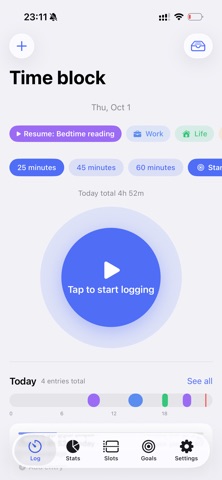
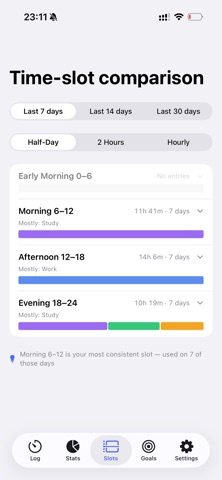
WhereTimeGo: Time Tracker is a productivity app that starts timing with one tap and lets you categorize entries later, with a fallback bucket so nothing is lost. It offers pie charts, time-of-day analysis, Pomodoro focus sessions, and goal tracking, aimed at students, freelancers, and anyone who wants to see where their time went. Data stays on the device by default, and it works offline.
Resumo do Debuts, com base na ficha da App Store.Sobre
Ever ended a busy day unable to say where the hours went? Most time trackers make it worse: create a project, pick a category, fill in a form, three to five steps before the clock even starts. Then you forget to stop the timer, the data breaks, and you quit by day three.
WhereTimeGo fixes that. One tap starts the clock. Categorize later, or not at at all, because nothing gets lost. Daily, weekly and monthly pie charts show exactly where your time goes.
ONE-TAP TRACKING Start with a single tap, no project setup required Pick a category when you stop, with custom colors and icons Three-step onboarding gets you going in seconds
UNCATEGORIZED SAFETY NET Forgot to categorize? Time lands in a fallback bucket that reminds you Backfill any time range in one step Edit, delete and undo fully supported
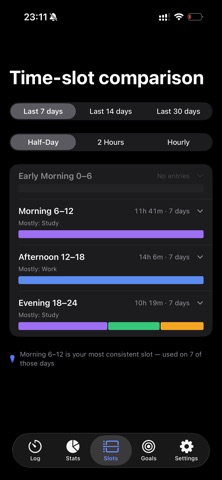
DEEP STATS AND REVIEW Pie charts for day, week and month with category breakdowns Time-of-day analysis to find your golden hours and fragmented time Per-category detail: entries, average length, month-over-month change Compare any two periods, plus a full-year heatmap
POMODORO FOCUS TIMER 25, 45 or 60 minute focus sessions Finished sessions automatically become time blocks in your stats Live progress in the Dynamic Island
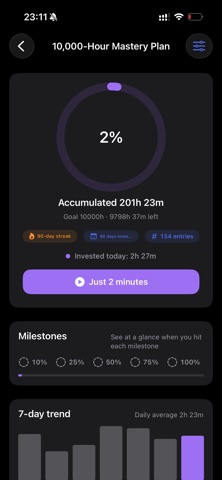
GOALS AND MILESTONES Set long-term goals like 10,000 hours for skills, study or fitness Progress ring, streak days and estimated completion date Milestones at 10%, 25%, 50%, 75% and 100%
EVERYWHERE YOU ARE Home Screen and Lock Screen widgets Apple Watch: start and stop from your wrist Optional iCloud sync across devices
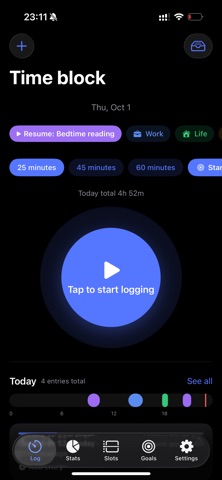
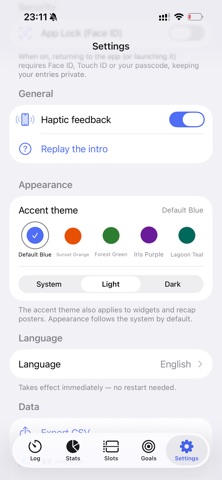
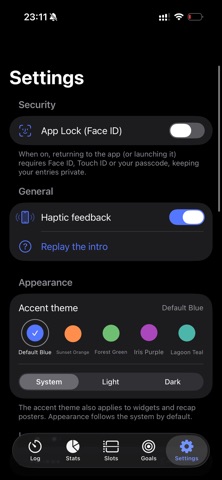
YOUR DATA STAYS YOURS Everything is stored on your device by default Face ID app lock for extra privacy Export a JSON backup or CSV anytime 23 languages with full Dark Mode
WHO IT IS FOR Students: watch study hours add up toward exam day Freelancers and professionals: track time per project and client Habit builders: streaks and goal progress beat procrastination with data Anyone who just wants to know where the time went
WHY WHERETIMEGO Genuinely free: every feature unlocked, no subscription, no in-app purchases, no ads Faster logging: one tap instead of the usual three to five steps A complete loop: tracking, stats and goals in one app Private by design: no data collection, no third-party SDK, works fully offline
Refined with feedback from a hundred-person beta test. No account needed. Download now and make the next hour count.
A avaliação das pessoas
Inicia sessão para avaliares esta aplicação. O que conta é seres sincero.
Ainda sem avaliações. Já a experimentaste? Sê o primeiro a avaliar.
Mais apps de Produtividade
As melhores apps novas de Produtividade desta semana ChickMark: Habit TrackerChickMark is a simple habit tracker for routines, goals, and reminders
 Dayflint: One Thing a DayToo many priorities?
- BeginAnywayMorning alarm for hard tasks: set one task, prove you started, build a streak
 DHUDEDHUDE Analityxs es la herramienta de gestión diaria para grupos de restauración y ocio…
 FTC BIOBUZZ Scorer & TrainerBIOBUZZ Scorer is a free, ad-free scorer for the 2026–2027 FTC season, built on…
 Intent - Scroll by ChoiceTake back control of your screen time