
ADB Remote: TV Touchscreen
Inget anspråk gjortLost the remote?
Av Shivam Raj · VerktygDärför förväntar vi oss mycket av den: A clear, privacy-focused remote that turns Android TVs into touchscreens, with a thorough description and well-explained setup steps.




Kort sagt
ADB Remote: TV Touchscreen turns an Android TV, Google TV or Android projector into a touchscreen controlled from an iPhone. It shows a live preview of the TV screen, supports typing with the iPhone keyboard, and includes a D-pad or touchpad remote. One standout feature is that the app collects no data and connects directly to the TV over Wi-Fi.
Sammanfattning från Debuts, baserad på appsidan i App Store.Om appen
Lost the remote? Your iPhone is better.
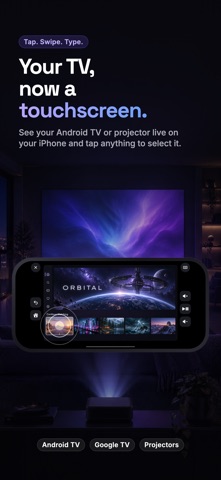
ADB Remote turns your Android TV, Google TV or Android projector into a touchscreen. See the TV's screen live on your iPhone, tap anything to select it, swipe through rows, and type with your iPhone keyboard. A fast, haptic remote is always one tap away.
YOUR TV, NOW A TOUCHSCREEN • A live preview of the TV screen, right on your phone • Tap a poster, button or menu to select it • Swipe to move through rows; press and hold for more options • Full-screen mode: turn your phone sideways and the TV fills it
TYPE WITH YOUR IPHONE KEYBOARD • When a search box opens on the TV, your keyboard pops up automatically • Text already in the box comes along, so you can edit it instead of starting over • Clear the TV's text box in one tap
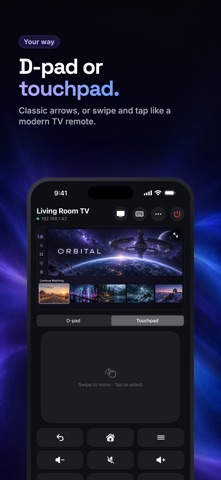
A REMOTE THAT FEELS RIGHT • D-pad or touchpad: pick classic arrows or swipe and tap like a modern TV remote • Back, Home, Menu, volume, mute, play/pause, rewind, fast-forward and power • Hold an arrow or volume button to repeat • A gentle haptic tap on every press • Near-instant response on many Android projectors
ONE-TAP APPS • Launch any app installed on your TV • Pin your favorites to the front, in the order you want
HEADPHONES IN TWO TAPS • Open your TV's Bluetooth settings from your phone and connect your earbuds to the TV, with lip sync handled by the TV
PRIVATE BY DESIGN • No account, no sign-in, no ads, no analytics • Your phone talks directly to your TV on your Wi-Fi, and nothing else • The app collects no data
SETUP (ABOUT TWO MINUTES, ONCE) ADB Remote uses Android's built-in debugging connection (ADB), so your TV needs one setting turned on: 1. On the TV, open Settings > About and select Build number 7 times to unlock Developer options. 2. In Developer options, turn on USB debugging (and ADB over network, if listed). 3. Open ADB Remote on the same Wi-Fi. It finds your TV automatically. 4. On the TV's "Allow USB debugging?" prompt, tick Always allow and choose Allow.
Works with Android-based TVs, Google TV and Android TV devices, projectors and streaming boxes that support ADB debugging over the network (port 5555). Some features depend on your device and apps.
Need help? Visit adbremote.xyz/support.
Android and Google TV are trademarks of Google LLC. ADB Remote is not affiliated with or endorsed by Google.
Så betygsätter folk den
Logga in för att betygsätta appen. Det ärliga betyget räknas.
Inga betyg ännu. Har du provat appen? Ge det första betyget.
Fler appar i kategorin Verktyg
Veckans bästa nya appar i kategorin Verktyg Drainly: Speaker CleanerMuffled speaker after a splash, rain, or a sweaty workout?
 Photo & PDF Resize: KBFile too large to upload?
 Arvectum Proxy LauncherArvectum Proxy Launcher is a network utility that routes your iPhone through a proxy you…
 Vodoalarm: vodostaji BiHVodoalarm javlja kad tvoja rijeka naglo raste, pa ne moraš stalno gledati vodostaje
 Dusty: Photo Cleaner PetYour camera roll's new pet
 FairAuth: AuthenticatorFairAuth creates the codes for two-step verification on iPhone and iPad