
Desktop Screenshot: OCR
Inget anspråk gjortTurn anything on your screen into editable text
Av 晶 王 · VerktygDärför förväntar vi oss mycket av den: Clear value and a strong privacy promise, with on-device recognition and a generous free tier that suits curious users.



Om appen
Turn anything on your screen into editable text.
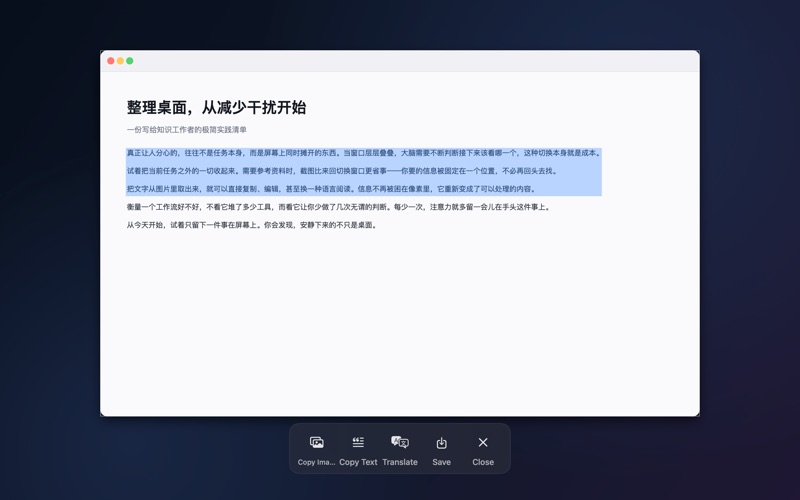
Drag a box over a chart, an error message, a PDF, a video frame or a photo someone sent you — and the words inside come out as real text you can copy, save and read in your own language.
WHAT IT DOES • Region capture — drag over anything. A badge shows the exact pixel size before you let go. • Full-screen capture — one shortcut, the whole screen. • On-device text recognition — Apple's Vision engine reads the text right on your computer. Nothing is uploaded. • Character-level selection — drag over the captured image and pick exactly the words you meant, down to a single character. They go to your clipboard the moment you release. • Translation — recognized text goes through Apple's on-device translation and is redrawn on top of the original, in place. Switch back to the original with one click. • Save — write the capture straight into your Downloads folder. • Custom shortcuts — rebind region and full-screen capture to keys you already use.
PRIVATE BY DESIGN Your screen never leaves your computer. Both recognition and translation run on-device using Apple's frameworks. No account, no sign-in, no analytics, no upload.
FREE VS PREMIUM Free and unlimited: capture, text recognition, selection, copying, saving and custom shortcuts. Translation is free for the first 3 days after you first open the app. After that it needs a subscription — everything else stays free.
Premium membership: • Weekly — US$1.99 per week, first week free • Yearly — US$9.99 per year Your local App Store shows the price in your own currency.
Payment is charged to your Apple ID account at confirmation of purchase. The subscription renews automatically unless it is cancelled at least 24 hours before the end of the current period. Manage or cancel it any time in System Settings → Apple Account → Subscriptions. Already subscribed? Use "Restore Purchases" on the membership screen.
REQUIREMENTS Requires macOS 27.0 or later. Screen Recording permission is needed for capture — the app walks you through granting it on first run.
Privacy policy: https://wjshzr2021.github.io/DesktopScreenshot/ Terms of use: https://www.apple.com/legal/internet-services/itunes/dev/stdeula/
Så betygsätter folk den
Logga in för att betygsätta appen. Det ärliga betyget räknas.
Inga betyg ännu. Har du provat appen? Ge det första betyget.
Fler appar i kategorin Verktyg
Veckans bästa nya appar i kategorin Verktyg Drainly: Speaker CleanerMuffled speaker after a splash, rain, or a sweaty workout?
 Photo & PDF Resize: KBFile too large to upload?
 Arvectum Proxy LauncherArvectum Proxy Launcher is a network utility that routes your iPhone through a proxy you…
 Vodoalarm: vodostaji BiHVodoalarm javlja kad tvoja rijeka naglo raste, pa ne moraš stalno gledati vodostaje
 FairAuth: AuthenticatorFairAuth creates the codes for two-step verification on iPhone and iPad
 Polarglow: Aurora AlertsKnow tonight's chance of seeing the aurora where you are, and never miss a storm night