
DWG SiteMark: Site Markup
Inget anspråk gjortTwo drawings side by side
Av Umut Vancin · ProduktivitetDärför förväntar vi oss mycket av den: A detailed, well-explained niche tool that works offline on the device, with clear value for site engineers.


Kort sagt
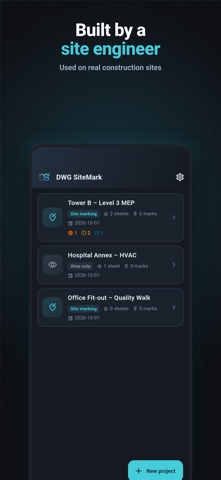
DWG SiteMark is a productivity app for iPhone and iPad that opens DWG and DXF plans on the device, lets users box areas and log findings with photos, and exports PDF or Excel reports. It is aimed at people who walk construction sites, such as inspectors and engineers handling snag lists, HVAC, fire, electrical and civil work. A notable point is that drawings are converted and kept locally, with no account or upload required.
Sammanfattning från Debuts, baserad på appsidan i App Store.Om appen
Two drawings side by side. PDF and Excel reports straight from the DWG.
SiteMark turns your iPhone or iPad into a site tool: open the DWG or DXF plan, draw a box around what you are looking at, record what you found, and hand over a PDF or Excel report before you leave the site.
Built by a mechanical engineer for people who walk sites — snag and punch lists, progress billing, HVAC, fire protection, electrical and civil inspections.
TWO SHEETS AT ONCE (PRO) • Open two drawings side by side — HVAC next to ventilation, architecture next to MEP • Side by side on tablets, foldables and in landscape; tabs on a phone • One toolbar works on the sheet you touched last
REPORTS YOU CAN HAND OVER (PRO) • PDF grouped by discipline, with a summary table and page numbers • Every mark with a close-up of the drawing, an overview pin and your photos • Choose which part of the sheet the overview shows • Excel with one row per mark, the same images and a summary sheet • Preview the PDF in the app, save it to a folder you choose, or share it
OPEN REAL DRAWINGS — ON THE DEVICE • DWG (AutoCAD 2000 to current formats) and DXF, including very large sheets • Converted on your phone: nothing is uploaded, no internet needed • Open a .dwg straight from Files or email with “Open with” • Layers on/off, drawing text on/off, dark or light background
MARK WHAT YOU SEE • Drag a box over the area, then fill in the details • Status: complete, incomplete, defective, awaiting check, cancelled • Discipline → category → sub-category from a building work breakdown library (civil, electrical, mechanical); add your own • Record type (NCR, CPR, observation, punch item), room, level, work item, report number, description • Photos from the camera or gallery • Filter the list by status or discipline; tap an item to jump to that spot on the drawing
BACK TO THE DWG • Save your marks into a copy of the drawing (name_DWGSMARK.dwg): a light transparent fill in the status colour, a revision cloud and bold text. The original file is never changed. (Works for drawings saved in AutoCAD 2010 or later formats.)
DRAW AND MEASURE (FREE) • Line, polyline, arrow, circle, revision cloud, text and dimension • Save your drawings into a copy of the DWG • Measure in mm, cm, m, inches or feet, with a scale bar on the drawing • A toolbar you can rearrange: press and hold any tool
PRIVATE BY DESIGN No account, no sign-up, no cloud sync. Drawings, marks, photos and reports stay in a local database on your device. Anonymous crash reports (Firebase Crashlytics) help us fix bugs. Anonymous usage statistics (Firebase Analytics) show us which features matter; no drawing content is ever sent.
FREE AND PRO Free, with no limit on sheets or file size: open DWG and DXF, layers, site marking with photos, measuring, all drawing tools (revision cloud, text, arrow…) and saving your marks and drawings back into the DWG. The free version may show an ad when you open a sheet. Pro (monthly or yearly subscription): two sheets side by side and PDF and Excel reports — with no ads. For your first 14 days after installing, every Pro feature is open for free with no ads; no purchase or card needed, and nothing is charged when the period ends. Pro is offered as an auto-renewing monthly or yearly subscription. Payment is charged to your Apple Account when you confirm. The subscription renews automatically unless cancelled at least 24 hours before the end of the current period. You can manage or cancel it in your Apple Account settings.
Available in English, Turkish, German, French, Spanish, Portuguese, Russian and Arabic.
Så betygsätter folk den
Logga in för att betygsätta appen. Det ärliga betyget räknas.
Inga betyg ännu. Har du provat appen? Ge det första betyget.
Fler appar i kategorin Produktivitet
Veckans bästa nya appar i kategorin Produktivitet ChickMark: Habit TrackerChickMark is a simple habit tracker for routines, goals, and reminders
 Dayflint: One Thing a DayToo many priorities?
 Snappy Do ItSix connected modes. One traceable journey.
 Fristo CAFMFristo is the app for Fristo CAFM, the facility management software
 UhWhat? Voice NotesCatch the thought before it disappears
- BeginAnywayMorning alarm for hard tasks: set one task, prove you started, build a streak