
HopOff - Parental Control
Inget anspråk gjortHopOff is a parental control app for parents
Av QUANTUMPIVOT LIMITED · ProduktivitetDärför förväntar vi oss mycket av den: The description clearly explains how the task-based screen time system works and what data it never touches.


Kort sagt
HopOff - Parental Control is a productivity app that hides chosen apps on a child's iPhone or iPad using Apple's Screen Time. Children earn points by completing tasks that parents approve, then spend them on screen time. The free version covers one child, one device and one blocked app.
Sammanfattning från Debuts, baserad på appsidan i App Store.Om appen
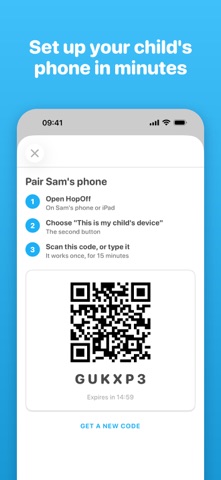
HopOff is a parental control app for parents. It is not a game: you install it on your phone and on your child's iPhone or iPad, and you decide which apps they can open, and when.
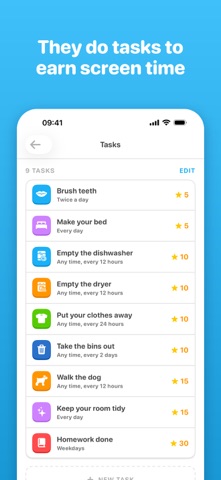
HopOff hides the apps you choose on your child's iPhone or iPad. They earn them back by doing real tasks, like making the bed or finishing homework. You approve each one with a tap, the points go on their balance, and they spend them on screen time at the prices you set. When the time is up, the apps lock again.
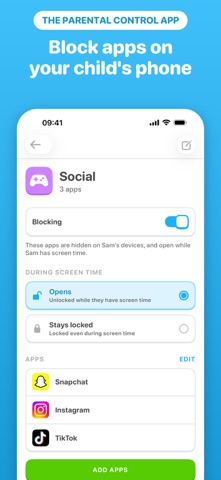
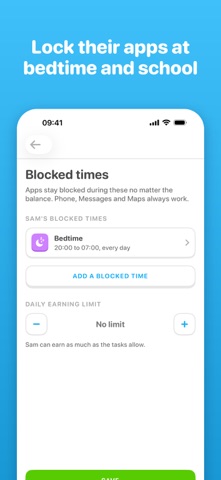
HOW IT WORKS • Choose the apps to block. Group them in lists like Social or Games, and switch a list off whenever you like. • Pick the tasks. Start with a ready-made set or write your own, and decide what each one is worth. • Approve with one tap. Your child ticks a task off on their phone; you approve it, or send it back with Not yet. • Points buy screen time. Your child spends them in the shop, at your prices, and the apps open until the time is up. • Keep bedtime and school free. Blocked times stop anything being bought, whatever the balance.
BUILT FOR PARENTS • Set up in about ten minutes, with a short video for every step at hopoffapp.com/start. • Changes reach their phone in seconds, and you can see when they have. • You are told if Screen Time access is switched off or their phone stops checking in. • Lock now ends screen time early and gives the unused minutes back as points. • Two parents can share one family, and every change is recorded with who made it. • Works with or without Family Sharing.
PRIVATE BY DESIGN HopOff uses Apple's Screen Time to hide apps. It never sees your child's messages, photos, browsing or location. Your child is a first name and an age band. No ads and no tracking.
FREE, OR THE FAMILY PLAN HopOff is free for 1 child, 1 device and 1 blocked app. The family plan opens everything: any number of blocked apps, more children and devices, tasks and points, the shop, blocked times and a second parent. One plan covers the whole family, priced by how many children it covers, paid monthly or yearly. New subscribers may be offered a free trial.
Payment is charged to your Apple Account when you confirm the purchase. The plan renews automatically unless you cancel at least 24 hours before the end of the current period, and your account is charged for the renewal within 24 hours before the end of the period. Manage or cancel it in your Apple Account settings.
Terms of Use: https://hopoffapp.com/terms Privacy Policy: https://hopoffapp.com/privacy
Så betygsätter folk den
Logga in för att betygsätta appen. Det ärliga betyget räknas.
Inga betyg ännu. Har du provat appen? Ge det första betyget.
Fler appar i kategorin Produktivitet
Veckans bästa nya appar i kategorin Produktivitet ChickMark: Habit TrackerChickMark is a simple habit tracker for routines, goals, and reminders
 Dayflint: One Thing a DayToo many priorities?
- BeginAnywayMorning alarm for hard tasks: set one task, prove you started, build a streak
 DHUDEDHUDE Analityxs es la herramienta de gestión diaria para grupos de restauración y ocio…
 FTC BIOBUZZ Scorer & TrainerBIOBUZZ Scorer is a free, ad-free scorer for the 2026–2027 FTC season, built on…
 Intent - Scroll by ChoiceTake back control of your screen time