
KN Network Toolkit
Inget anspråk gjortKN Network Toolkit puts the network tools you reach for into one app
Av Thomas Ntais · VerktygDärför förväntar vi oss mycket av den: Thorough, well-described toolkit that brings many essential network tools into one clean, free app.

Kort sagt
KN Network Toolkit is a utilities app that gathers common network tools in one place. It scans a Wi-Fi network for devices and their open services, and includes ping, traceroute, DNS lookup, SSH, SMB shared folder browsing and a certificate check. It is aimed at people who manage home or office networks, and it stands out for keeping scans and saved data on the device with no account or analytics.
Sammanfattning från Debuts, baserad på appsidan i App Store.Om appen
KN Network Toolkit puts the network tools you reach for into one app. Find every device on your Wi-Fi, check that a computer answers, open a terminal or a shared folder, and look into DNS, certificates and your internet speed. Free, with no ads and no account.
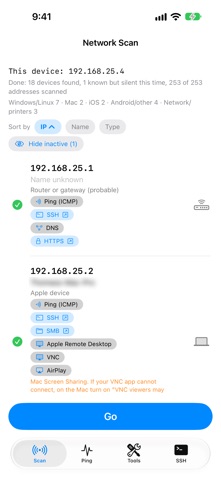
NETWORK SCAN • Scans your Wi-Fi network and lists every device that answers, with its name and the services it offers (web, SSH, shared folders, remote desktop, printing and more) • A guess of what each device is, from the ports it has open • Remembers devices from earlier scans, so you see which ones are silent this time • Tap a service to open it: a web page, a terminal, or the shared folders of that computer
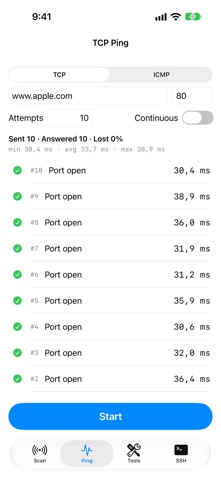
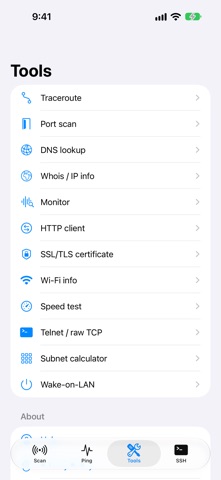
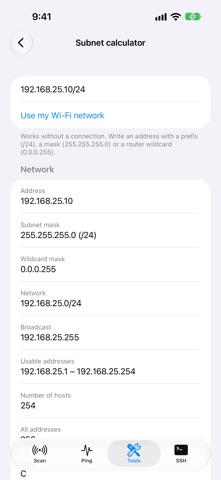
TOOLS • Ping (TCP or ICMP) with minimum, average, maximum and loss • Traceroute: the routers between you and a host • Port scan: which ports of a computer are open • DNS lookup against Cloudflare, Google, Quad9 or your own server • Whois / IP info: where an address is and who owns it • Monitor: watch computers and services and get a notification when one goes down • HTTP client: status, timing and headers, with copy as curl • SSL/TLS certificate check: validity, names, chain and fingerprint • Wi-Fi info: your address, mask, router, DNS and network name • Speed test: latency, download and upload, on the internet or against your own server • Subnet calculator: mask, range, hosts, divide into smaller networks, works offline • Wake-on-LAN: wake a computer with one tap • Telnet and raw TCP terminal, for routers, switches and testing a service by hand
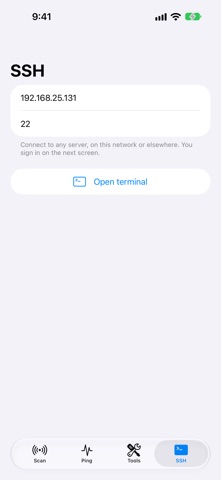
SSH • A full terminal with Esc, Ctrl, Tab and arrow keys • Sign in with a password or an SSH key you create in the app • Passwords and keys are kept in the Keychain and protected by Face ID • Warns you if a server's identity changes
SHARED FOLDERS (SMB) • Browse the shared folders of Windows, Mac and Linux computers and NAS drives like in the Files app • Videos and music play straight from the computer, with no waiting for a download • Text files open in the app, pictures and documents open with Quick Look • SMB 2 and 3 with signing and encryption
PRIVATE BY DESIGN There is no account, no advertising and no analytics. What you scan and save stays on your device. Only the tools that need the internet, such as Whois, Speed test and DNS lookup, contact the services they are made for, when you use them.
Telnet, plain TCP and plain http:// are not encrypted. Use SSH and https whenever you can.
Så betygsätter folk den
Logga in för att betygsätta appen. Det ärliga betyget räknas.
Inga betyg ännu. Har du provat appen? Ge det första betyget.
Fler appar i kategorin Verktyg
Veckans bästa nya appar i kategorin Verktyg Drainly: Speaker CleanerMuffled speaker after a splash, rain, or a sweaty workout?
 Photo & PDF Resize: KBFile too large to upload?
 Arvectum Proxy LauncherArvectum Proxy Launcher is a network utility that routes your iPhone through a proxy you…
 Look Twice: Scam & AI CheckLook twice before you click
 Vodoalarm: vodostaji BiHVodoalarm javlja kad tvoja rijeka naglo raste, pa ne moraš stalno gledati vodostaje
 MonkeytailMonkeytail is a native request debugger for iPhone, iPad, Mac, and Apple Vision Pro