
NetHelper - by Let's Tech
Inget anspråk gjortSomething's wrong with the internet
Av Let's Tech LLC · VerktygDärför förväntar vi oss mycket av den: A thoughtful diagnostic tool with clear value and a well-written description that explains exactly what it checks.


Kort sagt
NetHelper by Let's Tech is a utilities app that diagnoses slow or unreliable internet. It tests five well-known services, your home router, DNS lookups, and the route traffic takes, then gives plain Good, Fair or Bad verdicts. It produces a PDF report to share with whoever supports your network.
Sammanfattning från Debuts, baserad på appsidan i App Store.Om appen
Something's wrong with the internet. You can tell — pages hang, calls break up, video stalls — but when you call for help the first question is always "what exactly is it doing?", and the honest answer is usually "I don't know, it's just slow."
NetHelper answers that question for you, in words you can repeat.
WHAT IT CHECKS
Five destinations. NetHelper sends test messages to five well-known services and counts how many come back. Each gets a plain verdict — Good, Fair or Bad — based on how much went missing, not a number you have to interpret yourself.
Your router. The first step out of your home is measured on its own, because trouble there is a different problem from trouble out on the internet. You get loss, delay and steadiness for the link between your device and the box in your home.
Name lookups. Websites are found by name, and that lookup can fail quietly. NetHelper asks your device the normal way, and also asks your DNS servers directly. When the two disagree it says so — which is how a DNS server that has stopped answering hides behind your device's saved copies until they expire and everything stops at once.
The route. A plain-language trace of how far your traffic gets: your router, the internet beyond it, then the destinations themselves. The full hop table is one tap away when someone technical wants it.
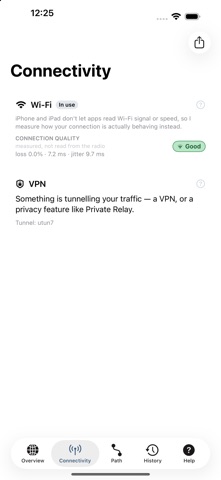
Your connection. Which adapter is actually carrying traffic, the Wi-Fi standard and signal where the system will report it, cellular type, Low Data Mode, and whether your traffic is going through a tunnel.
A REPORT YOU CAN SEND
Every check becomes one formatted PDF. Hand it to whoever supports your network — a colleague, an IT desk, your provider — and the conversation starts from evidence instead of adjectives. Past runs are kept so you can show that today is worse than last week.
HONEST ABOUT WHAT IT DOESN'T KNOW
Some networks block the kind of test this uses. Some services never answer it. Apple doesn't let apps read Wi-Fi signal strength on iPhone and iPad. In each of those cases NetHelper says so plainly instead of inventing a number or blaming your connection. A result you can't trust is worse than no result at all.
Så betygsätter folk den
Logga in för att betygsätta appen. Det ärliga betyget räknas.
Inga betyg ännu. Har du provat appen? Ge det första betyget.
Fler appar i kategorin Verktyg
Veckans bästa nya appar i kategorin Verktyg Drainly: Speaker CleanerMuffled speaker after a splash, rain, or a sweaty workout?
 Photo & PDF Resize: KBFile too large to upload?
 Arvectum Proxy LauncherArvectum Proxy Launcher is a network utility that routes your iPhone through a proxy you…
 Vodoalarm: vodostaji BiHVodoalarm javlja kad tvoja rijeka naglo raste, pa ne moraš stalno gledati vodostaje
 Dusty: Photo Cleaner PetYour camera roll's new pet
 FairAuth: AuthenticatorFairAuth creates the codes for two-step verification on iPhone and iPad