
OT SwitchPort - Network Docs
Inget anspråk gjortOT SwitchPort is a local documentation app for industrial and technical networks
Av Dominik Gausmann · ProduktivitetDärför förväntar vi oss mycket av den: A thoughtfully detailed niche tool with clear value for OT network technicians, offline privacy, and a well-organized feature set.



Kort sagt
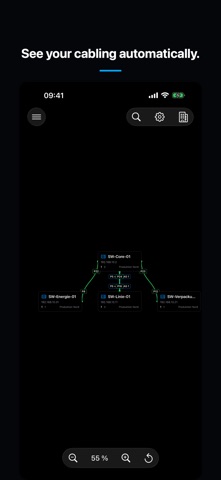
OT SwitchPort - Network Docs is a productivity app for recording industrial and technical network sites, switches, and individual ports on iPhone or iPad. It works fully offline, keeps data on the device, and never scans the network. One standout feature is the network map, which arranges linked switches based on their actual cabling.
Sammanfattning från Debuts, baserad på appsidan i App Store.Om appen
OT SwitchPort is a local documentation app for industrial and technical networks. Record sites, switches, and every individual port directly on iPhone or iPad – clearly organized, fully offline, and without automatic network scanning.
DOCUMENT SWITCHES AND PORTS Create switches with any port count and document each port individually. Record labels, status, port type, speed, PoE, cable labels, peers, descriptions, notes, and your own custom fields.
CONNECTORS AND MODULES Configure mixed port layouts with RJ45, SFP, SFP+, SFP28, QSFP+, or QSFP28. For fiber and uplink ports, record the manufacturer, model, and the type, medium, or reach of the installed transceiver module.
VLANS AND LINK AGGREGATION Assign multiple VLANs to a port and mark each membership as Tagged, Untagged, or Forbidden. Document LAG groups as LACP or static link aggregation and recognize grouped ports directly in the port overview.
LINK PEER PORTS Enter any peer as free text or directly link a port to a port on another documented switch. The connection is maintained on both ends and remains unambiguous when a switch is renamed.
CLEAR OVERVIEW AND FAST WORKFLOWS Use tile or list views, search, filters, favorites, and recently edited items. Copy port configurations and apply them to other ports. Sites organize multiple switches by customer, plant, hall, or area.
CUSTOM TEMPLATES Create reusable switch templates with any port count and an individual configuration for every port. Quickly add recurring switch models with mixed RJ45, SFP, and uplink port layouts.
PREMIUM NETWORK MAP The network map automatically arranges linked switches according to their actual cabling. Connection lines identify the participating port numbers, while multiple cables between the same switches are grouped for a clean overview.
BACKUP AND EXPORT Create local backups and restore documentation when needed. JSON, CSV, and PDF exports support sharing and archiving. A change history keeps updates traceable.
PRIVACY No user account is required. The app contains no advertising and uses no tracking. Your network documentation stays locally on your device. OT SwitchPort never scans your network or changes switch configurations.
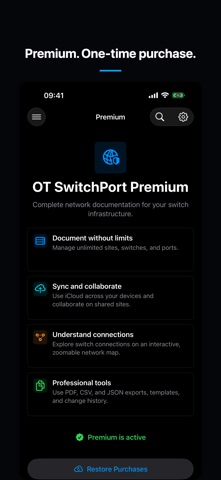
Core functionality is available for free. OT SwitchPort Premium is offered as a one-time purchase and unlocks unlimited sites, switches, and ports, plus templates, exports, change history, and the network map.
Så betygsätter folk den
Logga in för att betygsätta appen. Det ärliga betyget räknas.
Inga betyg ännu. Har du provat appen? Ge det första betyget.
Fler appar i kategorin Produktivitet
Veckans bästa nya appar i kategorin Produktivitet ChickMark: Habit TrackerChickMark is a simple habit tracker for routines, goals, and reminders
 Dayflint: One Thing a DayToo many priorities?
 Snappy Do ItTurn photos, text and voice into tasks, plans and more.
 Fristo CAFMFristo is the app for Fristo CAFM, the facility management software
 UhWhat? Voice NotesCatch the thought before it disappears
- BeginAnywayMorning alarm for hard tasks: set one task, prove you started, build a streak