
Privasinq
Inget anspråk gjortPrivasinq keeps one folder in sync across your Apple devices, without the internet, the…
Av CHRISTOPHER WHITTIER · Verktyg


Kort sagt
Privasinq syncs one folder across your Apple devices directly over Wi-Fi, with no internet connection, cloud service, or account. It suits people who want files kept in step between their own iPhones, iPads, and Macs without uploading anything. One standout detail: if a file is deleted on another device, it moves to a To Be Deleted folder rather than disappearing.
Sammanfattning från Debuts, baserad på appsidan i App Store.Om appen
Privasinq keeps one folder in sync across your Apple devices, without the internet, the cloud, or an account.
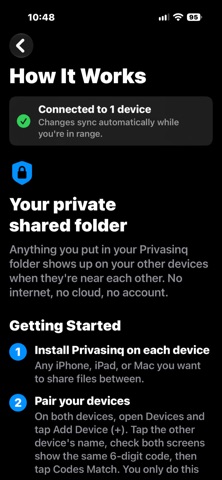
Put a file in your Privasinq folder on one device, and it appears on your other devices when they're near each other. Edit it, rename it, or delete it, and the change carries over. Everything travels directly between your own devices, encrypted. Nothing is ever uploaded anywhere.
SET UP IN MINUTES A short guided setup walks you through it the first time you open the app: name your device, set up your Privasinq folder, and connect your other devices.
WORKS WITHOUT A NETWORK Your devices connect directly to each other over Wi‑Fi. You don't need a Wi‑Fi network, a router, or an internet connection, just Wi‑Fi turned on. On the same network, it works there too.
PRIVATE BY DESIGN • No account, no sign-up, no servers • Connections are encrypted, and only devices you've paired can connect • Pair once by checking that both screens show the same 6‑digit code • Lost a device? Revoke it, and your other devices stop syncing with it • No tracking and no data collection
YOUR FOLDER • On iPhone and iPad, your folder is in the Files app under On My iPhone/iPad › Privasinq • On Mac, you choose where your folder lives • Only that folder syncs, nothing else
NOTHING GETS LOST • If a file is deleted on another device, your copy moves to a To Be Deleted folder instead of disappearing. Restore it by moving it back • Edited the same file on two devices? Both versions are kept • Each device empties its own bin
MORE THAN TWO DEVICES Pair as many of your iPhones, iPads, and Macs as you like. Changes pass along from one device to the next.
GOOD TO KNOW • iPhone and iPad sync while Privasinq is open on screen. Mac syncs whenever Privasinq is running, and it can open at login • Works between Apple devices only • iCloud Drive folders can't be used as the sync folder • A built-in How It Works guide answers common questions
Så betygsätter folk den
Logga in för att betygsätta appen. Det ärliga betyget räknas.
Inga betyg ännu. Har du provat appen? Ge det första betyget.
Fler appar i kategorin Verktyg
Veckans bästa nya appar i kategorin Verktyg Drainly: Speaker CleanerMuffled speaker after a splash, rain, or a sweaty workout?
 Photo & PDF Resize: KBFile too large to upload?
 Arvectum Proxy LauncherArvectum Proxy Launcher is a network utility that routes your iPhone through a proxy you…
 Look Twice: Scam & AI CheckLook twice before you click
 Vodoalarm: vodostaji BiHVodoalarm javlja kad tvoja rijeka naglo raste, pa ne moraš stalno gledati vodostaje
 Ham Radio IQHam Radio IQ answers one question: which band is open right now, from where you are, and…