
Scan & Print: PDF Scanner, OCR
Inget anspråk gjortScan & Print finds your scanner, scans the stack, reads the text and writes one…
Av Wuxxu s.r.o. · ProduktivitetDärför förväntar vi oss mycket av den: The detailed listing makes its value clear, with strong on-device privacy and broad scanner compatibility that appeals to many users.




Kort sagt
Scan & Print is a Mac app that finds a scanner on your network or USB, scans a stack of pages, and runs text recognition on the device to produce a searchable PDF. It suits people who scan receipts, invoices, forms or archives and want no driver setup or sign-in. One notable point is that nothing is uploaded, since every step runs locally on the Mac.
Sammanfattning från Debuts, baserad på appsidan i App Store.Om appen
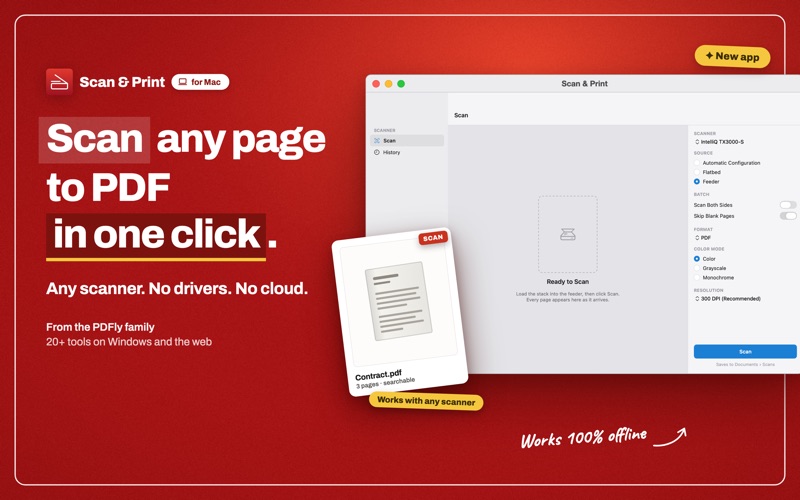
Scan & Print finds your scanner, scans the stack, reads the text and writes one searchable PDF. No driver hunting, no vendor utility, no sign-in, and nothing is uploaded, because every step runs on your own Mac.
WORKS WITH YOUR SCANNER • Scanners and all-in-one printers from HP, Canon, Epson, Brother, Fujitsu, Kodak, Xerox, Lexmark, Ricoh, Samsung, Panasonic, Plustek and more: any scanner macOS supports, USB or network, the same devices Image Capture sees • Wi-Fi and network scanning over eSCL (AirScan), which on most modern MFPs needs no driver at all • USB and network devices are discovered for you. Nothing found? Type the scanner's IP address or hostname
TEXT RECOGNITION THAT NEVER LEAVES YOUR MAC • On-device text recognition with Apple's engine, in every language macOS supports on your Mac, with nothing to download • Pages that went in sideways or upside down are detected and straightened before the text is read, so the text layer matches the image • A searchable PDF looks exactly like the scan, but you can select, copy and search the words in any PDF reader, and Spotlight finds the file by its contents
BUILD THE WHOLE DOCUMENT • Send a stack through the feeder and watch the pages arrive, or add them one at a time from a flatbed with Add Page. A flatbed still makes a twenty-page document • Blank pages from a feeder run are dropped automatically, so an empty side never reaches the PDF
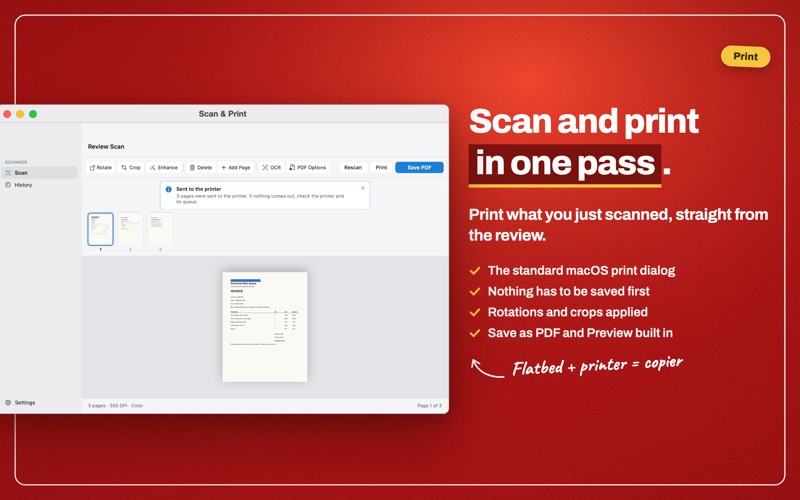
FIX PAGES BEFORE YOU SAVE • Rotate, crop and enhance any page, and re-open a crop later to adjust it • Enhance lifts contrast so faint text on gray paper stays legible
EVERY SETTING WHERE YOU EXPECT IT • 150, 200, 300, 600 or 1200 DPI: 150 for receipts you only need to read, 600 and 1200 for small print and archives • Color, grayscale or black & white • Flatbed, feeder, or let the app choose; two-sided (duplex) scanning on feeders that support it • Receipts, invoices, contracts, ID cards, tax forms, letters, book pages and photos
SAVE IT THE WAY THE NEXT PERSON NEEDS IT • PDF, searchable PDF, JPEG (JPG), PNG or multi-page TIFF • Shrink a heavy scan to an email-friendly PDF without turning the text to mush • Lock a PDF with a password, or write PDF/A for long-term archiving
SCAN AND PRINT IN ONE PASS • Print the pages you have just scanned straight from the review screen, through the standard macOS print dialog, with Save as PDF and Preview built in • Nothing has to be saved first: a flatbed and any printer become a photocopier
KEEP TRACK OF WHAT YOU SCANNED • Scan history lists every document with its date, page count and file type; reopen one or reveal it in the Finder in a click
FREE AND PRO Scanning is free, and so is saving as PDF, up to three pages per document, as PDF, JPEG, PNG or TIFF, with page editing and printing included. Pro lifts the page limit and adds searchable PDFs (OCR), 600 and 1200 DPI, two-sided scanning, Enhance, PDF compression, password protection and PDF/A, as a yearly plan or a one-time lifetime license.
Runs on macOS 14 Sonoma or later, on Apple silicon and Intel.
HP, Canon, Epson, Brother, Fujitsu, Kodak, Xerox, Lexmark, Ricoh, Samsung, Panasonic and Plustek are trademarks of their respective owners, named here only to describe compatibility. Scan & Print is not affiliated with, authorized by or endorsed by any of them.
Så betygsätter folk den
Logga in för att betygsätta appen. Det ärliga betyget räknas.
Inga betyg ännu. Har du provat appen? Ge det första betyget.
Fler appar i kategorin Produktivitet
Veckans bästa nya appar i kategorin Produktivitet ChickMark: Habit TrackerChickMark is a simple habit tracker for routines, goals, and reminders
 Dayflint: One Thing a DayToo many priorities?
 Fristo CAFMFristo is the app for Fristo CAFM, the facility management software
- BeginAnywayMorning alarm for hard tasks: set one task, prove you started, build a streak
 DHUDEDHUDE Analityxs es la herramienta de gestión diaria para grupos de restauración y ocio…
 ScrollTime: Limit & ChallengesTikTok, Instagram, Facebook… ScrollTime helps you take back control of the time you…