
Screen Loupe
Inget anspråk gjortA zoomed monitor exactly where you need it
Av Stanislav Semenov · VerktygDärför förväntar vi oss mycket av den: Thoughtful pixel-true inspection tools with clear value for designers and front-end developers.




Kort sagt
Screen Loupe pins a movable frame over part of the screen and shows that area magnified in a live, pixel-true Viewer, while clicks still reach the app underneath. It is aimed at UI designers, front-end and Apple-platform developers, and anyone writing design reviews or bug reports. A notable feature is the Color Meter, which copies colour values as HEX, CSS, SwiftUI, AppKit or display formats with one click.
Sammanfattning från Debuts, baserad på appsidan i App Store.Om appen
A zoomed monitor exactly where you need it. Pin a frame over any part of the screen, keep working there with your normal mouse and keyboard, and watch that spot magnified — live, pixel-true and perfectly still — in a window next to it.
Made for UI designers checking how a design actually renders, for front-end and Apple-platform developers tuning layout, and for anyone writing a design review or a bug report who needs a crisp, zoomed picture of exactly what is on screen.
WORK IN PLACE • Clicks inside the frame go to the app underneath, so hover states stay live while the Viewer shows them big — on the same display or another one. • The Viewer keeps its zoom and framing while you move or resize the frame. Nothing moves on its own. • Snap the frame to window edges with ⌘, fit it to a window in one click, or attach it with the magnet so it follows the window as it moves and resizes. • Margins capture only an inner part of that window, such as a web page without the browser's toolbar. • A handle on the frame pans the Viewer right from the frame.
PIXEL-TRUE • At 800% every screen pixel is a crisp 8×8 square, never a blur, on Retina and non-Retina displays alike. • Zoom presets from Fit to 16×, or any value by pinch, scroll or a typed percentage. Presets glide smoothly.
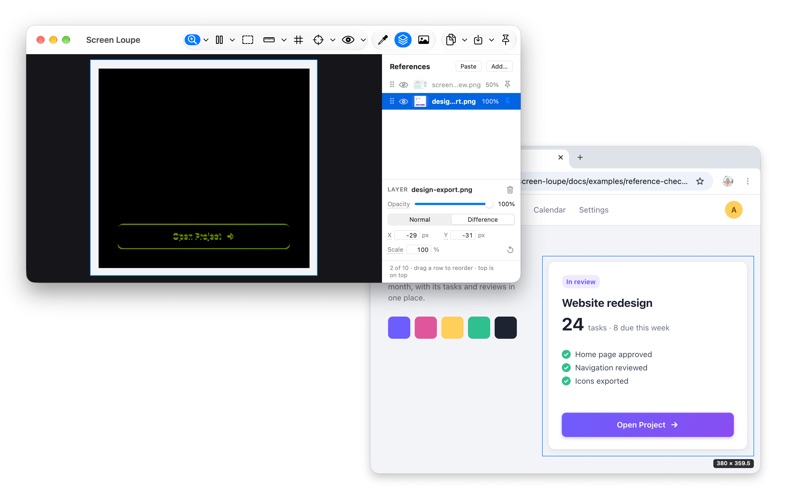
INSPECT • Color Meter: HEX, CSS rgb(), SwiftUI Color, AppKit NSColor and the native display value, each one click to copy. Recent colours and eight favourites, kept between launches. • Contrast: a text and a background colour, the WCAG 2 ratio and AA and AAA verdicts. • Rulers in pixels and points: a corner ruler you place, and a selection ruler for a selection's width and height. • A pixel grid on the exact pixel boundaries. • Reference layers: lay a design export over the live screen in Difference, and matching pixels turn black. • Before and after: use a snapshot or the frozen frame as a reference, change the code, and whatever moved glows. • Open, drop or paste an image file and inspect it with the same tools.
SEE IT AS OTHERS DO • Colour vision simulation: protanopia, protanomaly, deuteranopia, deuteranomaly, tritanopia and grayscale, live over any app while you edit — and in Copy View, for a bug report.
COPY EXACTLY WHAT YOU SEE • Copy View: the zoomed view as it looks, ready for a review or a bug report. • Copy Source: the area at native resolution, unmagnified. • Copy a selection snapped to whole pixels, or Option-drag any region. Save as PNG.
SCREENSHOT STUDIO Exact, clean pictures for App Store and website screenshots, docs and bug reports. • Exact pixel sizes, including the Mac App Store's, your own sizes and Aspect Lock. • A 3, 5 or 10 second timer to catch a menu or a hover. • A colour, gradient or image background, shown on screen under every window. • One window alone, whole even where it is covered, with or without its shadow. • PNG, JPEG or HEIC, sRGB or the display's colours, with no date, device or location in the file.
CATCH TRANSIENT STATES • Freeze the view from any app with a global shortcut while the mouse is still held down, or after a countdown. • Take Snapshot (⌘T) keeps the moment in Recent Captures, with opened images, to inspect later — also after a restart. • Link snapshots to share one zoom and position, and flip between the light and the dark theme at the same spot.
OUT OF THE WAY • At rest the frame is a hairline; handles appear only when the cursor comes near. • The app's own windows never show up in its capture. • Global shortcuts, a menu bar item, and a menu-bar-only mode.
PRIVACY Screen Loupe needs Screen Recording access to see the screen. What it captures stays on your Mac: no account, no analytics, no network. The app collects no data.
Free and open source (MIT).
Så betygsätter folk den
Logga in för att betygsätta appen. Det ärliga betyget räknas.
Inga betyg ännu. Har du provat appen? Ge det första betyget.
Fler appar i kategorin Verktyg
Veckans bästa nya appar i kategorin Verktyg Drainly: Speaker CleanerMuffled speaker after a splash, rain, or a sweaty workout?
 Photo & PDF Resize: KBFile too large to upload?
 Arvectum Proxy LauncherArvectum Proxy Launcher is a network utility that routes your iPhone through a proxy you…
 Vodoalarm: vodostaji BiHVodoalarm javlja kad tvoja rijeka naglo raste, pa ne moraš stalno gledati vodostaje
 FairAuth: AuthenticatorFairAuth creates the codes for two-step verification on iPhone and iPad
 Polarglow: Aurora AlertsKnow tonight's chance of seeing the aurora where you are, and never miss a storm night