
Siteprint: Design to Prompt
Inget anspråk gjortSiteprint measures the design of the website in front of you and turns it into something…
Av Filip Papic · Verktyg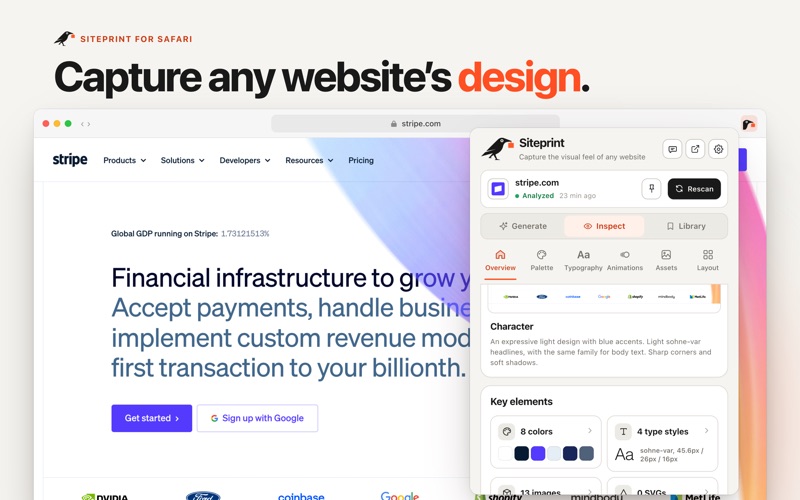




Kort sagt
Siteprint: Design to Prompt is a Mac utility for Safari that measures the design of any open website, covering palette, typography, layout, animations, corners, shadows, spacing, components and assets. It turns those measurements into copyable CSS variables, JSON, or Figma tokens, and the Pro one-time purchase adds prompts for coding agents. Its standout feature is that it runs entirely on the Mac, with no server, account, or tracking.
Sammanfattning från Debuts, baserad på appsidan i App Store.Om appen
Siteprint measures the design of the website in front of you and turns it into something your coding agent can build from.
Open any site in Safari and click Siteprint. It reads the page right there on your Mac and shows you what makes it look the way it does:
• Palette: every color with its role, from canvas and text to accent and borders, ranked by how much of the page it paints. • Typography: the type scale with family, size, weight, line height and color for each level. • Layout: a blueprint of every section in page order, with its grids, rows and spacing. Redline any element to see its box, and lay a grid over the page. • Animations: the hovers, focus and press states, menus opening, loops and moving backgrounds the page’s own CSS plays, shown live the way the site draws them. • Corners, shadows, spacing and components such as buttons and cards. • Assets: the SVGs and images the page uses, ready to copy. • Tokens: copy the design as CSS variables, JSON or Figma tokens.
Click a color or a text style and Siteprint highlights where it is used on the page.
SITEPRINT PRO, ONE PURCHASE
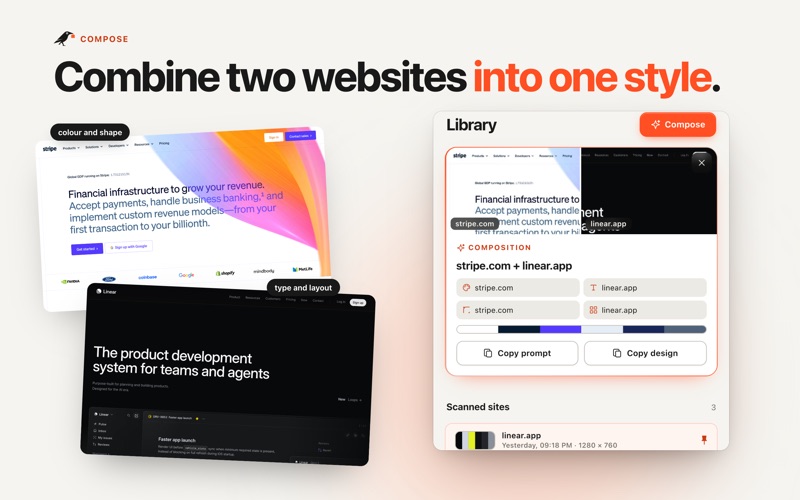
• Site prompt: one prompt with the exact measured values, animations included, for Claude Code, Cursor, Codex and other coding agents. Choose compact, detailed or full, and add a screenshot. • DESIGN.md: a shorter design direction for building new screens in the same style. • Animations in every prompt: the site prompt and DESIGN.md carry the page’s own animation CSS, so your agent rebuilds the hovers and transitions too. Any single effect copies as a prompt or as HTML, CSS or Tailwind. • Themes: ready-made Tailwind v4 and shadcn/ui theme files. • Compose: mix two sites into a new style, taking color, type, shape and layout from each. • Coding agents: your agent reads your scans straight from Siteprint on this Mac through its MCP server. No pasting. • Ask this design: on a Mac with Apple Intelligence, ask why a design works and how to use it, answered from the measurements.
Try one prompt and one DESIGN.md free on a site of your choice. Pro is a one-time purchase. No subscription, no account.
PRIVATE BY DESIGN
Siteprint runs entirely on your Mac. It has no server, no account, no analytics and no tracking. The only things it loads are the scanned page’s own images and icon, to show them in the popup. It reads styles and layout, never form values, passwords or cookies. Apple Intelligence features use the on-device model.
Use what you learn to build something of your own: Siteprint captures a design’s system, not a site’s content or branding.
Så betygsätter folk den
Logga in för att betygsätta appen. Det ärliga betyget räknas.
Inga betyg ännu. Har du provat appen? Ge det första betyget.
Fler appar i kategorin Verktyg
Veckans bästa nya appar i kategorin Verktyg Vodoalarm: vodostaji BiHVodoalarm javlja kad tvoja rijeka naglo raste, pa ne moraš stalno gledati vodostaje
 NadhirNadhir is an independent app
 Rokey: Romanian KeyboardType Romanian without worrying about diacritics
 Vibe Island: AI Agent MonitorVibe Island is a command center for the AI coding agents running on your Mac
 Private AuthenticatorPrivate Authenticator keeps your two-factor authentication codes on your own Apple…
 Photo Clean: Photo CleanupA crowded camera roll?