
Vault Exit
Inget anspråk gjortVault Exit shows you what would get lost before you switch password managers, and keeps…
Av Timothy Krechel · Verktyg


Kort sagt
Vault Exit Reads a 1Password 1PUX export on iPhone and produces a CSV file that Apple Passwords and Bitwarden can import, with everything else kept in an encrypted, read-only archive on the device. It is aimed at people leaving 1Password who want a report of what would not transfer before they switch. The app has no account or server, and a built-in sample export lets users try the import and report for free.
Sammanfattning från Debuts, baserad på appsidan i App Store.Om appen
Vault Exit shows you what would get lost before you switch password managers, and keeps it. It reads the 1PUX export file from 1Password on your iPhone, creates a file that Apple Passwords and Bitwarden can import, and stores everything else in an encrypted archive on your device.
SEE WHAT MOVES BEFORE YOU MOVE The report sorts every item into three groups: fully transferable, partially transferable and archive only. It lists what Apple Passwords cannot store, like secure notes, custom fields, attachments, tags, extra websites, password histories, credit cards and identities.
EVERY FIELD WITH ITS DESTINATION Open any item to see which value goes into which column of the import file and which data stays in the archive.
A CLEAN IMPORT FILE Logins, one-time codes and notes go into the right columns of the CSV format of Apple Passwords. Bitwarden reads the same file. Optionally, tags, extra websites and custom fields are added to each login's note as text.
NOTHING LEFT BEHIND Secure notes, cards, identities, software licenses, attachments and old passwords stay readable in an encrypted, read-only archive on your iPhone. Preview and share attachments, or share an item as text.
A SECURITY CHECK ON THE WAY The report points out reused and weak passwords, duplicate entries and logins with one-time codes to check after importing.
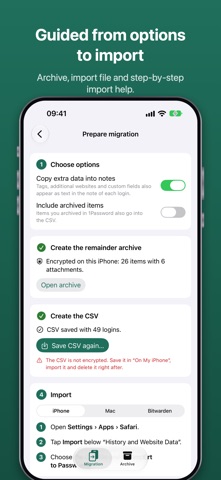
GUIDED TO THE END Numbered steps take you from options to import instructions for iPhone, Mac and Bitwarden, and a checklist reminds you to delete the unencrypted export files.
PRIVATE BY DESIGN No account, no server, no analytics. Your export is read on your iPhone and never uploaded. The archive is encrypted with a key that stays in the keychain of this device.
TRY IT FIRST, PAY ONCE Importing, the complete report and the item mapping are free, including a built-in sample export. One purchase unlocks the import file, the archive and sharing of attachments. No subscription.
Vault Exit is not affiliated with 1Password, Apple or Bitwarden.
Så betygsätter folk den
Logga in för att betygsätta appen. Det ärliga betyget räknas.
Inga betyg ännu. Har du provat appen? Ge det första betyget.
Fler appar i kategorin Verktyg
Veckans bästa nya appar i kategorin Verktyg Drainly: Speaker CleanerMuffled speaker after a splash, rain, or a sweaty workout?
 Photo & PDF Resize: KBFile too large to upload?
 Arvectum Proxy LauncherArvectum Proxy Launcher is a network utility that routes your iPhone through a proxy you…
 Vodoalarm: vodostaji BiHVodoalarm javlja kad tvoja rijeka naglo raste, pa ne moraš stalno gledati vodostaje
 Dusty: Photo Cleaner PetYour camera roll's new pet
 FairAuth: AuthenticatorFairAuth creates the codes for two-step verification on iPhone and iPad