
Ate: Food Photo & Weight Log
Not claimedAte is a food journal and weight log that doesn't make you count
By IndieWay · Health and fitnessWhy we expect it: A thoughtful, non-judgmental food and weight tracker with a clear trend view and a free entry point.



In short
Ate: Food Photo & Weight Log is a food journal and weight log for people who want to track meals and weight without counting calories. Users take a photo of each meal, enter one weight per day, and view a moving-average trend line. The app stores all data on the device with no account or ads, and it includes an optional goal weight and iPad support.
Summary by Debuts, based on the App Store listing.About
Ate is a food journal and weight log that doesn't make you count. Snap what you ate, jot down one number for your weight, and let the trend line do the rest.
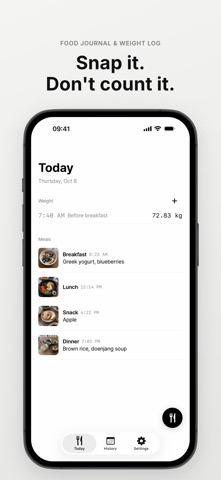
• A PHOTO FOR EACH MEAL Tap the meal button, take a picture, done. Add a short note if you like. Breakfast, lunch, dinner, or snack is picked from the time you ate. You can move each photo to choose the part that shows in small tiles and on share cards.
• OR PICK FROM YOUR LIBRARY Choose up to 10 photos at once and each one becomes a meal. Photos use the time they were taken, when the photo includes it. You can also add photos to a past day.
• NO CALORIE COUNTING No food search, no nutrition tables, no daily targets. Just a calm record of what you ate.
• A WEIGHT TREND, NOT A DAILY VERDICT Your weight goes up and down every day. Ate shows a moving-average trend line so you can see where it's really heading. Add a note such as "no clothes" or "after a workout" to any entry.
• MEALS AND WEIGHT SIDE BY SIDE The History screen puts your weight chart on top and your days below it, each with that day's weight and meal photos.
• GOAL, IF YOU WANT ONE Set an optional goal weight and see a simple estimate based on the trend you've logged.
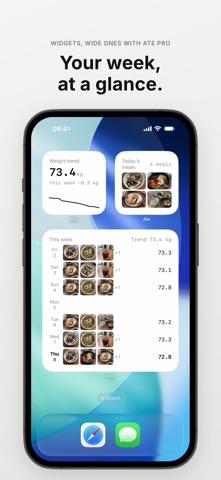
• WIDGETS AND A CAMERA BUTTON Small widgets for your weight trend and today's meals on the Home Screen, and your weight trend on the Lock Screen. On iOS 18 or later, open the camera straight from Control Center or the Lock Screen with the Ate Camera button.
• A MORNING REMINDER, IF YOU WANT ONE One quiet weigh-in reminder that skips the days you've already logged.
• SHARE AS A CARD Turn today's or this week's meal photos into a single image to share. Your weight is never on the card.
• ON IPAD TOO Ate works on iPad in any orientation.
• YOUR DATA STAYS WITH YOU No account and no ads. Ate never sends your photos or records to a server. They stay on your device and in your device backup, and leave only when you export or share them. The network is used only to check your purchase status. Export everything as a zip anytime. Viewing and exporting your own records will always be free.
People rate it
Sign in to rate this app. Honest is what counts.
No ratings yet. Tried it? Be the first to rate it.
More Health and fitness apps
Best new Health and fitness apps this week Orbit: Self-Care Habit TrackerYour healthy choices deserve more than a checkmark
 Wellbeing: Digital WellbeingBillions of people spend more time scrolling than they want to
 Pinfall: Bowling StatsPinfall is the bowling score tracker for league bowlers who want to get better, not just…
 Nuchronic: Energy & SymptomsTrack your energy and symptoms in seconds
 Drrreong - Sleep RecorderWhat did your night sound like?
 Galim - Mood DiaryGalim ("waves" in Hebrew) is a calm, simple daily mood diary built for people living…