
CineCut: Video Editor & LUTs
Not claimedCineCut turns iPhone and iPad footage into cinematic video, and now edits your photos too
By Umair Wadood · Photo and video



In short
CineCut: Video Editor & LUTs is a photo and video editor for iPhone and iPad, built around colour grades from photographer Umair Wadood and calibrated for HDR footage. It offers a pro camera, a photo editor, 23 looks, and on-device AI tools such as sky and subject masking, with nothing uploaded. It suits people who want cinematic colour without leaving their device, and it stands out for keeping all AI processing local.
Summary by Debuts, based on the App Store listing.About
CineCut turns iPhone and iPad footage into cinematic video, and now edits your photos too.
It is built around real colour grades from photographer Umair Wadood: the same looks behind his Instagram work, calibrated for iPhone HDR footage so the colour you see is the colour you get. Pick a look, fine-tune it, export in full quality.
PHOTOGRAPHY (FREE) • A full photo editor: light, colour, curves, colour grading, detail, optics and effects, with a live histogram • Masks: select the sky or the subject, or paint with a brush; linear, radial, colour and luminance masks • Crop with aspect presets, straighten (or auto straighten), rotate and flip • 102 built-in presets plus your own; export as JPEG, HEIF or 16-bit PNG, with or without location • Pro photo camera: HEIF, JPEG, ProRAW and RAW at up to 48 MP, manual controls, bracketing, grid, level and histogram
RECORD • Record in 4K, 60 fps, HDR with a look previewed live on the viewfinder; zoom glides between lenses • Pro camera: Apple Log on iPhone 15 Pro and later, manual ISO, shutter, white balance and focus, tap to focus with AE/AF lock, zebras, focus peaking, histogram, grid, level and a preview LUT (including your own .cube LUTs) • Or import any video from your library, HDR or SDR
LOOKS AND COLOUR • 23 calibrated looks for HDR, SDR and Apple Log footage, plus your own .cube LUTs • Log to Rec.709 for Apple, Sony, Canon, Panasonic, Fujifilm, Nikon, ARRI, DJI, RED and Blackmagic Log • Film stocks: cinema, photo, slide and black & white emulations with prints, push and pull, halation, bloom and grain • Adjust, Colors, Curves, three-way Grade wheels, HDR zones and Glow • Color Warper: reshape colours on a hue and saturation mesh • Live waveform, parade, vectorscope and histogram, a split-screen Compare and Shot Match • Masks: linear, radial, colour range, luminance and correction layers • Save your own settings as My Looks; apply to one clip or every clip
AI TOOLS, ON THE DEVICE • Select the sky or any subject in one tap, tracked through the clip • Depth masks and cinematic background blur • Relight: add a light after the shot • Face Refinement: smooth skin, brighter eyes, whiter teeth, a subtle slim • Remove an object that walked through the shot • Smart Reframe for vertical video Nothing is uploaded; the AI runs on your iPhone or iPad.
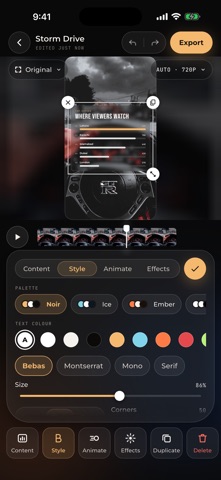
GRAPHICS • 25 animated charts, lower thirds, quotes and text boxes from your own numbers and words, styled and animated your way
A REAL EDITOR • Magnetic multi-clip timeline: hold to move clips, trim, split, speed, reverse, freeze, rotate and mirror • Multitrack: video overlays and audio on their own tracks, with blend modes • Move, pinch and rotate text and overlays right on the video • Keyframes on grade, look strength, zoom, text, overlays and volume, with Smooth, Linear, Ease in, Ease out and Hold • Speed ramps and smooth slow motion, even from 30 fps clips • Auto captions, text in 21 fonts (9 Urdu) or your own, with animations, and text that follows a subject • Music, extracted audio and voice-overs, Beat Sync, stabilisation and noise reduction • Transitions, picture-in-picture, vertical, square and widescreen canvases • Export in original quality, HDR preserved • Designed for iPhone and iPad, in portrait or landscape
CINECUT PRO The editor is free. Free exports carry a small CineCut watermark and a short CineCut ending. Pro removes both, includes every look we add in future, and unlocks the AI tools (AI masks, Depth, Relight, Face Refinement, object removal) and graphics in exports. Monthly or yearly, with a free trial on the yearly plan. Payment is charged to your Apple ID account; subscriptions renew automatically unless cancelled at least 24 hours before the end of the period. Manage or cancel in your account settings.
Help: https://cinecut.drumairwadood.com/ Privacy Policy: https://cinecut.drumairwadood.com/privacy/ Terms of Use: https://www.apple.com/legal/internet-services/itunes/dev/stdeula/
People rate it
Sign in to rate this app. Honest is what counts.
No ratings yet. Tried it? Be the first to rate it.
More Photo and video apps
Best new Photo and video apps this week Zoetrope ViewerWatch your zoetrope records and slipmats animate through your camera, or live on your…
 Migumento · QR photo albumOne album for every guest
 SwipeshineSwipeshine turns photo cleanup into one gesture
 Pocket Film: Vintage CameraPocket Film turns your phone into the back of a real film camera
 PlanIt Earth: VR Photo PlannerFor landscape, travel, nature, cityscape, night, time-lapse, star-trail, Milky Way and…
 TonalierYour photos now have an editor