
Clip Strip
Not claimedTurn your phone into a photo booth
By Rhodri Richards · Photo and video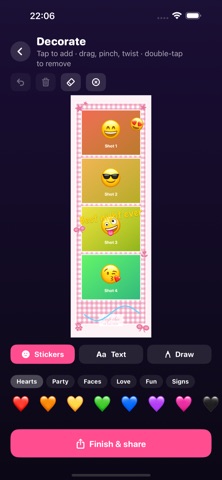


About
Turn your phone into a photo booth.
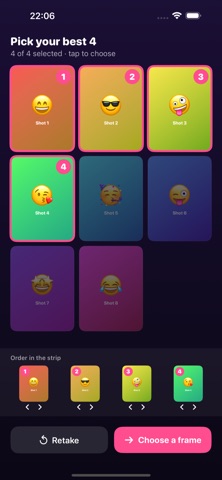
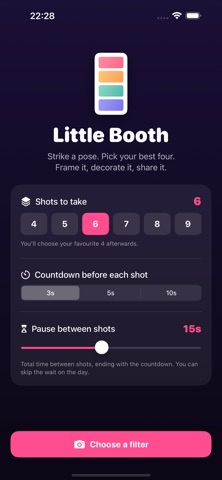
Set how many shots you want, pick a filter for the whole set, then strike a pose. A 3-2-1 countdown fires before every shot with a pause in between to change it up. When the set is done, choose your favourite four and drop them into a strip.
FRAMES Fifteen templates, from a classic black strip and 35mm film to scrapbook, gingham, lace, doodle and polaroid looks. Every frame has an editable background and accent colour, an editable caption and an optional date.
FILTERS Fourteen looks tuned for faces, from a subtle portrait grade to warm, airy, matte, film and three strengths of black and white. Preview them live before you shoot. One filter applies to the whole set so the strip feels like one moment.
LIVE STRIPS Every shot also records a short clip. Switch the finished strip to Live and it becomes a looping video with all four moments moving.
DECORATE Add stickers, write text in six typefaces, and draw straight onto the strip. Drag, pinch and rotate anything you add.
SAVE AND SHARE Save the finished strip or video to Photos at full resolution, post it to your socials with a matching backdrop, or share it anywhere.
PRIVATE BY DESIGN Everything happens on your phone. No account, no uploads, no tracking.
People rate it
Sign in to rate this app. Honest is what counts.
No ratings yet. Tried it? Be the first to rate it.
More Photo and video apps
Best new Photo and video apps this week Zoetrope ViewerWatch your zoetrope records and slipmats animate through your camera, or live on your…
 Migumento · QR photo albumOne album for every guest
- ScreenLux: Live Wallpapers 4KLive wallpapers for iPhone and 4K video wallpapers for Android
 Vinette: Sticker JournalFor the person who finds rest in decorating
 IROZOUIROZOU is a color workspace made for designers: fashion, textile, graphic and product…
 SwipeshineSwipeshine turns photo cleanup into one gesture