
Compress Photos Pictures
Not claimedCompress images quickly and reduce image file size with a simple, modern, and…
By VIREXA TECHNOLOGIES (SMC-PRIVATE) LIMITED · Photo and videoWhy we expect it: Clear, practical value with a well-organized feature list and broad language support makes this a promising utility for everyday photo compression.




In short
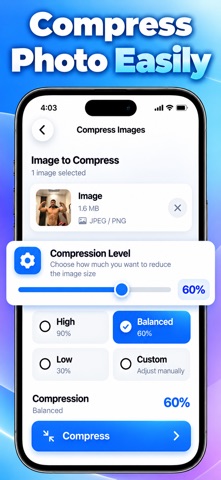
Compress Photos Pictures is a photo-video app for shrinking image file sizes, with High, Balanced, Low, and Custom compression levels. It suits people who want to reduce photos before sharing or storing them, and it can process several images at once in batch mode. Compressed files are saved in one place, and results show the original size next to the new one.
Summary by Debuts, based on the App Store listing.About
Compress images quickly and reduce image file size with a simple, modern, and easy-to-use image compressor. Image Compressor helps you reduce photo sizes, manage compressed files, and save valuable storage space without complicated steps.
Whether you need to reduce the size of a photo before sharing it, make large images easier to store, or compress multiple images at once, Image Compressor gives you practical tools to get the job done.
Key Features of Image Compressor App:
• Easy Image Compression: Select an image and compress it in just a few steps. Choose the compression level that works great for your needs.
• Multiple Compression Levels: Choose from High, Balanced, Low, or Custom compression settings. Adjust compression according to how much you want to reduce your image size.
• Camera: Take a new photo directly from the app and prepare it for compression without switching between multiple apps.
• Gallery: Select photos from your device and quickly add them to the compression workflow.
• Batch Mode: Compress multiple images together with batch processing. A convenient option when you need to reduce the size of several photos.
• Drive Support: Access images through Drive and add them to your compression workflow when you need to work with files stored there.
• Compression Results: Compare the compressed file size with the original size and see how much your image size has been reduced.
• Saved Compressed Files: Keep your compressed images organized in one convenient place. Easily access previously compressed files whenever you need them.
• Quick Download: Download your compressed files when they are ready and use them wherever you need.
People rate it
Sign in to rate this app. Honest is what counts.
No ratings yet. Tried it? Be the first to rate it.
More Photo and video apps
Best new Photo and video apps this week Zoetrope ViewerWatch your zoetrope records and slipmats animate through your camera, or live on your…
 Migumento · QR photo albumOne album for every guest
- ScreenLux: Live Wallpapers 4KLive wallpapers for iPhone and 4K video wallpapers for Android
 Saint Studios - Video EditorSaint Studios is a professional video editor built for creators who want to get the most…
 Ashigrain: Film EmulationAshigrain gives your videos and photos the colour, grain and glow of motion picture and…
 AstrowetterIs tonight worth setting up for – and from when to when?