
Day: Days Until & Days Since
Not claimedDay is a countdown app for people whose home screen deserves better than stickers
By IndieWay · LifestyleWhy we expect it: Clear, well-described countdown app with a distinctive lunar calendar feature and a strong privacy promise.


In short
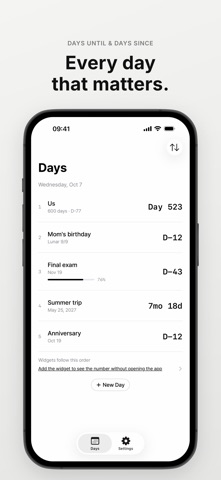
Day: Days Until & Days Since is a countdown app for counting days until a date, days since one, or yearly dates, shown as a single black-and-white number. It suits people who want their home screen widget to carry the count, and it stores everything on the phone with no account or ads. One thing that stands out is its lunar calendar support, which converts days kept on the Korean lunar calendar to their solar dates each year.
Summary by Debuts, based on the App Store listing.About
Day is a countdown app for people whose home screen deserves better than stickers.
Type a date and a title, then see days until, days since, or a yearly date as one plain black-and-white number.
• THREE WAYS TO COUNT Days until an exam, days since you met (Day 1 is the first day), or a birthday that comes back every year.
• DAYS, WEEKS, OR MONTHS See "14w 2d" or "3mo 8d" instead of a raw day count. Yearly dates count as "7-year anniversary" or "64th", your choice.
• LUNAR DATES, TOO Add days you keep on the Korean lunar calendar, leap months included, and see which solar date they fall on each year. Lunar dates are calculated on your iPhone from public data by the Korea Astronomy and Space Science Institute.
• MILESTONES ON THEIR OWN Days since shows the next 100-day mark and anniversary automatically, and each day lists its upcoming ones with dates.
• HOW FAR ALONG Set a start date on a countdown and a progress bar in the app shows how far you've come.
• THE WIDGET IS THE APP Put a number-only widget on your Home Screen or Lock Screen. Long-press it and choose Edit Widget to pick which day it shows, and tap it to open that day. The number updates at midnight without opening the app.
• ONLY THE NOTIFICATIONS YOU WANT Turn on an on-the-day notification for each day. Leave it off and nothing arrives.
• ON IPAD, TOO On a wide screen your days sit side by side as cards.
• YOUR DAYS, YOUR PHONE No account, no cloud, no ads. Export to JSON or CSV anytime.
• DAY PRO Three days, the small and Lock Screen widgets, on-the-day notifications, and export are free. Day Pro adds unlimited days, medium and large widgets that show several days, progress bars on widgets, reminders the day before, 3 days before, and 7 days before, a separate notification time for each day, and a choice of number size and alignment for your widgets. Future Pro features are included at no extra cost.
People rate it
Sign in to rate this app. Honest is what counts.
No ratings yet. Tried it? Be the first to rate it.
More Lifestyle apps
Best new Lifestyle apps this week askoraAI 회상 노트
 Familjekalender – familjens årFamiljekalender är en delad kalender för hela familjen, där varje dag kan bära ett foto…
 My Anime TrackerAnime watch order, no guesswork.
 WatchLux: Animated Watch FacesOver 750 animated watch faces for Apple Watch and Wear OS
 SCNT ControlSCNT conecta tu teléfono con tu difusor de aroma por Bluetooth y te da el control…
 Sakinah: Quran, Adhkar & DuaSakinah brings the Qur'an, the prayer and daily remembrance together in one calm app, in…