
DGArt:RT
Not claimedDGArt:RT is a complete 3D modeling studio that runs entirely on your iPhone and iPad
By Heng Jia Liang · Photo and videoWhy we expect it: Comprehensive on-device 3D modeling tools and a detailed description make the value clear for hobbyist and pro artists.




About
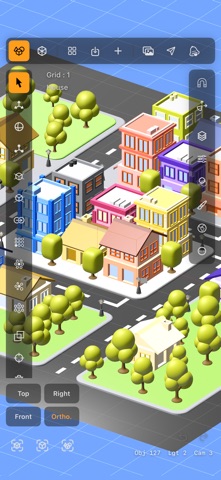
DGArt:RT is a complete 3D modeling studio that runs entirely on your iPhone and iPad. Start from a single cube, shape it with real modeling tools, paint it by hand, light the scene, and finish with a ray-traced render — all on the device.
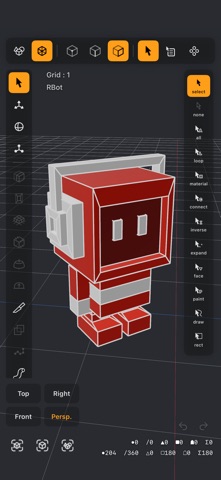
TWO MODES, ONE APP Scene mode is where you build and animate your world: add objects, lights and cameras, group them, clone them, bring them to life with animation and frame the shot. Modeler mode opens any object for point, edge and polygon editing, with more than fifty tools behind it.
MODELING • 17 primitives, from cube, sphere and torus to spring, capsule, tube and all five Platonic solids • Extrude, Inset, Smooth Shift, Thicken, Lathe and Mesh Blend • Bevel, Chamfer and Fillet with adjustable width and segments • Loop Cut, Edge Slide, Knife, Split Poly, Cap and edge bridging • Catmull-Clark subdivision with edge creasing • Boolean union, subtract and intersect • Draw Poly, Tap Made Poly and Bezier Surface • Pipe Along Edges, Create Drain, Create Cage, and Sweep or Clone Along Path • Lattice Warp, Warp Cylinder, Warp Sphere, Mesh Project and Smooth • Twist, Bend, Taper, Stretch, Skew and Vortex deformers, previewed live • Point Drag with axis lock and a soft magnet • Mirror, Bevel, Thicken, Lattice and Shrinkwrap modifiers, applied when you are ready • Array, Radial, Random and Point cloning • Grid snapping, numeric entry, gizmos, and reference objects to model against
PAINTING AND MATERIALS Paint onto the model in 3D or flat in the UV editor, with your choice of brush, on separate colour, metallic, roughness and emission maps. PBR materials with a preset library, glass with a real index of refraction, image textures with five projection modes, and a shadow catcher for setting a render over a photo.
LIGHTING AND ENVIRONMENT Directional, point, spot and area lights, or an HDR environment for image-based lighting. A layers panel keeps the scene in order: drag to rearrange, group, lock and hide.
RT:RENDER A progressive GPU path tracer written in Metal, using hardware ray tracing on devices that have it. Soft shadows, glass and refraction, glowing surfaces, depth of field and true global illumination. Save a still to Photos, with a transparent background when you need one and a full-range .hdr file alongside, or render an animation out as video. Clay AO, Normals and Depth modes give quick passes.
ANIMATION Keyframe position, rotation, scale and visibility with easing. Curve the motion path with Bézier handles and let an object turn to face along it. Animate camera zoom and focus, lights, materials and morph targets. A turntable spins the view for a quick look around.
AR PREVIEW Place your scene on a real table or floor through the camera, at real size or scaled to fit, with its animation playing.
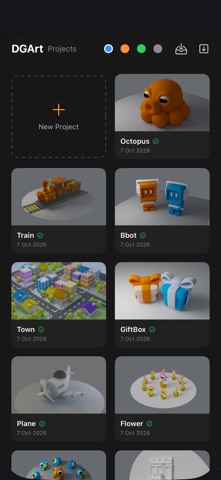
YOUR PROJECTS A project library with thumbnails and filters for works in progress, finished pieces and templates. Keep favourite objects on a Custom Objects shelf, append one project into another, and send a project, textures and all, to another iPhone or iPad as a single file.
IMPORT AND EXPORT Open OBJ, STL, GLB, USDZ and SVG files. Export OBJ, STL, GLB and USDZ for AR Quick Look, game engines, other 3D apps or a 3D printer. Projects save as USD (.usda), a readable, open format your work is never locked inside.
BUILT FOR TOUCH Every tool is laid out for fingers rather than a mouse. Pinch to zoom, two fingers to pan, a tap for Top, Front, Right or Perspective, a Quick Menu of your own favourite tools, and panels that fold away. It works the same on an iPhone on the train as on an iPad at the kitchen table.
WHO IT IS FOR Game artists blocking out props, 3D printing enthusiasts, students learning polygon modeling, AR creators who need a USDZ, product designers sketching an idea, and anyone who would rather model on the sofa than at a desk.
People rate it
Sign in to rate this app. Honest is what counts.
No ratings yet. Tried it? Be the first to rate it.
More Photo and video apps
Best new Photo and video apps this week Zoetrope ViewerWatch your zoetrope records and slipmats animate through your camera, or live on your…
 Migumento · QR photo albumOne album for every guest
- ScreenLux: Live Wallpapers 4KLive wallpapers for iPhone and 4K video wallpapers for Android
 Saint Studios - Video EditorSaint Studios is a professional video editor built for creators who want to get the most…
 Ashigrain: Film EmulationAshigrain gives your videos and photos the colour, grain and glow of motion picture and…
 AstrowetterIs tonight worth setting up for – and from when to when?