
FileFly | Share & Upload Files
Not claimedFileFly: Share & Upload Files Upload
By Kello Solutions SIA · ProductivityWhy we expect it: A clear, simple file sharing tool with useful extras like expiring links and password protection.





About
FileFly: Share & Upload Files
Upload. Get a link. Share.
FileFly makes sharing files simple. Choose a file from your iPhone, upload it, and instantly get a shareable link. Send the link through Messages, email, social apps, or anywhere else you want. No complicated setup. No user profile. Just your file and a link.
KEY FEATURES - Upload Files Upload documents, photos, videos, audio files, archives, and more directly from your device.
- Instant Share Links Every upload gets its own unique link that you can copy and share anywhere.
- Share Anywhere Send your file through Messages, Mail, or your favorite apps using the standard iOS sharing options.
- Password Protection Protect supported file links with a password for an additional layer of control.
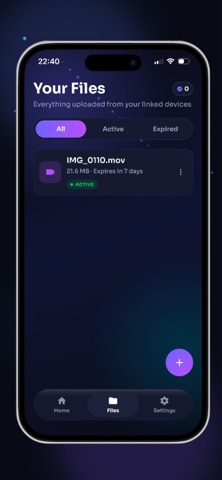
- Set Expiration Choose how long your file remains available. Let links automatically expire after the period you select.
- Share Multiple Files Upload multiple files and share them together through a single link where supported.
- QR Codes Create a QR code for your file link and let someone scan it to access the download.
- Download Information Keep track of available download information for your shared files.
- Manage Your Links View your uploaded files, copy links, share them again, or delete files when you no longer need them.
People rate it
Sign in to rate this app. Honest is what counts.
No ratings yet. Tried it? Be the first to rate it.