
Gumlock: Offline Passwords
Not claimedGumlock is a password manager that keeps your passwords on your iPhone — not on our…
By SANGHOON LEE · ProductivityWhy we expect it: Clear privacy promise, transparent free features, and a thoughtful family focus make this a compelling offline password manager.


In short
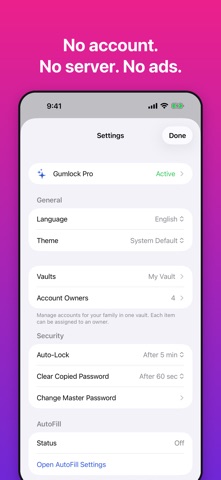
Gumlock: Offline Passwords is a password manager that stores an encrypted vault on the iPhone with no account and no server. It is aimed at individuals and families who want to manage shared logins, with items assigned to owners and filtered by person. One notable point is that core features, including AutoFill, Face ID and CSV export, are free, while iCloud sync and automatic backups are a one-time purchase.
Summary by Debuts, based on the App Store listing.About
Gumlock is a password manager that keeps your passwords on your iPhone — not on our servers, because we don't have any.
NO ACCOUNT. NO SERVER. There is nothing to sign up for. Your vault is encrypted on your device with a master password that only you know, and nothing leaves your device unless you choose to sync or back it up. We can't see your passwords, and nobody can sell them.
BUILT FOR THE WHOLE FAMILY Manage accounts for your partner, parents and kids in one vault. Give each item an owner, then filter the list by person in one tap.
FAST EVERY DAY • Unlock with Face ID • AutoFill usernames and passwords in Safari and other apps • Save a new account for a site right from the AutoFill sheet • Copy a username or password, or show it, straight from the list • Copied passwords are cleared from the clipboard automatically • Search by site, username or owner, and pin favorites to the top
SECURITY FEATURES ARE ALWAYS FREE Unlimited items, AutoFill, Face ID, encryption, encrypted backup and restore, and CSV export are free — forever. If you ever want to leave, export a CSV that Apple Passwords and other managers can import.
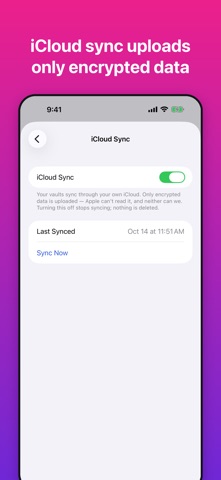
GUMLOCK PRO — ONE-TIME PURCHASE, NOT A SUBSCRIPTION • iCloud sync between your devices (only encrypted data is uploaded to your own iCloud) • Automatic backups to a folder you choose • Attachments such as photos of ID cards • Multiple vaults, each with its own master password • Custom fields • Home and Lock Screen widgets Family Sharing is supported.
HOW IT PROTECTS YOU • AES-256-GCM encryption; the key is derived from your master password with PBKDF2-SHA256 (600,000 iterations) • Your master password is never stored. Decrypted data exists only in memory while the vault is open • Auto-lock after the time you choose • No analytics, no ads, no tracking
IMPORTANT If you forget your master password, your vault cannot be recovered — by anyone, including us. Keep it somewhere safe, and export an encrypted backup from time to time.
Available in English, Korean, German, Spanish and Japanese.
People rate it
Sign in to rate this app. Honest is what counts.
No ratings yet. Tried it? Be the first to rate it.
More Productivity apps
Best new Productivity apps this week ChickMark: Habit TrackerChickMark is a simple habit tracker for routines, goals, and reminders
 Dayflint: One Thing a DayToo many priorities?
- BeginAnywayMorning alarm for hard tasks: set one task, prove you started, build a streak
 DHUDEDHUDE Analityxs es la herramienta de gestión diaria para grupos de restauración y ocio…
 Intent - Scroll by ChoiceTake back control of your screen time
 Whisperly DictationWhisperly turns your voice into clean text