
Halora: Text & Photo Editor
Not claimedThe art of your everyday
By Ahmed Al Balushi · Photo and videoWhy we expect it: Halora packs a capable, well-organized feature set into a free app, with thoughtful Arabic and English text tools that stand out in photo editing.



In short
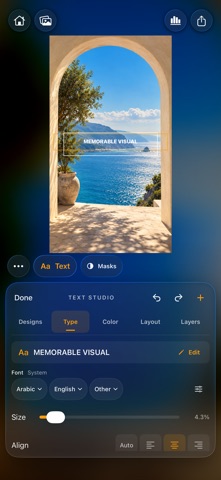
Halora: Text & Photo Editor is a photo editor for adjusting color and light, adding text, building collages, and removing backgrounds to export clean cutouts. It suits people who want to personalize everyday photos with presets, LUTs, and layered typography in Arabic and English. One standout feature is the Text Studio, which offers editable title designs, gradient palettes, and layer controls.
Summary by Debuts, based on the App Store listing.About
The art of your everyday.
Make your photos feel like your own with Halora, a photo editor for color, text, collages, and clean cutouts.
SHAPE YOUR LOOK Explore photo looks, adjust their strength, and fine-tune color and light. Import LUTs or XMP presets to bring your favorite styles into your workflow. Crop, zoom, and reframe your photo, or use masks to adjust selected areas. Auto Object masks let you target a subject or its background.
CREATE WITH TEXT STUDIO Start from 8 editable title designs or write your own words in Arabic and English. Customize each text layer, highlight, rule, and frame separately. Explore 20 gradient palettes, edit their colors and direction, or use solid and glass text treatments. Adjust fonts, spacing, alignment, rotation, outlines, shadows, opacity, and blend modes. Drag to position, pinch to resize, and manage layers with visibility, locking, duplication, and undo. Import fonts from Files to expand your collection.
BUILD A COLLAGE Combine photos in classic layouts or rounded pillars. Change the aspect ratio, spacing, and background, including gradients or your own photo. Reposition or replace individual images to create your composition.
REMOVE BACKGROUNDS Choose a photo, isolate its subject, and export a clean cutout from a dedicated workspace.
EXPORT YOUR FINISHED IMAGE Save your work as JPEG or PNG. Choose PNG to preserve transparency. HDR JPEG export is available on supported devices with iOS 18 or later.
From a subtle color edit to expressive typography, Halora gives you tools to make the final image yours.
People rate it
Sign in to rate this app. Honest is what counts.
No ratings yet. Tried it? Be the first to rate it.
More Photo and video apps
Best new Photo and video apps this week Zoetrope ViewerWatch your zoetrope records and slipmats animate through your camera, or live on your…
 Migumento · QR photo albumOne album for every guest
- ScreenLux: Live Wallpapers 4KLive wallpapers for iPhone and 4K video wallpapers for Android
 Vinette: Sticker JournalFor the person who finds rest in decorating
 IROZOUIROZOU is a color workspace made for designers: fashion, textile, graphic and product…
 SwipeshineSwipeshine turns photo cleanup into one gesture