
LensTalk: Teleprompter & Video
Not claimedLensTalk is a teleprompter that records video while you read
By Dark Matter AI Labs LLC · Photo and video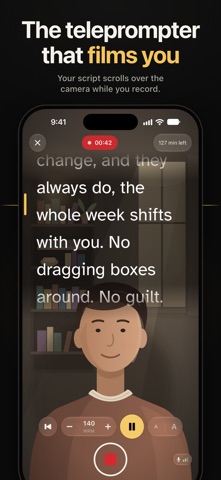




In short
LensTalk Teleprompter & Video is a teleprompter app that scrolls your script over the front camera preview so you can read while looking near the lens. It records 1080p video with saved takes, a practice mode, and no account or tracking. It suits vloggers, presenters, teachers, and anyone making self-tapes, and the standout is that the script is never recorded into the video.
Summary by Debuts, based on the App Store listing.About
LensTalk is a teleprompter that records video while you read. The line you’re reading sits just under the front camera, so your eyes stay near the lens and you look at your audience, not at your notes.
READ AT THE LENS • Your script scrolls over the camera preview, with the current line just under the front camera • Set the speed in words per minute and the text size • Three high-contrast themes: white on black, black on white, and yellow on black • A countdown before the script starts: 3, 5 or 10 seconds, or none • The script is shown only to you. It is never recorded into your video
RECORD TAKES • Tap Record: the countdown runs, then your script and the recording start together • A REC timer and an audio meter while you record • Every take is saved on your iPhone, with a thumbnail and its length • Play a take back, save it to Photos or share it • Records in 1080p at 30 fps. LensTalk Pro adds 4K and 60 fps where your iPhone’s camera supports them • No watermark on your videos
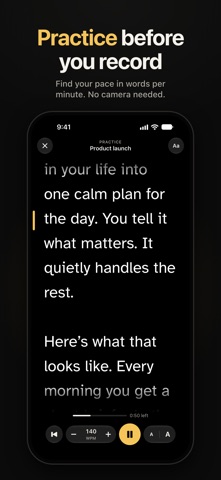
PRACTICE FIRST • Practice mode runs the prompter without the camera, so you can find your pace before you record
YOUR SCRIPTS • Write or paste a script and see its word count and read time at your speed • Import .txt, .md and .rtf files with LensTalk Pro • A sample script shows how it all works
SIRI AND SHORTCUTS • Say “Record [script name] with LensTalk” or “Practice [script name] in LensTalk” • Say “New script in LensTalk” to add one • Use LensTalk actions in your own shortcuts
MADE FOR IPHONE DUO • Tabletop: half-fold it and stand it up. Camera and script above the fold, controls below • Book: preview and script on the camera’s side, controls on the other, nothing on the crease • Open flat in landscape: a wide recording layout, with your scripts, speed and text size in a side panel
MIRROR MODE • Flip the text for beam-splitter teleprompter glass, with LensTalk Pro
PRIVATE BY DESIGN • No account and no sign-up • No ads, no analytics, no tracking • LensTalk collects no data and has no servers. Your scripts and takes stay on your iPhone unless you choose to save or share them
FREE, WITH A ONE-TIME UPGRADE LensTalk is free with 3 scripts, plus the sample. LensTalk Pro is a single purchase, not a subscription. It unlocks unlimited scripts, file import, mirror mode, and 4K and 60 fps recording.
Made for vlogs and social videos, founder updates, lessons, listings and sales videos, presentations, speeches and self-tapes.
People rate it
Sign in to rate this app. Honest is what counts.
No ratings yet. Tried it? Be the first to rate it.
More Photo and video apps
Best new Photo and video apps this week Zoetrope ViewerWatch your zoetrope records and slipmats animate through your camera, or live on your…
 Migumento · QR photo albumOne album for every guest
 SwipeshineSwipeshine turns photo cleanup into one gesture
 Pocket Film: Vintage CameraPocket Film turns your phone into the back of a real film camera
 PlanIt Earth: VR Photo PlannerFor landscape, travel, nature, cityscape, night, time-lapse, star-trail, Milky Way and…
 TonalierYour photos now have an editor