
Lightplan
Not claimedLightplan is a lighting notebook for photographers
By 昆俞 崔 · Photo and videoWhy we expect it: Lightplan answers a real studio problem with a careful, specific design that files frames under the exact lighting diagram that made them.


In short
Lightplan is a lighting notebook for photographers that lets them draw a studio setup, record when it goes live and wraps, and file imported frames under the matching diagram. It suits photographers who need to recreate a look later, and it stands out for keeping photos untouched while storing only references and EXIF details, with data kept in the user's own iCloud.
Summary by Debuts, based on the App Store listing.About
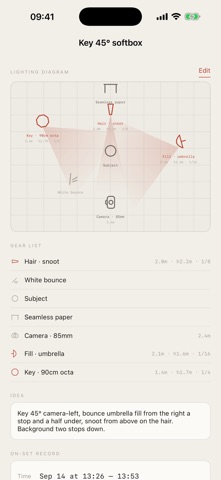
Lightplan is a lighting notebook for photographers. Draw the setup, tap twice on set, and the frames file themselves under the diagram that made them.
WHY A light setup lives for twenty minutes and then it is gone. Phone snaps of the stands never tell you the distance, the height or the power, and by the time a client asks for "that look from March" the plot is unrecoverable. Lightplan keeps the diagram, the gear list and the frames that came out of it in one place.
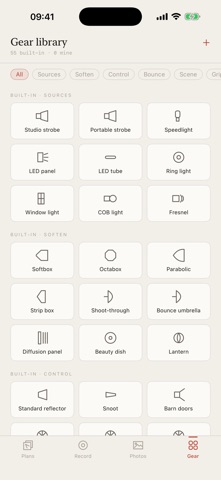
DRAW - A floor plan with 55 built-in gear types in 8 categories - strobes, softboxes, umbrellas, snoots, flags, backdrops, grip and power - each drawn as its own symbol, plus any custom gear you add - Light cones show where the light actually falls, not just where the stand is - Distance, height and power on every light, and a gear list that reads like a call sheet - An idea note for the one sentence you would say to an assistant
RECORD - Tap Start when a setup goes live and Wrap when you strike it. Two taps per setup, not one per frame - your hands are on the camera - One large target that works one-handed in a dark studio - Frame ranges with a live counter; correct the start or the current number at any time - "Wrap up" ends the day; "Wrap - next setup" rolls straight into the next look
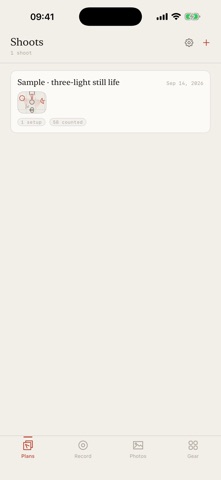
FILE - Import the shoot from your photo library and each frame lands under its setup - Two channels: capture time is the main one, so no numbers are needed at all, and frame numbers verify it - When the two disagree nothing is filed. A wrong diagram is worse than none, because you would light a reshoot from it. Those frames wait in Unfiled for one tap - Aperture, shutter, ISO and lens are read from EXIF and shown beside the light that made them - Photos are never copied, modified or uploaded. Lightplan stores a reference and the details it read
YOUR DATA STAYS YOURS No account, no server of ours, no analytics, no ads. Drawing, recording and importing all run on the device. iPhone and iPad stay in step through your own iCloud private database, which the developer has no way to read.
Everything is free. English and Simplified Chinese, iPhone and iPad, iOS 17 or later.
People rate it
Sign in to rate this app. Honest is what counts.
No ratings yet. Tried it? Be the first to rate it.
More Photo and video apps
Best new Photo and video apps this week Zoetrope ViewerWatch your zoetrope records and slipmats animate through your camera, or live on your…
 Migumento · QR photo albumOne album for every guest
- ScreenLux: Live Wallpapers 4KLive wallpapers for iPhone and 4K video wallpapers for Android
 Vinette: Sticker JournalFor the person who finds rest in decorating
 IROZOUIROZOU is a color workspace made for designers: fashion, textile, graphic and product…
 SwipeshineSwipeshine turns photo cleanup into one gesture