
Looploom Audio Loop Maker
Ei lunastettuLooploom is a focused audio loop editor for Mac
Tekijä: Gobling Company · Musiikki ja ääni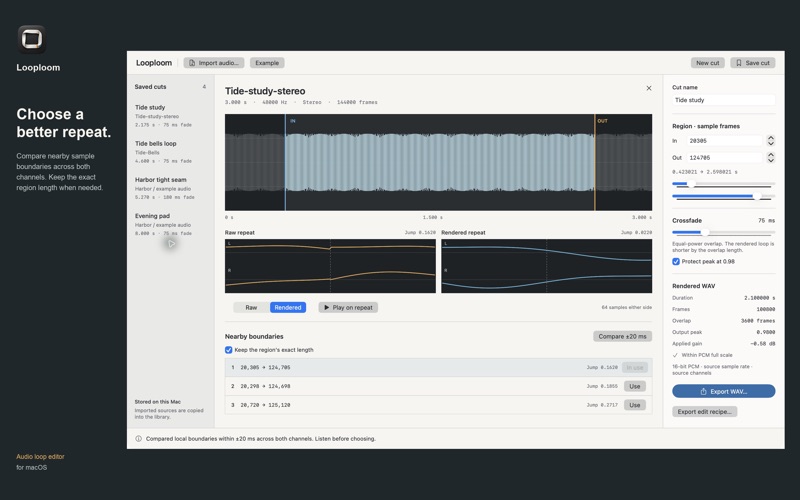


Lyhyesti
Looploom Audio Loop Maker is a Mac app for editing audio loops from local WAV, AIFF, M4A or MP3 files, with exact sample-frame boundaries, boundary comparison and an equal-power crossfade. It suits people who want to prepare a repeating sample or ambience without a multi-track session. It stands out for its optional JSON edit recipe, which records exact boundaries, processing values and file hashes but contains no audio.
Debutsin tekemä tiivistelmä App Store -listauksen pohjalta.Tietoa
Looploom is a focused audio loop editor for Mac. Prepare a repeating sample or ambience without setting up a multi-track session. Import a local WAV, AIFF, M4A or MP3, or try the original Harbor example.
EDIT THE REAL SAMPLES Set In and Out using exact sample frames, single-frame steppers or sliders. View the selected source waveform and both channels at the repeat boundary. Compare up to three nearby boundary candidates within ±20 ms, optionally preserving the selected region’s exact frame count. This is local sample comparison, not automatic beat detection.
LISTEN AND CHECK THE OVERLAP Switch between the raw region and rendered loop for repeat playback. Adjust an equal-power crossfade from 0–250 ms; the overlap is capped at a quarter of the region and shortens the rendered output. Optional peak protection applies one gain across all channels to cap the rendered peak at 0.98. Inspect the actual output frame count, peak and applied gain before exporting.
KEEP THE CUT AND ITS AUDIO Save named cuts locally. Newly imported audio is copied into the private library so saved cuts can reopen after the external source moves. Older saved cuts migrate their copy when their source can be reopened. Use Window → Show Looploom Workspace, or Command-1, to reopen a closed editing window.
EXPORT SOMETHING YOU CAN USE Write a 16-bit PCM WAV at the source sample rate and channel count. Optionally export a separate JSON edit recipe with exact boundaries, processing values and source/output SHA-256 hashes. A recipe contains no audio and is not an importable project file.
Supports decodable mono or stereo sources with integer sample rates of 8–192 kHz. Input must be 0.25–300 seconds, no larger than 128 MiB, and no more than 24 million decoded frames; all limits apply together. Minimum region length: a quarter second. WAV export without peak protection clamps samples outside PCM full scale and shows an overflow warning beforehand.
No account, subscription, ads, analytics or developer cloud processing. No recording, time stretching, mixing or guaranteed musical matching. A lower sample jump alone cannot guarantee a seamless musical loop: listen to the actual rendered repeat.
Ihmisten arvio
Kirjaudu sisään arvioidaksesi tämän sovelluksen. Rehellisyys on tärkeintä.
Ei vielä arvioita. Oletko kokeillut sitä? Anna ensimmäinen arvio.
Lisää Musiikki ja ääni-sovelluksia
Viikon parhaat uudet Musiikki ja ääni-sovellukset KlingKlang – Control de AudioKlingKlang reúne todas las salas de tu sistema Sonos en una sola pantalla
 BANANA-1One banana
 Acord: Guitar Tuner, MetronomeAcord is a precise tuner and metronome for every musician
 MonandaegMōnandæg is two field recorders that cannot leave anything alone
 Yul — Gugak Tuner & JangdanA tuner and rhythm trainer built for Korean traditional instruments
 MusiquitosMusiquitos es una app de música para niños con treinta canciones para cantar, bailar y…