
Notation: Sheet Music & Loops
Not claimedYOUR DIGITAL SHEET MUSIC LIBRARY
By Moritz Kuntz · Music and audioWhy we expect it: Clear, well-targeted value for musicians with practical looping, annotation, and recording tools, though the listing would benefit from tighter copy and more ratings.


In short
Notation: Sheet Music & Loops is an iPad and iPhone app for organizing imported PDF scores into collections and setlists, annotating them with fingerings and notes, and practicing with audio loops at adjustable speeds. It is aimed at musicians, students and teachers. One notable point is that on-device PDF analysis suggests metadata, and the user decides whether to accept it.
Summary by Debuts, based on the App Store listing.About
YOUR DIGITAL SHEET MUSIC LIBRARY. MORE ROOM FOR MUSIC.
Keep your scores organized, add personal annotations and work on challenging passages: Notation brings your PDF library and powerful music tools together on iPad and iPhone. For musicians, students and teachers – at home, in lessons, at rehearsals and in concert.
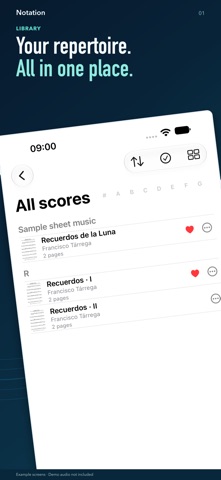
YOUR LIBRARY, ORGANIZED Import your own PDF scores and organize your repertoire into collections and setlists. Favorites, search and bookmarks help you find the right piece and passage. Add work details and notes. On-device PDF analysis suggests metadata; you decide what to accept.
Read your music, turn pages and zoom in on details. The included sample score “Recuerdos de la Luna” lets you try things out right away.
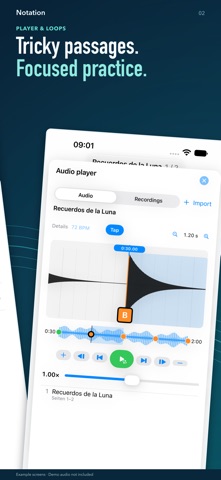
PRACTICE WITH LOOPS AT YOUR OWN PACE Link imported audio or your own recordings to your scores. Place markers in the waveform to define practice sections and repeat exactly the passage you want to work on. Adjust playback speed for the entire track or your loops and progress step by step.
Notation automatically estimates the BPM. If needed, correct the value manually or tap the beat with TAP. Your correction is applied only after you confirm it. These features work with both imported audio and your own recordings.
MAKE YOUR SCORES YOUR OWN Add fingerings, highlight important passages and write personal reminders directly on the page. Use the pen, text, musical symbols and shapes – from a simple line to a music staff. Colors, line widths and layers help you organize your annotations. Write with Apple Pencil on compatible iPads.
RECORD, LISTEN, KEEP PRACTICING Record your playing and listen alongside the corresponding score. Then use your recording to practice with loops and adjusted playback speed. A metronome and chromatic tuner round out your toolkit.
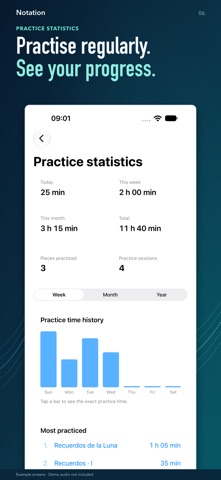
KEEP TRACK OF YOUR PRACTICE See how long you have practiced and which pieces you have worked on. Weekly, monthly and yearly views show your practice history. Select today or a previous practice day in the calendar to explore its details.
CONNECTED ON IPAD AND IPHONE Sync your library data through iCloud across devices using the same Apple Account. PDF and audio files are stored in iCloud Drive. Content already available on your device can also be used without an internet connection.
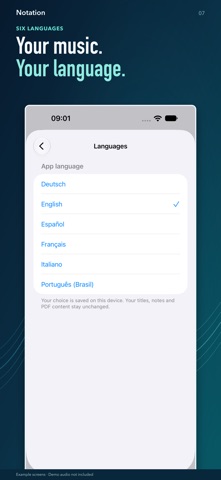
A short interactive introduction helps you get started. Notation is available in German, English, Spanish, French, Italian and Portuguese (Brazil).
START FREE. EXPAND WITH PRO. Use Notation without a time limit with up to:
People rate it
Sign in to rate this app. Honest is what counts.
No ratings yet. Tried it? Be the first to rate it.
More Music and audio apps
Best new Music and audio apps this week KlingKlang – Control de AudioKlingKlang reúne todas las salas de tu sistema Sonos en una sola pantalla
 MonandaegMōnandæg is two field recorders that cannot leave anything alone
 Yul — Gugak Tuner & JangdanA tuner and rhythm trainer built for Korean traditional instruments
 MusiquitosMusiquitos es una app de música para niños con treinta canciones para cantar, bailar y…
 Harmonious: Microtonal musicHarmonious is a microtonal ambient instrument
 RitLoop: Slow Downer & LoopsStudy, practice and transcribe music by ear