
PasteFlow: Auto Input Message
Not claimedPasteFlow is a keyboard that remembers what you type — and types it back for you
By Nguyen Thi Thu · ProductivityWhy we expect it: A clear, privacy-respecting keyboard that solves a daily typing chore for a wide range of users.


In short
PasteFlow: Auto Input Message is a keyboard that stores frequently typed phrases, shortcuts and placeholders such as city or time, inserting them with one tap in any text field. It is aimed at freelancers, sales teams, support agents, teachers and students who type the same messages daily. It stands out for keeping the library on the device, with no account, no ads and no collection of typed text.
Summary by Debuts, based on the App Store listing.About
PasteFlow is a keyboard that remembers what you type — and types it back for you.
Stop leaving the chat to open Notes, copy a reply and paste it back in. Add PasteFlow to your keyboards, open it inside any text field, and your texts are one tap away — anywhere.
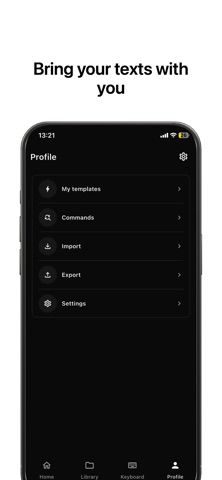
WHAT YOU GET • Quick texts — save any phrase, insert it with one tap • Scenarios — group texts for sales, support, work, personal • Shortcuts — type /hello and it expands into your full greeting • Auto replacement — fix typos and expand abbreviations while you type • Constants — {{city}}, {{address}}, {{time}}, {{clipboard}} and your own keys are filled in automatically • AI tools — rewrite, shorten, expand, change tone, translate, write a reply, summarize, turn a text into a template • Kaomoji — 1000+ faces in 10 categories • Emoji — 1600+ across 11 categories • ASCII art — turn text or a photo into monospaced art, plain or in colour • PasteFlow x N — send the same message 5, 10 or 100 times • Import & export — from Notes, CSV, Google Sheets or a JSON backup
PRIVATE BY DESIGN No account. No ads. Nothing you type is collected or analysed. Your library lives on your device and is shared only with the keyboard you installed. Full Access is what lets the keyboard read your latest texts and run the AI tools over the network; without it the keyboard keeps typing normally.
BUILT LIKE A REAL KEYBOARD Ranked suggestions and most-used ranking, a sections toolbar for texts, scenarios, kaomoji, emoji, constants, ASCII, AI and repeats, 130+ layout languages, sound and haptic feedback, adjustable height, key size and text scale, light and dark themes in black, white and grey.
WHO IT IS FOR Freelancers, sales teams, support agents, online sellers, teachers, students — anyone who types the same things every day.
HOW IT WORKS 1. Settings ▸ General ▸ Keyboard ▸ Keyboards ▸ Add New Keyboard ▸ PasteFlow 2. Save the texts you repeat 3. Tap them from the keyboard, in any app
Type once. Never again.
Privacy Policy : https://docs.google.com/document/d/1Pp4PWp9PfB2xC8QqcBCuY7qdNLIGEvU1zvFNewwxwA0/edit?usp=share_link Terms Of Service : https://docs.google.com/document/d/1K_lM-K9ejyUxG62gKD5_cqZtVylaKbs67sNbMJRTKXk/edit?usp=share_link
People rate it
Sign in to rate this app. Honest is what counts.
No ratings yet. Tried it? Be the first to rate it.
More Productivity apps
Best new Productivity apps this week ChickMark: Habit TrackerChickMark is a simple habit tracker for routines, goals, and reminders
 Dayflint: One Thing a DayToo many priorities?
- BeginAnywayMorning alarm for hard tasks: set one task, prove you started, build a streak
 DHUDEDHUDE Analityxs es la herramienta de gestión diaria para grupos de restauración y ocio…
 Intent - Scroll by ChoiceTake back control of your screen time
 Whisperly DictationWhisperly turns your voice into clean text