
PulseO2: Blood Oxygen Tracker
Not claimedYour Blood Oxygen
By Get Happy, LLC · Health and fitness




In short
PulseO2: Blood Oxygen Tracker shows Apple Watch blood oxygen readings on the watch face, in the app, and on iPhone widgets. It is aimed at Apple Watch owners who want to see their readings at a glance, including overnight summaries and trends over 24 hours to 90 days. One standout point is that in the US, where results otherwise stay in the iPhone Health app, it sends new readings to the watch automatically.
Summary by Debuts, based on the App Store listing.About
Your Blood Oxygen. Back on your wrist.
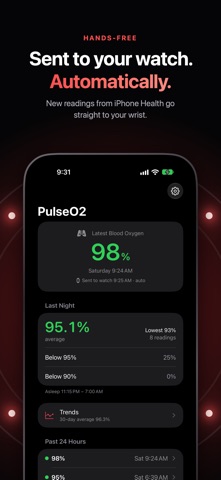
Your Apple Watch measures your blood oxygen throughout the day and night. PulseO2 puts those readings where you can see them at a glance: on your watch face, in the app, and on your iPhone. In the US, where Blood Oxygen results appear only in the Health app on iPhone, PulseO2 brings every new reading back to your wrist automatically.
ONE PRICE. ONE TIME. EVERYTHING INCLUDED. Buy PulseO2 once and every feature is yours. No subscriptions, no in-app purchases, no tip jars, no premium tier, and no ads. Every chart, every complication, every widget, and every future update is included.
ON YOUR WATCH FACE • Circular, corner, and inline complications with your latest reading on a color-coded gauge • A large complication with your choice of trend: 24 hours, 7 days, or 30 days • Add more than one to see today and the past month side by side • Readings dim once they're more than 4 hours old, so you always know how current they are
ON APPLE WATCH • Your latest reading, last night, and the past 24 hours • A 24-hour graph with today's average so far • Today, yesterday, 7-day, and 30-day averages with time-in-range bars, plus a 7-day chart
WAKE UP TO LAST NIGHT • Your overnight average and lowest reading • How much of the night was below 95% and below 90% • Uses your sleep times from Health, or 10 PM to 8 AM if you don't track sleep • A morning notification sums up your night
SEE THE BIGGER PICTURE • Trends for 24 hours, 7 days, 30 days, and 90 days • Each day's average, low, and high, and how your average compares with the period before • Day vs. night: your readings while asleep and awake, side by side • Time in range: 95% and above, 90–94%, and below 90% • Readings per day, and the times of day your watch measured
EVERY READING IN CONTEXT • Tap any reading to see its level, where it fell within its day, and how it compares with readings taken around the same time on other days
LOW OXYGEN ALERTS • Optional notifications when a reading falls below a level you choose
ON IPHONE • Home Screen and Lock Screen widgets for your latest reading • A 7-day trend widget in small and medium sizes • Built-in questions and answers
AUTOMATIC New readings reach your watch on their own. In the US, they're sent from your iPhone as it saves them to Health; iOS protects Health data while your iPhone is locked, so readings taken overnight reach your watch shortly after you unlock your iPhone in the morning.
PRIVATE BY DESIGN No account. No ads. No tracking. PulseO2 makes no network connections. Your readings go only from your iPhone to your own Apple Watch.
People rate it
Sign in to rate this app. Honest is what counts.
No ratings yet. Tried it? Be the first to rate it.
More Health and fitness apps
Best new Health and fitness apps this week Orbit: Self-Care Habit TrackerYour healthy choices deserve more than a checkmark
 Wellbeing: Digital WellbeingBillions of people spend more time scrolling than they want to
 Nuchronic: Energy & SymptomsTrack your energy and symptoms in seconds
 Drrreong - Sleep RecorderWhat did your night sound like?
 Galim - Mood DiaryGalim ("waves" in Hebrew) is a calm, simple daily mood diary built for people living…
 Kuida+ Rotina de SaúdeKuida+ helps you take care of your health and the health of the people you love…