
RenameKing
Not claimedRenameKing renames many files and folders at once
By Tsuyoshi Ishimaru · Utilities



About
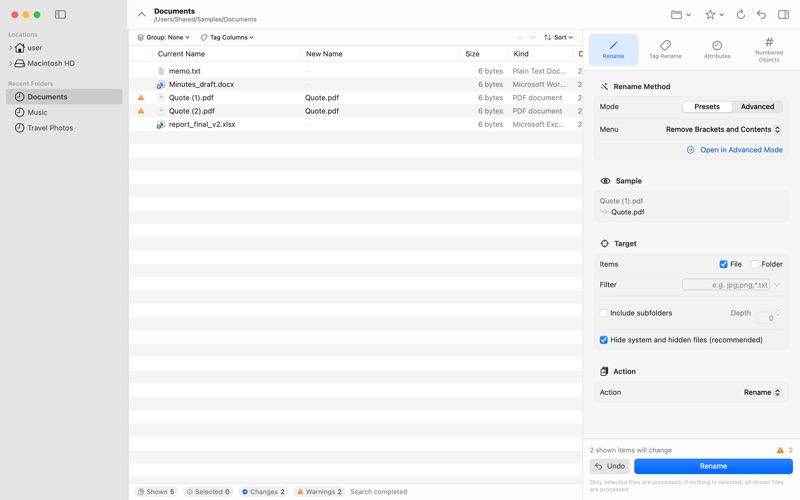
RenameKing renames many files and folders at once. Every new name is shown in a list before anything changes, and names that would collide are flagged in advance — so you can work with confidence.
PRESETS — JUST PICK AND GO Add numbers or dates, remove or replace text, change letter case or character width, change extensions and more, simply by choosing from a menu.
ADVANCED RENAMING Rearrange any part of a name with wildcards, regular expressions or character translation. Combine sequence numbers, dates, folder names, file sizes and more. Save your favorite settings as presets.
TAG RENAME Use information stored inside your files: the date and camera model of photos, song titles, artists and albums, and the titles of Word, Excel and PDF documents.
SORT INTO FOLDERS Automatically create folders by date (such as “2026-08”) or by artist and album, and move files into them. You can also move or copy files to another folder while renaming.
DATES AND ATTRIBUTES Change modification and creation dates in bulk — set, shift or match them. Lock or hide files too.
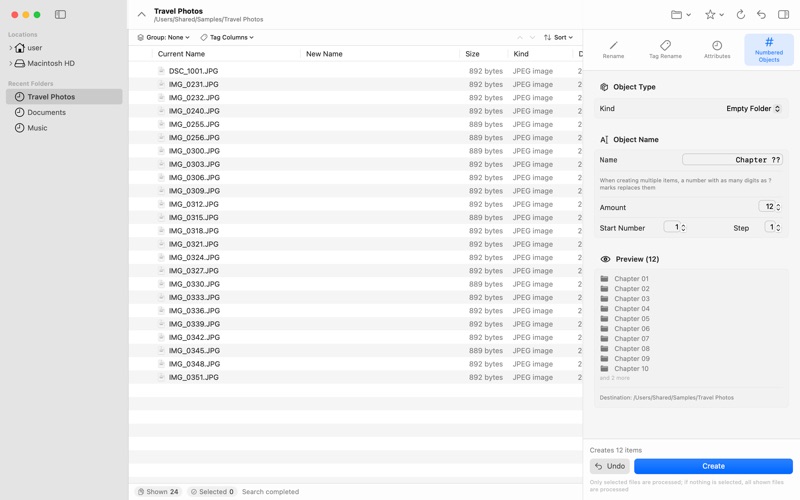
CREATE NUMBERED FOLDERS AND FILES Create numbered folders or files, such as “Chapter 01” to “Chapter 12”, in one step.
WORK SAFELY • Preview every new name before running • Get warned about name conflicts in advance • Undo the last operation — even after quitting the app
ALSO • Open files from the Finder’s Control-click menu • Write your own conversions with JavaScript • Available in 10 languages: English, Japanese, Chinese (Simplified and Traditional), Korean, German, French, Spanish, Italian and Portuguese
Note: The first time you use RenameKing, you’ll be asked to allow access to the folders you want to rename.
People rate it
Sign in to rate this app. Honest is what counts.
No ratings yet. Tried it? Be the first to rate it.