
RipRoll: Fun Photo Cleaner
Not claimedCleaning up your photos doesn't have to be a chore
By jiashuo zhang · Photo and video



In short
RipRoll: Fun Photo Cleaner is a photo-video app for clearing a camera roll by swiping photos up to keep or down to destroy them with tools such as a shredder, fire pit, or acid bath. Deleted photos are only removed after a confirmation step and remain in Recently Deleted for about 30 days. Each tool has recorded sound and its own haptic pattern on iPhone.
Summary by Debuts, based on the App Store listing.About
Cleaning up your photos doesn't have to be a chore. RipRoll is a new, more fun way to clear your camera roll: swipe a photo up to keep it, or down to shred it, burn it or tear it apart with your finger. Every tool has real recorded sound and its own haptics, so you feel every shred, rip and smash in your hand.
FEEL EVERY RIP On iPhone, each tool has its own haptic pattern, timed to its sound. • Shredder: the motor hums, the blades bite with a jolt, then a dense chewing buzz rises and falls as the photo goes through. • Tear: the grain follows your finger. Rip slowly for a sparse crackle, fast for a dense rip, and feel the snap when a piece comes free. • Crumple: feel the paper as you rub it, a squeeze when it balls up, a knock off the rim and a heavy thump when it lands in the wastebasket. • Smash: each knock is a heavy hit with a glassy shiver, harder when you knock harder on the back of your phone. The third one shatters the glass with the strongest jolt of all. • Lighter, Fire Pit and Acid Bath: the lighter clicks on and throbs only while the flame is burning the photo, the fire rumbles and crackles, and the acid bubbles in waves that speed up. Drag a photo toward the Shredder, Fire Pit or Acid Bath and the buzz grows the deeper you go. Pick Light, Standard or Strong, or turn haptics off, in Settings.
HOW IT WORKS • Swipe up to keep: the photo slides into the Keep folder at the top. Your library isn't changed. • Swipe down to destroy: pick a tool at the bottom. The photo goes to the To Delete list. Nothing is deleted yet, and you can undo from the banner. • Confirm once: review To Delete, put back anything you want to keep and delete the whole batch in one step. iOS asks you to confirm too, and deleted items go to Photos → Recently Deleted, where you can recover them for about 30 days.
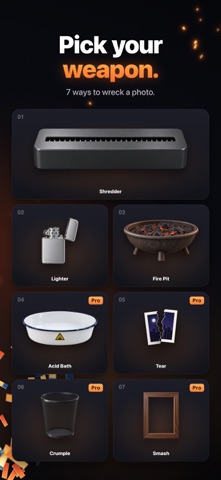
SEVEN TOOLS • Shredder: hear a real cross-cut shredder chew it into confetti. • Lighter: drag the flame onto the photo and burn wherever you like. • Fire Pit: watch it burn to ash from the bottom up. • Acid Bath: it yellows, sinks and dissolves. • Tear: the rip follows your finger, white paper edge and all. • Crumple: crumple it into a ball and toss it into the wastebasket. • Smash: tap the glass, or knock on the back of your phone, to smash the frame.
SORT FASTER • Pick a scope: all photos, the last 30 days, screenshots, videos or a single year. • Smart Groups: Bursts & Similar, Long Videos, Live Photos and Possibly Blurry (scanned on device). • Select up to 20 at once and send them to the Shredder, Fire Pit or Acid Bath. • Works with iCloud Photos, Live Photos and videos. • See how much space a batch will free before you confirm. • Stats & achievements, a daily reminder, short clips of the moment to share, and a Home Screen widget (iOS 17 or later).
YOUR PHOTOS STAY ON YOUR PHONE Sorting, the blur scan and your history stay on your device. RipRoll never uploads your photos. No account, no ads, no analytics.
RIPROLL PRO The Shredder, Lighter and Fire Pit, plus every sorting feature, are free with no limits. RipRoll Pro is a one-time purchase that unlocks Acid Bath, Tear, Crumple, Smash and every future tool. No subscription, and Family Sharing is supported. Before you buy, the four Pro tools come with 20 free tries, shared between them.
Questions? Write to support@riproll.app
People rate it
Sign in to rate this app. Honest is what counts.
No ratings yet. Tried it? Be the first to rate it.
More Photo and video apps
Best new Photo and video apps this week Zoetrope ViewerWatch your zoetrope records and slipmats animate through your camera, or live on your…
 Migumento · QR photo albumOne album for every guest
 SwipeshineSwipeshine turns photo cleanup into one gesture
 Pocket Film: Vintage CameraPocket Film turns your phone into the back of a real film camera
 PlanIt Earth: VR Photo PlannerFor landscape, travel, nature, cityscape, night, time-lapse, star-trail, Milky Way and…
 TonalierYour photos now have an editor