
Spreadsheet: XLSX & CSV Editor
Not claimedSpreadsheet lets you open, edit and save spreadsheets on your phone
By YOU SEUNGMIN · ProductivityWhy we expect it: Clear, practical value for a common need, with careful handling of original files, no account required, and a well-organized feature description.




In short
Spreadsheet: XLSX & CSV Editor lets people open, edit and save XLSX, CSV and other spreadsheet files on a phone, with no account or sign-in. It offers more than 120 formulas, sorting, filtering and a card view for editing one row as a form. One notable point is that charts, pictures, pivot tables and macros stay in the file when it is saved.
Summary by Debuts, based on the App Store listing.About
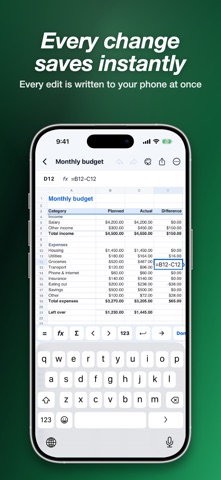
Spreadsheet lets you open, edit and save spreadsheets on your phone. Open XLSX and CSV files from the Files app or another app, change a cell and the change is saved right away. No account, no sign-in.
OPEN AND SAVE YOUR FILES • Open XLSX, XLSM, XLS, ODS, CSV and TSV files. • XLSX, XLSM and CSV files opened from the Files app are saved back to the same file when you leave. XLS and ODS files are saved as XLSX. • Parts this app does not show yet, such as charts, pictures, pivot tables, macros and comments, stay in the file when you save. • If saving would change something in the original, the app keeps your edits here and tells you what would change, instead of overwriting. • Every edit is written to your phone as you make it. Revert to the original file at any time.
FORMULAS • More than 120 functions: SUM, AVERAGE, IF, IFERROR, SUMIFS, COUNTIFS, VLOOKUP, XLOOKUP, INDEX, MATCH, dates, text and loan payments. • A key bar above the keyboard with =, functions, AutoSum and a Next cell key. • Function names are suggested as you type.
SORT, FILTER AND FIND • Sort A to Z or Z to A, and filter any column by its values. • Find and replace across one sheet or all sheets. • Freeze panes, merge cells, hide rows and columns, change widths and heights. • Add, rename, move and hide sheets.
MADE FOR A PHONE SCREEN • Card view: edit one row as a simple form, with the header row as labels. • Select cells to see their sum, average, count, minimum and maximum. Tap a value to copy it. • Pinch to zoom and scroll smoothly through large sheets.
FORMAT • Bold, italic, underline, text and fill colors, alignment, wrap text and borders. • Number formats: currency, percent, date, time and more.
TEMPLATES Start from a budget, expense tracker, invoice, inventory, to-do list or attendance sheet.
SHARE AND PRINT • Export as XLSX, CSV (choose the delimiter and encoding) or PDF. • Print from your phone.
FREE WITH ADS, OR PREMIUM Spreadsheet is free with ads, and there are no ads while you edit. Spreadsheet Premium removes all ads. Choose a monthly subscription or a one-time lifetime purchase.
Privacy Policy: https://dsm0829.github.io/spreadsheet-privacy/ Terms of Use: https://www.apple.com/legal/internet-services/itunes/dev/stdeula/
People rate it
Sign in to rate this app. Honest is what counts.
No ratings yet. Tried it? Be the first to rate it.
More Productivity apps
Best new Productivity apps this week ChickMark: Habit TrackerChickMark is a simple habit tracker for routines, goals, and reminders
 Dayflint: One Thing a DayToo many priorities?
 Snappy Do ItSix connected modes. One traceable journey.
 Fristo CAFMFristo is the app for Fristo CAFM, the facility management software
- BeginAnywayMorning alarm for hard tasks: set one task, prove you started, build a streak
 DHUDEDHUDE Analityxs es la herramienta de gestión diaria para grupos de restauración y ocio…