
Sunscroll: Screen Time Control
Not claimedSunscroll is the cute, gentle screen time app and app blocker for iPhone
By Roman Hadiiev · ProductivityWhy we expect it: Thoughtful, gentle screen time concept with a clear pause feature and a polished, detailed description for a free iPhone app.





In short
Sunscroll: Screen Time Control is a productivity app for iPhone that blocks chosen apps like Instagram, TikTok and YouTube with one shared daily limit. When time runs out, a short pause (breathing, a quick sum or a mini game) comes before an app opens. Its distinctive touch is a pastel, picture-book sun that shows remaining time and avoids guilt or punishment.
Summary by Debuts, based on the App Store listing.About
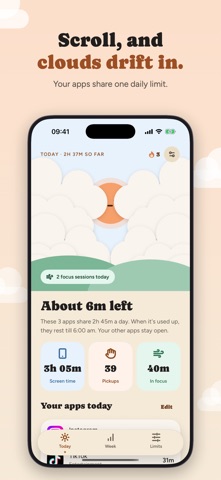
Sunscroll is the cute, gentle screen time app and app blocker for iPhone. A friendly sun helps you stop doomscrolling Instagram, TikTok, YouTube or any app you choose, with no guilt, no shame and no punishment. Give the apps that eat your day one daily limit: as you scroll, clouds drift over the sun in a pastel sky, and when the time is up, your apps rest until morning.
Sunscreen for your scrolling.
LOOKING FOR A SCREEN TIME APP THAT DOESN'T MAKE YOU FEEL GUILTY? That's exactly what Sunscroll is made for. No red alarms, no lectures, no shaming when you go over. The sun teases itself and your apps, never you. Kind limits, made to be kept.
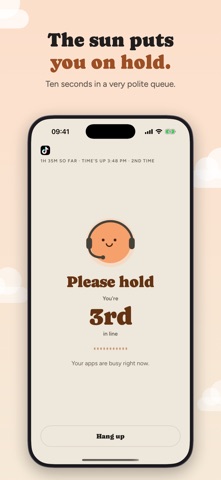
WANT A PAUSE INSTEAD OF A HARD BLOCK? When your time is up and you need an app anyway, the sun asks for one small thing first: three slow breaths, a quick sum, or one of six tiny games. Where's the sun? Please hold. Not a robot. Count the clouds. Blow the cloud away. Talk me into it. Then choose 5, 10 or 30 minutes. A mindful pause made to break the autopilot, without locking you out of your own phone, as often as you need it.
LOVE CUTE APPS? Sunscroll is drawn like a picture book: a pastel sky, a smiling sun mascot that reacts when you tap it, and a sleepy moon at night. Cozy enough to open on purpose.
SCROLLING IN BED UNTIL 2AM? Turn on sleep mode and your apps rest from bedtime (11 pm, or the hour you pick) until 6 am. The moon keeps watch, and the same gentle pause is there if you truly need something.
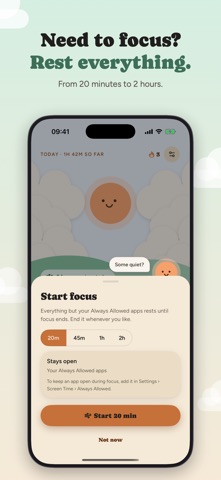
NEED TO FOCUS? Start focus: 20, 45, 60 or 120 minutes in which every app rests except the ones iOS always allows. Study, work or read, and end it whenever you like.
ONE DAILY LIMIT, NOT A SPREADSHEET Pick your apps in Apple's own picker and give them one daily limit they share. The sun always tells you, kindly, about how much is left. Your other apps stay open.
KEY FEATURES • App blocker with one shared daily limit for the apps you choose • A sun that shows how much of today's time is left • A mindful pause before apps open: breathing exercise, a quick sum or a mini game • Focus sessions from 20 minutes to 2 hours • Sleep mode for bedtime scrolling • Screen time, pickups and minutes per app, straight from Screen Time • The apps outside your limit that took the most time today • Your week at a glance, and a streak for the days that count • In English, Spanish, Portuguese, French, German, Indonesian, Turkish, Russian and Ukrainian • No account, no ads, no tracking
PRIVATE BY DESIGN Your Screen Time data stays on your iPhone. Sunscroll can't even see which apps you picked: iOS hands it anonymous tokens.
SUBSCRIPTION Sunscroll is free to download and needs a subscription to use: yearly, with a free trial for new subscribers, or monthly. Payment is charged to your Apple Account when you confirm the purchase. The subscription renews automatically unless it is cancelled at least 24 hours before the end of the current period, and the renewal is charged within 24 hours before that end. Manage or cancel it in your Apple Account settings. Any unused part of a free trial ends when you subscribe.
Terms of Use: https://www.apple.com/legal/internet-services/itunes/dev/stdeula/ Privacy Policy: https://forappssake.studio/sunscroll/privacy
People rate it
Sign in to rate this app. Honest is what counts.
No ratings yet. Tried it? Be the first to rate it.
More Productivity apps
Best new Productivity apps this week ChickMark: Habit TrackerChickMark is a simple habit tracker for routines, goals, and reminders
 Dayflint: One Thing a DayToo many priorities?
- BeginAnywayMorning alarm for hard tasks: set one task, prove you started, build a streak
 DHUDEDHUDE Analityxs es la herramienta de gestión diaria para grupos de restauración y ocio…
 Intent - Scroll by ChoiceTake back control of your screen time
 Whisperly DictationWhisperly turns your voice into clean text