
VertiCut
Not claimedTurn landscape footage into vertical video
By kou works · Photo and videoWhy we expect it: The description clearly explains a useful landscape-to-vertical workflow, with thoughtful privacy promises and a fair free tier.

In short
VertiCut turns landscape (16:9) footage into 9:16 vertical video, automatically following a person you tap on the first frame. It is for iPhone users who want to reframe clips without a computer or editing software. Tracking, face detection and export all run on the device, and the audio and colors are carried over from the original.
Summary by Debuts, based on the App Store listing.About
Turn landscape footage into vertical video.
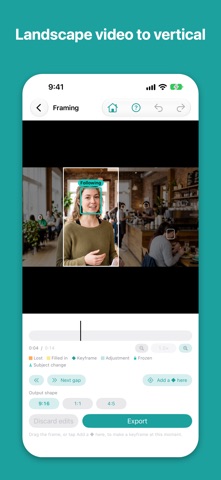
VertiCut cuts a 9:16 vertical video out of footage shot in landscape (16:9), following your subject automatically as it crops. No computer, no editing software — just your iPhone.
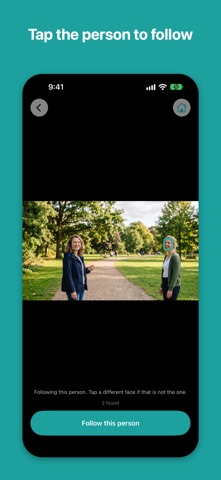
TAP A PERSON, AND IT FOLLOWS THEM Tap the person to follow on the first frame. VertiCut analyzes the whole clip and moves the vertical frame to keep them centered. The movement is smoothed, so small jitters in the face don't become a shaky picture.
FIX WHAT THE AUTOMATIC TRACKING MISSES • Add a ◆ (keyframe) on the timeline and drag the frame to change what's in shot • Switch to a different person partway through • “Freeze up to the next ◆” holds the framing still over a stretch • Stretches the tracking had to estimate are marked on the timeline, one tap away • Pinch to zoom the timeline; undo and redo as you go
EXPORTED AS THE ORIGINAL • Colors stay as they were in the original video • The original audio tracks are carried over as they are • Resolution is capped at the original's — nothing is upscaled • Save the result to Photos
YOUR VIDEO NEVER LEAVES YOUR DEVICE Face detection, tracking and export all happen on your iPhone. Nothing about your video or the faces in it is sent anywhere, and there is no account. No analytics, no ads.
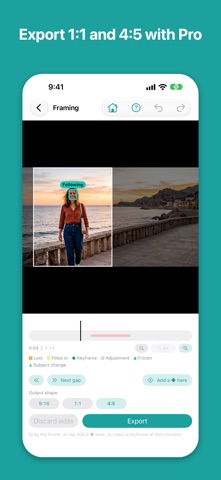
FREE AND PRO The free version includes all of the automatic tracking, person switching, keyframes and freezing. It has three limits, and only three: • Videos up to 1 minute • 9:16 output • A watermark on exported videos
Pro is a one-time purchase, not a subscription. It removes the length limit, adds 1:1 and 4:5 output, and removes the watermark.
Requires an iPhone with iOS 17 or later.
People rate it
Sign in to rate this app. Honest is what counts.
No ratings yet. Tried it? Be the first to rate it.
More Photo and video apps
Best new Photo and video apps this week Zoetrope ViewerWatch your zoetrope records and slipmats animate through your camera, or live on your…
 Migumento · QR photo albumOne album for every guest
 SwipeshineSwipeshine turns photo cleanup into one gesture
 Pocket Film: Vintage CameraPocket Film turns your phone into the back of a real film camera
 PlanIt Earth: VR Photo PlannerFor landscape, travel, nature, cityscape, night, time-lapse, star-trail, Milky Way and…
 TonalierYour photos now have an editor