
VideoSqueezer: Compress Videos
Not claimedYour iPhone is full of video
By Igor Kunin · Photo and video



In short
VideoSqueezer: Compress Videos is an iPhone app that finds the largest videos in your library and shrinks them on the device, with a preview of the new size before any encoding happens. It is aimed at people clearing out storage, and it can queue many clips, pause and resume, and keep working with the screen dimmed. Clips up to 60 seconds are free, and nothing is uploaded.
Summary by Debuts, based on the App Store listing.About
Your iPhone is full of video. VideoSqueezer finds the clips taking up the most space, makes them dramatically smaller while keeping them looking the way you shot them, and gives you the space back — all on your device.
No uploads, no ads, no account. Clips up to 60 seconds are free, forever.
FIND THE GIGABYTES Space Radar scans your whole library and ranks every video by how much space it would give back. The biggest wins come first — usually a handful of forgotten 4K clips.
SEE IT BEFORE YOU COMMIT • The new size of every video, forecast before anything is encoded • Before and after on the same frame: drag to compare, hold to magnify • Maximum Quality, Balanced, Small or Smallest — or fit a specific size for email or a messaging app
GET THE SPACE BACK, SAFELY • History shows the space you actually freed, kept apart from space you merely could • Originals from Photos wait in Recently Deleted for 30 days; originals from Files are held where you can put them back • Resolution, frame rate, HDR, date and location are kept
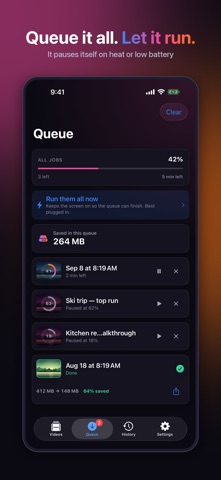
BUILT FOR THE BIG CLEAR-OUT • Queue dozens of videos, with progress, time left, pause and resume • Leave it running: a screen that keeps the queue going, dims to a single line, and stops itself if the phone gets warm or the battery runs low • Progress on the Lock Screen and in the Dynamic Island • Survives interruption: a crash or force-quit costs at most ten seconds of work • Edit in bulk: one preset, crop shape or destination for every video at once
EVERYTHING ELSE YOU WOULD WANT • Trim and crop: 1:1, 16:9, 9:16, 4:3 or free • Efficient HEVC by default, and two-pass encoding when quality matters most • HDR handled properly: keep it, convert a copy for sharing, or both • Import from Photos, Files, iCloud Drive or the share sheet • Shortcuts and Siri • Locks with Face ID or Touch ID while the queue keeps running • A desktop-style queue on iPad, and it runs on a Mac with Apple silicon
FREE AND PAID Clips up to 60 seconds are free at every quality setting — not a watered-down demo. Unlock videos of any length with a single purchase, or yearly if you prefer. No weekly subscription, no ads, no account.
PRIVACY Nothing leaves your device. There is no analytics, no tracking and no server of ours: every video is read, encoded and written on your iPhone.
Requires iOS 17, or macOS 14 on a Mac with Apple silicon.
Terms of Use: https://www.apple.com/legal/internet-services/itunes/dev/stdeula/
People rate it
Sign in to rate this app. Honest is what counts.
No ratings yet. Tried it? Be the first to rate it.
More Photo and video apps
Best new Photo and video apps this week Zoetrope ViewerWatch your zoetrope records and slipmats animate through your camera, or live on your…
 Migumento · QR photo albumOne album for every guest
- ScreenLux: Live Wallpapers 4KLive wallpapers for iPhone and 4K video wallpapers for Android
 Vinette: Sticker JournalFor the person who finds rest in decorating
 IROZOUIROZOU is a color workspace made for designers: fashion, textile, graphic and product…
 SwipeshineSwipeshine turns photo cleanup into one gesture