
BeadPattern
Ikke gjort krav påMake a bead pattern from your own photo, adjust the details, and follow your progress as…
Af 健 熊 · Foto og video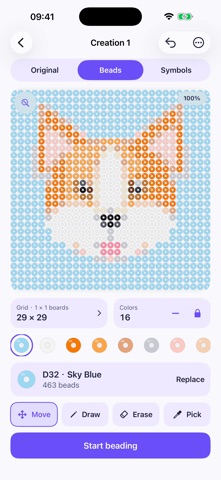


Kort fortalt
BeadPattern turns your own photo into a bead pattern, with tools to crop, recolor, and edit bead by bead. It is aimed at people who make bead projects and want to track their work by row or color, with material counts included. One detail that stands out is that the free version covers single boards up to 29 × 29 beads, while Pro adds larger multi-board layouts and PDF and CSV exports.
Resumé fra Debuts, baseret på app-siden i App Store.Om appen
Make a bead pattern from your own photo, adjust the details, and follow your progress as you build it.
BeadPattern brings photo conversion, bead-by-bead editing, material counts, and making progress into one workspace for iPhone and iPad.
START A PROJECT Choose a photo, crop or rotate it, and try different background options. View the original image, bead preview, or symbol pattern to check your design.
REFINE THE DETAILS Paint, erase, pick a color, replace colors, and undo changes. Keep saved versions so you can return to an earlier design.
MAKE IT AT YOUR PACE See how many beads you need and follow your work by row or color. Save your progress and come back when you are ready.
FREE TO START Create single-board patterns up to 29 × 29 beads with 8, 12, or 16 colors. Use your own photos, edit and save projects, track progress, and share PNG images without a watermark. Local project storage, themes, and all supported app languages are included.
BEADPATTERN PRO Unlock larger layouts up to 3 × 3 boards (87 × 87 beads), 24- and 32-color patterns, PDF pattern exports, tiled printing, and CSV material lists with one lifetime in-app purchase. No subscription.
Your existing saved projects remain accessible without Pro, including after a refund. New projects, increases in pattern specifications, and advanced exports follow the current Free or Pro limits. The app shows the purchase price in your App Store currency.
CHOOSE YOUR LANGUAGE English is the default. Switch within the app to Simplified Chinese, Traditional Chinese, Japanese, Korean, German, or French.
PALETTE AND PRINTING NOTE The current version uses a demonstration palette, not a verified bead manufacturer's color catalog. Check colors against the beads you intend to use. When printing at actual size, print a calibration page and check the scale against your own board before starting a project.
Brugernes bedømmelse
Log ind for at bedømme appen. Det vigtigste er, at du er ærlig.
Ingen bedømmelser endnu. Har du prøvet den? Giv den første bedømmelse.
Flere apps i kategorien Foto og video
De bedste nye apps i kategorien Foto og video denne uge Zoetrope ViewerWatch your zoetrope records and slipmats animate through your camera, or live on your…
 Migumento · QR photo albumOne album for every guest
 SwipeshineSwipeshine turns photo cleanup into one gesture
 Pocket Film: Vintage CameraPocket Film turns your phone into the back of a real film camera
 PlanIt Earth: VR Photo PlannerFor landscape, travel, nature, cityscape, night, time-lapse, star-trail, Milky Way and…
 TonalierYour photos now have an editor