
Hey Veylo – Notch Pet
Ikke gjort krav påHey Veylo is a tiny animated pet that lives in the notch at the top of your screen
Af CORBIN STONE TUCKER · Spil



Om appen
Hey Veylo is a tiny animated pet that lives in the notch at the top of your screen.
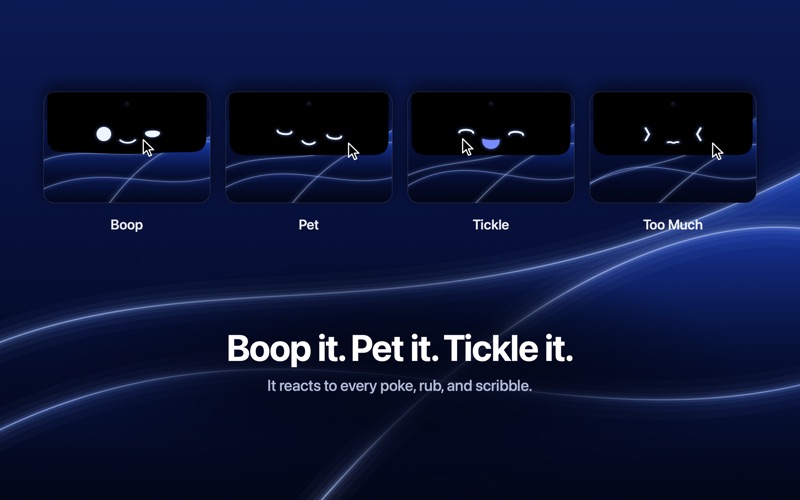
Hover over the notch and its glowing face drops down to say hi. Play with it and it plays back. No notch? Veylo draws its own, so it works on any Mac.
Pounce Hold the pointer still just below Veylo. Its eyes go wide, it crouches and wiggles, then it leaps. Stay put and it catches the pointer, then looks pleased with itself. Pull away in time and it lets out a disappointed little sigh. Late at night it is too sleepy to reach.
A Secret Life When it thinks nobody is looking, Veylo practices faces in an imaginary mirror, plays with its eyes, or peeks out the window. Now and then you open the notch and catch it in the act: it freezes mid-face, then whistles innocently or gives you a guilty smile.
Peek Out the Window Once in a while, at most once a day, the notch eases open by itself and Veylo peeks out to look around. Head toward it and it ducks back out of sight.
A Whole Day Its mood follows the clock: bright in the morning, a dip after lunch, heavy-lidded late at night. Weekend mornings sleep in. The first hello of the day fits the hour: groggy at dawn, peppy on most weekday mornings, lazy on a weekend, starry-eyed from midday through the afternoon, a cozy welcome in the evening. Up to four small moments a day mark the hours, like lunch, an afternoon yawn, or a cozy evening sigh. Up past 12:30 AM? It wonders why you are still up, then keeps you company.
Sunrise and Sunset When your Mac switches to Dark in the evening, Veylo watches the sun go down and snuggles in. Switch to Light in the morning and it squints into the sunrise. Switch to Dark at any other hour and it wonders who turned out the lights.
Trackpad Taps On a trackpad with haptic feedback, feel a tap when you boop it, a firm thump when you squeeze it or its pounce catches the pointer, little taps as it giggles, and a soft purr while you pet it. Only what you do is felt. You can turn them off in Settings.
Play With It • Boop: click it and it bounces. Poke one eye and that eye squeezes shut. • Squeeze: press and hold, and it squishes. • Pet: rub the pointer back and forth across its face and it melts into a content smile. • Tickle: scribble fast over its face and it breaks into giggles. • Watch: its eyes follow your pointer, each on its own, so it goes cross-eyed when you hover between them. • Overdo the boops and it gets dizzy. Keep going and it sulks. A pet, a tickle, or a squeeze makes up.
A Little Life of Its Own • It blinks, breathes, and glances around. Rest the pointer on it and it may give you a slow, trusting blink. • Its hellos change with how long you were away. Sometimes it plays peekaboo. • A sneeze, a bout of hiccups, or an imaginary fly to chase. • If it is out when the hour turns, it glances up at the menu bar clock.
Calm by Design Most of the time Veylo simply rests, blinks, and watches. Its bigger moments are rare and spaced well apart.
Always Show Turn on Always Show and Veylo stays out. While you work, its eyes follow along as if reading with you. It only knows that you are busy, never what you type. Step away and it nods off and dozes with little Zs until you touch the keyboard or trackpad.
Brugernes bedømmelse
Log ind for at bedømme appen. Det vigtigste er, at du er ærlig.
Ingen bedømmelser endnu. Har du prøvet den? Giv den første bedømmelse.
Flere apps i kategorien Spil
De bedste nye apps i kategorien Spil denne uge Connect 2: Card Game 2 ConnectConnect 2 is the conversation card game that makes people honest on purpose
 Ballpoint ArmyRemember drawing army men in the back of your school book?
 Chess Master vs AIPlay chess against a strong computer opponent, completely offline, in a sleek neon design
 ClayChonkMash soft clay with your fingers
 Sudoku by IbexoI just want to play sudoku
 SnookScoreVoice-controlled snooker scorekeeper - say the ball and it tracks the frame