
Isopxl: Low Poly Modeling
Ikke gjort krav påTurn low-poly 3d models into pixel sprites, right on your iPhone and iPad
Af SHAYNE YOSHIHIRO KASAI · Foto og videoDerfor forventer vi det: A clear niche tool with a well-explained workflow, strong export options, and a broad audience of pixel artists and indie game developers.



Kort fortalt
Isopxl: Low Poly Modeling lets users build low-poly 3D models on iPhone and iPad, paint pixels on their surfaces, and export them as transparent PNG sprites from isometric, top-down, or side views. It suits makers of assets for pixel-art games. One standout feature is OBJ export with textures for use in Blender and other 3D tools.
Resumé fra Debuts, baseret på app-siden i App Store.Om appen
Turn low-poly 3d models into pixel sprites, right on your iPhone and iPad.
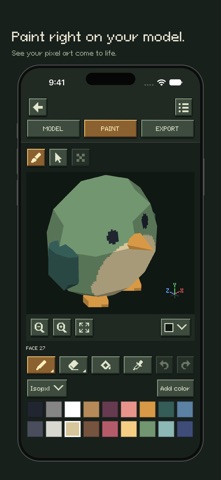
Isopxl lets you build characters, props, and buildings, paint pixels directly on their surfaces, and export them from multiple directions. Make assets for isometric worlds, top-down adventures, and side-scrolling games, or export a textured 3D model for use in other tools.
BUILD YOUR MODEL
Start with a cube, wedge, cylinder, cone, UV sphere, or icosphere. Move, rotate, scale, extrude, and subdivide to shape your creation.
Edit individual faces, points, or whole parts. Use axis controls for precise adjustments, duplicate parts, and experiment with undo and redo.
PAINT PIXELS ON EVERY SURFACE
Paint directly on your model, or open an individual face on a flat canvas for detailed pixel work.
Use pencil, line, circle, fill, eraser, and color picker tools. Keep surface pixels a consistent size across your model.
Choose a built-in palette, create your own colors, or import palettes from the Lospec website.
ONE MODEL, MULTIPLE SPRITE VIEWS
Choose Isometric, Top-down, or Side-view. Preview 4, 8, or 16 directions, then export one view or several as separate transparent PNG files.
Fit each sprite inside a 16×16, 32×32, 64×64, or 128×128 image, or use a fixed number of pixels per tile to keep characters, props, and buildings at the same scale.
Brugernes bedømmelse
Log ind for at bedømme appen. Det vigtigste er, at du er ærlig.
Ingen bedømmelser endnu. Har du prøvet den? Giv den første bedømmelse.
Flere apps i kategorien Foto og video
De bedste nye apps i kategorien Foto og video denne uge Zoetrope ViewerWatch your zoetrope records and slipmats animate through your camera, or live on your…
 Migumento · QR photo albumOne album for every guest
- ScreenLux: Live Wallpapers 4KLive wallpapers for iPhone and 4K video wallpapers for Android
 Saint Studios - Video EditorSaint Studios is a professional video editor built for creators who want to get the most…
 Ashigrain: Film EmulationAshigrain gives your videos and photos the colour, grain and glow of motion picture and…
 AstrowetterIs tonight worth setting up for – and from when to when?