
PhotoColor: Coloring Book
Ikke gjort krav påTurn any photo into a coloring page, then color it right on your iPhone or iPad
Af GREITAS KODAS, MB · SpilDerfor forventer vi det: A clear, well-written listing that turns any photo into a colorable page with strong privacy promises.




Kort fortalt
PhotoColor: Coloring Book turns any photo into a coloring page with clean, closed shapes that fill with a single tap. It suits children and adults alike, with nine drawing styles and a library of 600 ready-made pages. It stands out for processing everything on the device, with no account, ads or tracking.
Resumé fra Debuts, baseret på app-siden i App Store.Om appen
Turn any photo into a coloring page, then color it right on your iPhone or iPad.
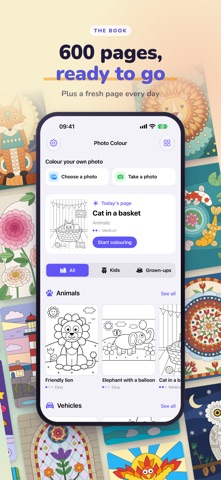
Pick a picture of your dog, your kids, your garden or last summer's holiday. Photo Color traces it into clean, closed shapes, the way a printed coloring book would, so a single tap fills a shape without spilling into the next one. Choose from nine looks, from Big & Bold for a three-year-old to Pencil Sketch for a patient adult, and slide the detail up or down until it feels right.
Not in a photo mood? Open the book. 600 pages are ready to go: animals, vehicles, fantasy, scenes, mandalas, patterns, flowers, wildlife and places, plus pages for Christmas, Halloween and Easter, and a mandala maker that never runs out. There's a fresh page every day, and each one comes with suggested colors.
TAP, PAINT, FINISH • Tap a shape to fill it. The lines are walls, so nothing leaks. • Paint by hand with pen, watercolor, crayon or spray. Strokes stay inside the lines, which is exactly what small hands need. Turn it off if you'd rather go freestyle. • Apple Pencil pressure, hover preview and double-tap. • Crayon boxes of named colors: Brights, Pastels, Skin, Nature and Shades. • Peek at the original photo and borrow a color straight from it. • "Next shape" zooms to the bits you missed. • Undo, redo, pinch to zoom, and a cheer when the last shape fills.
KEEP IT • Every page saves itself as you go. • Save to Photos, share, or print the colored page with AirPrint. • Print the blank outline to color with real crayons. • Export your pages as one PDF. • Optional iCloud sync between your iPhone and iPad.
PRIVATE BY DESIGN Everything happens on your device. No account, no ads, no tracking, no analytics. Your photos are never uploaded anywhere. If you switch on iCloud sync, they go to your own iCloud, and nobody else's.
MADE FOR EVERYONE Bigger buttons and darker outlines are one switch away in Settings. It works in light and dark mode, in every orientation, and VoiceOver reads every crayon by name.
Pick a photo and start coloring.
Brugernes bedømmelse
Log ind for at bedømme appen. Det vigtigste er, at du er ærlig.
Ingen bedømmelser endnu. Har du prøvet den? Giv den første bedømmelse.
Flere apps i kategorien Spil
De bedste nye apps i kategorien Spil denne uge Connect 2: Card Game 2 ConnectConnect 2 is the conversation card game that makes people honest on purpose
 Ballpoint ArmyRemember drawing army men in the back of your school book?
 Chess Master vs AIPlay chess against a strong computer opponent, completely offline, in a sleek neon design
 ClayChonkMash soft clay with your fingers
 Sudoku by IbexoI just want to play sudoku
 Aquarium AdventuresA family-friendly mixed-reality aquarium with over 40 species