
Brush Studio
Nicht beanspruchtBrush Studio is a professional painting studio for iPad and iPhone — fast, precise and…
Von Kalidindi Bharat · Foto und VideoWarum wir das erwarten: Thorough feature set, clear one-time purchase value, and strong pro-artist appeal make this a promising debut.




Kurz gesagt
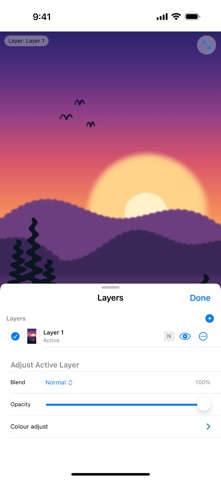
Brush Studio is a painting app for iPad and iPhone that works with Apple Pencil or a finger. It offers a custom brush engine, layers with blend modes, colour harmony tools, perspective and symmetry guides, and natural media like watercolour and oil. A single purchase unlocks everything, with no subscription, in-app purchases or ads.
Zusammenfassung von Debuts, basierend auf dem Eintrag im App Store.Info
Brush Studio is a professional painting studio for iPad and iPhone — fast, precise and completely private. Paint with Apple Pencil or your finger.
One purchase unlocks everything: no subscription, no in-app purchases, no ads.
PAINT LIKE YOU MEAN IT • A custom Metal brush engine with pressure, tilt and speed dynamics, textured shapes and grains, wet mixing and streamline smoothing • A large brush library — plus import your own brush shapes and grains • QuickShape: hold at the end of a stroke to snap to a perfect line, arc, ellipse or polygon
LAYERS THAT WORK LIKE A PRO APP • Layer masks, clipping masks, opacity and hue/saturation/brightness adjustments • 26 blend modes including Multiply, Screen, Overlay, Soft Light, Color Dodge, Hue and Luminosity • Move, scale and rotate any layer
COLOUR, THE WAY ARTISTS THINK • Colour disc, grid, sliders and hex • Harmony wheel: complementary, split complementary, analogous, triad, tetrad, square, monochromatic, tints-tones-shades, warm/cool contrast and limited palettes • Painter's (red-yellow-blue) or light (RGB) colour wheel • 24 hand-picked palettes you can add to your swatches in one tap
DRAW WITH PRECISION • Grid, isometric and 1-, 2- and 3-point perspective guides with drawing assist • Symmetry: mirror, quadrant, radial and rotational • On-canvas rulers and guide lines that strokes snap to • Physical rulers you can move and rotate with two fingers: straight edge, French curve and protractor • Thread stabilizer: the brush follows your finger on a string for perfectly smooth curves
CURVES & CLASSIC FORMS • Pen, spline, arcs, Bézier curves and shapes — stroked or filled with any brush • 30 classic curves: round, pointed, horseshoe, ogee, Tudor and trefoil arches with door and gate frames; golden and Fibonacci spirals, catenary, cycloid, egg, rose petals; foil windows, scalloped, wavy and cog rims, volutes and mouldings
NATURAL MEDIA • Watercolour, ink, gouache, acrylic, oil, soft pastel and pencil that blend, bleed and dry like the real thing
PAINT IN 3D • Import USDZ, OBJ and other 3D models and paint directly on them • Export the painted model as USDZ for AR Quick Look
FILTERS • Halftone, glitch, chromatic aberration, blur, sharpen, noise, pixelate and posterize with live preview
ANY CANVAS, ANY OUTPUT • Presets for print (A-series, US paper, at any DPI), social media, app icons and screens — or any custom size • sRGB, Display P3 and Adobe RGB working colour spaces • Export PNG, JPEG, HEIC, TIFF, PDF or layered PSD (blend modes included)
YOUR WAY • Assign two-, three- and four-finger taps to undo, redo, eyedropper, full screen and more • Your artwork autosaves and never leaves your device — no account, no tracking, no ads
Nutzer bewerten sie
Melde dich an, um diese App zu bewerten. Ehrlichkeit zählt.
Noch keine Bewertungen. Hast du die App ausprobiert? Gib die erste Bewertung ab.
Mehr Foto und Video-Apps
Die besten neuen Foto und Video-Apps dieser Woche Zoetrope ViewerWatch your zoetrope records and slipmats animate through your camera, or live on your…
 Migumento · QR photo albumOne album for every guest
- ScreenLux: Live Wallpapers 4KLive wallpapers for iPhone and 4K video wallpapers for Android
 IROZOUIROZOU is a color workspace made for designers: fashion, textile, graphic and product…
 SwipeshineSwipeshine turns photo cleanup into one gesture
 Pocket Film: Vintage CameraPocket Film turns your phone into the back of a real film camera