
HYPER FOCUS: ToDo List
Nicht beanspruchtYour to-dos are in one app, your calendar entries in another, and the thing you told…
Von David de Souza · Produktivität



Kurz gesagt
HYPER FOCUS: ToDo List is a productivity app that puts tasks, calendar events and Siri reminders on one screen. It offers several quick ways to add tasks, habit streaks, and a Pomodoro timer, and syncs through iCloud across Apple devices with no account needed.
Zusammenfassung von Debuts, basierend auf dem Eintrag im App Store.Info
Your to-dos are in one app, your calendar entries in another, and the thing you told Siri to remind you about is in another ecosystem altogether.
HYPER puts all 3 on one calm screen, built for brains that jump around.
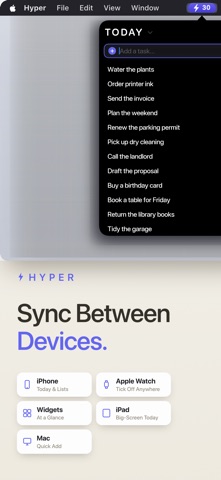
6 WAYS TO ADD TASKS, LIGHTNING FAST 1. Action Button: press it to add a task from anywhere, even the Lock Screen. 2. Pull down: pull your list down and a new task drops in under your thumb. 3. Calendars: Apple and Google events land on your schedule automatically. 4. Siri: "Hey Siri, remind me to call Joe at 6pm" syncs straight into HYPER. 5. Widgets: tap a Lock Screen or Home Screen widget and start typing. 6. Quick add: the box stays open after every task. Type, return, type, return.
YOUR DAY IN ONE PLACE • Your Apple and Google calendar events sync automatically and appear as tasks in HYPER. • Apple Reminders also appear as tasks, so you can see everything that you need to do in one place. • "Hey Siri, remind me to call the dentist at 4" lands straight in your schedule within HYPER. • Drag a task onto an hour to schedule it, or snooze it to later.
BUILT ON 3 IDEAS FROM BEHAVIOURAL SCIENCE 1. Eat the frog. Each morning, pick your single Most Important Task. HYPER pins it to the top with a gold border, and everything else feels easier once it's done. 2. Don't break the chain. Daily, weekly and monthly habits build streaks you won't want to lose. Link a habit to a calendar event and the event ticks it off. Rest days don't break your streak. 3. Pomodoro timer. Focus mode breaks work into short, focused bursts, so getting started feels easy. Your timer lives on the Lock Screen and in the Dynamic Island.
CUSTOMISE - MAKE IT YOURS • Choose which lists live in your tab bar: shopping, work, links, whatever you reach for most. • Share any list with an invite code. Everyone can add and tick things off.
AVAILABLE ON ALL YOUR APPLE DEVICES, NO ACCOUNT • No sign-up, no password. Everything syncs through your iCloud. • Mac: press Option-Command-T anywhere to add a task without leaving what you're doing, or use the menu bar. • iPad: use your Apple Pencil to make notes, sketch ideas or brainstorm. • Apple Watch: your lists on your wrist.
PRICING The first 100 members get HYPER free for life. After that, the earlier you join the less you pay, and whatever price you join at is yours for life. Every subscription starts with a free week, and if you don't like subscriptions you can pay once for life.
Terms of Use: https://hypertodo.com/terms Privacy Policy: https://hypertodo.com/privacy
Nutzer bewerten sie
Melde dich an, um diese App zu bewerten. Ehrlichkeit zählt.
Noch keine Bewertungen. Hast du die App ausprobiert? Gib die erste Bewertung ab.
Mehr Produktivität-Apps
Die besten neuen Produktivität-Apps dieser Woche ChickMark: Habit TrackerChickMark is a simple habit tracker for routines, goals, and reminders
 Dayflint: One Thing a DayToo many priorities?
- BeginAnywayMorning alarm for hard tasks: set one task, prove you started, build a streak
 DHUDEDHUDE Analityxs es la herramienta de gestión diaria para grupos de restauración y ocio…
 Intent - Scroll by ChoiceTake back control of your screen time
 Whisperly DictationWhisperly turns your voice into clean text