
Nowside
Nicht beanspruchtKeep one next thing in view
Von Daniel McDonald · Produktivität


Kurz gesagt
Nowside is a productivity app for iPhone and iPad, with a paired Apple Watch companion, that brings reminders, short focus sessions and saved thoughts together. It shows your current task and up to two more, and it can run 5, 15 or 25 minute focus sessions. One standout feature is that you can capture a thought on your Watch and find it later in Saved thoughts.
Zusammenfassung von Debuts, basierend auf dem Eintrag im App Store.Info
Keep one next thing in view.
Nowside brings reminders, short focus sessions and saved thoughts to iPhone and iPad, with a paired Apple Watch companion. Warm paper and charcoal layouts keep your tasks easy to scan.
CATCH IT ON APPLE WATCH When a thought arrives, dictate or type a Quick note on your Watch. Review it and tap Save note. Saved on iPhone confirms your thought is stored on the phone. Find it in Today → Saved thoughts or tap the Latest from Watch preview to open that exact note.
Check today's nudges, tick checklist items while shopping, mark a task done or snooze it for ten minutes. Log or undo today's Momentum and see its month calendar on your wrist.
Watch task and Momentum changes need a connection to the paired iPhone. One saved note can wait on Watch while offline and retries when Nowside reconnects or reopens. The Watch companion is included with the iPhone app.
CHOOSE YOUR NEXT STEP See your current task and up to two more. Add a first step or keep a checklist inside the task, from a shopping list to a bigger job. Checklist ticks and task completion stay separate. Organise tasks into Work, Personal or your own lists.
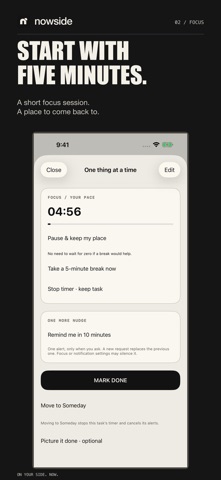
START SMALL Choose a 5-, 15- or 25-minute focus session. If you get interrupted, pause and leave a return point so you know where to pick up. You decide when the task is done.
SEE YOUR MOMENTUM Create a tile for a walk, reading or something you want to keep doing. Mark the days you did it on the month calendar, or correct an earlier entry. Unmarked days stay neutral.
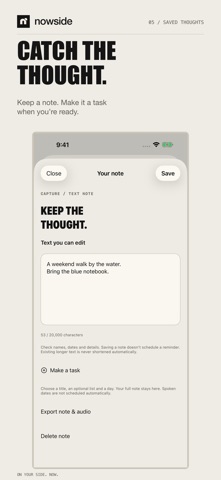
KEEP THE THOUGHT Record a short thought on iPhone or iPad, then review the on-device transcription where supported. Keep the audio and text in Saved thoughts, or turn it into a task. You can also type. Recording starts only when you tap Record.
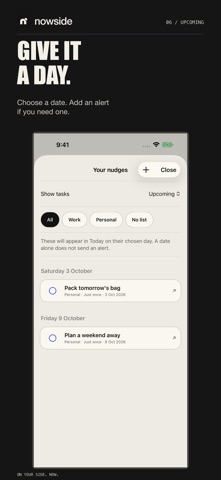
GIVE IT A DAY Choose Today, Tomorrow or a later date. Future tasks wait in Upcoming; undated ideas stay in Someday. Add an optional alert and choose whether it shows the task name or stays private. A fixed daily alert continues even after you mark its task done.
MORE SPACE ON IPAD Keep a list beside the task you're working on. Use the sidebar to move between sections in portrait, landscape or a narrower window.
YOUR DATA, ACROSS YOUR DEVICES Use Nowside without a Nowside account. Optional iCloud sync keeps tasks, lists, Momentum and saved thoughts, including recordings, across iPhone and iPad using the same Apple Account. Enable it on both devices, keep Nowside open and check the sync status. Notification preferences and focus timers stay local. Export a backup for a separate copy.
Nutzer bewerten sie
Melde dich an, um diese App zu bewerten. Ehrlichkeit zählt.
Noch keine Bewertungen. Hast du die App ausprobiert? Gib die erste Bewertung ab.
Mehr Produktivität-Apps
Die besten neuen Produktivität-Apps dieser Woche ChickMark: Habit TrackerChickMark is a simple habit tracker for routines, goals, and reminders
 Dayflint: One Thing a DayToo many priorities?
- BeginAnywayMorning alarm for hard tasks: set one task, prove you started, build a streak
 DHUDEDHUDE Analityxs es la herramienta de gestión diaria para grupos de restauración y ocio…
 Intent - Scroll by ChoiceTake back control of your screen time
 Whisperly DictationWhisperly turns your voice into clean text