
Study Desk: Source Flashcards
Nicht beanspruchtStudy from your own pages, then return to the evidence
Von Mubarak Almahmeed · Bildung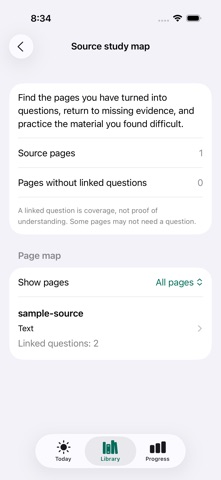


Info
Study from your own pages, then return to the evidence.
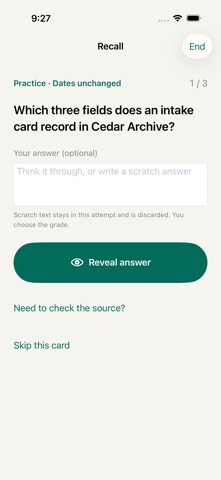
Study Desk connects your PDFs, selected photos and text to questions you create and review. Read a passage, make a basic, cloze or image-occlusion card, try recalling the answer, and open its source when you need context.
SEE YOUR MATERIAL IN THE SOURCE STUDY MAP • Find source pages with linked questions and pages without them. • Open a specific page to read it and create a question linked to that evidence. • Find source links that need repair. If the recorded source or selected passage no longer matches, your saved answer stays available while you choose a correct link. • Return to targets whose latest scheduled self-rating was Again or Hard. • Practice up to 20 linked targets from a page, or a set of difficult targets, without changing scheduled review dates.
The map describes links between your material and questions. A linked question does not establish understanding, and some pages may not need a question.
CREATE, RECALL AND CHECK • Import a PDF, selected photo or plain-text file, paste text, or scan a page with the document camera when available. • Make question-and-answer cards, fill-in-the-blank cloze cards and diagram cards with image occlusion. • Check recognized text against the original before using it. • Keep the answer concealed until you reveal it. Scheduled recall uses your own Again, Hard, Good or Easy rating. • Check the source before answering by choosing Practice; this leaves the scheduled date unchanged. • Start with the original Cedar Archive sample, or work with your own material.
KEEP YOUR WORK PORTABLE Create revision PDFs, share selected cards in a card pack, or export a private editable backup. A card pack and a backup include different information; review what you are sharing before export. Your study library is stored on your device. Files providers, Apple purchases, device backups and exports you choose may use network services. No Study Desk account is required.
START FREE Free includes the Source study map, one active course and 200 active review targets, all manual card types, scheduled recall, Practice, basic revision sheets, card sharing and editable backups. Each basic question, cloze group or image-occlusion target counts as one review target. Archive a course to free active capacity while keeping its material available for Practice, editing and export.
OPTIONAL PRO Pro adds active-course and card capacity, saved study filters and plans, and saved custom revision-sheet layouts. Annual and one-time Pro offer the same stated features. Existing study work remains available to study, edit and export when an annual subscription ends.
Current local prices and purchase terms appear in the app. Annual Pro renews automatically unless canceled through App Store subscription settings. One-time Pro is a single purchase; buying it does not cancel an existing annual subscription. Restore Purchases and Manage Subscription are available in Settings.
Privacy Policy: https://mubaraklabs.com/privacy/studydesk/ Terms of Use: https://mubaraklabs.com/terms/studydesk/ Support: https://mubaraklabs.com/support/studydesk/
Nutzer bewerten sie
Melde dich an, um diese App zu bewerten. Ehrlichkeit zählt.
Noch keine Bewertungen. Hast du die App ausprobiert? Gib die erste Bewertung ab.
Mehr Bildung-Apps
Die besten neuen Bildung-Apps dieser Woche FluencyToolShadow a native Japanese sentence, hear your own voice back, and get scored.
 YoMoo: Read & Shadow JapaneseYoMoo turns real Japanese writing into graded reading practice: news articles, Wikipedia…
 KeyswingLearn music notes, rhythm and piano through playful practice in a magical forest.
 Uncle Math Homeschool - 6 to 8No Math Fear, Uncle Math Is Here
 Malachi SpeaksMalachi Speaks gives a voice to people who don't use speech
 SelvarisWatch evolution unfold in real time – on an entire planet