
Video Splitter: Split & Cut
Nicht beanspruchtVideo Splitter: Split & Cut is an iPhone and iPad app that splits long videos into equal…
Von Amandeep Singh · Foto und Video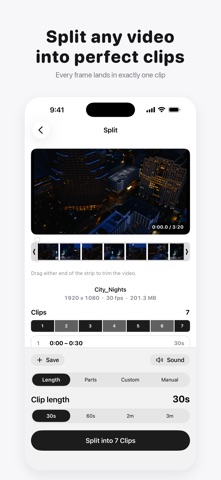



Kurz gesagt
Video Splitter: Split & Cut splits long videos into equal clips for Instagram Stories, WhatsApp Status and other apps with length limits. It runs entirely on the device, copies clips without re-encoding so they keep the original quality, and offers a free version with no watermark or ads.
Zusammenfassung von Debuts, basierend auf dem Eintrag im App Store.Info
Video Splitter: Split & Cut is an iPhone and iPad app that splits long videos into equal clips for Instagram Stories, WhatsApp Status and anywhere with a length limit. Every cut is frame-exact, clips keep the original quality, and everything happens on your device.
HOW IT WORKS
1. Pick a video from Photos or Files. 2. Drag the ends of the strip to trim off what you don't need. 3. Choose a clip length (30s, 60s, 2m or 3m) or a number of parts. 4. Check every clip's start and end before you split. 5. Choose the clips you want and save them to Photos in order, or share them.
GREAT FOR
• Posting a long video as a run of Instagram Stories or WhatsApp Status updates • Fitting a video under the length limit of TikTok, YouTube Shorts or a messaging app • Cutting a long recording, lecture or game into parts you can find again • Keeping only the good part of a video, saved as one trimmed clip
FREE
• Clip lengths of 30 seconds, 60 seconds, 2 minutes and 3 minutes • Split into 2 to 50 equal parts • Trim the start and end before splitting • Even Out: equal clips with no tiny leftover at the end, none over your limit • Choose which clips to save or share • Watch every clip before you save it • No watermark and no ads, on every clip
PRO
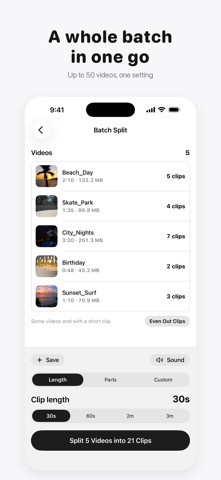
• Custom length: any duration you choose, from a tenth of a second to 10 minutes • Manual cuts, placed exactly where you want them • Batch Split: up to 50 videos in one go, with one setting for all • Remove sound: clips without their audio, ready for your own music • Saved presets for the settings you use most • Albums: each video's clips saved into an album of their own
Pro is a one-time purchase. There is no subscription and nothing renews.
WORKS WITH
• Videos from the Camera, Photos and the Files app, including iCloud videos • HEVC, H.264 and ProRes, in MOV and MP4 • HDR, Cinematic and Slo-mo videos from iPhone • Portrait and landscape, at any resolution • Up to 300 clips from one video • 11 languages, switchable inside the app
Nutzer bewerten sie
Melde dich an, um diese App zu bewerten. Ehrlichkeit zählt.
Noch keine Bewertungen. Hast du die App ausprobiert? Gib die erste Bewertung ab.
Mehr Foto und Video-Apps
Die besten neuen Foto und Video-Apps dieser Woche Zoetrope ViewerWatch your zoetrope records and slipmats animate through your camera, or live on your…
 Migumento · QR photo albumOne album for every guest
 SwipeshineSwipeshine turns photo cleanup into one gesture
 Pocket Film: Vintage CameraPocket Film turns your phone into the back of a real film camera
 PlanIt Earth: VR Photo PlannerFor landscape, travel, nature, cityscape, night, time-lapse, star-trail, Milky Way and…
 TonalierYour photos now have an editor