
3D Model Maker for iPhone
Sin reclamarCREATE 3D MODELS ANYWHERE 3D Model Maker is a mobile workspace for creating, sculpting…
De Go Simple X LLC · ProductividadPor qué la esperamos: The description clearly explains its touch-based 3D modeling tools, and the free download and 14-language support widen its reach.



En resumen
3D Model Maker is a mobile workspace for building, sculpting, painting and editing 3D models on iPhone and iPad, starting from basic shapes with touch controls. It suits hobbyists, learners and designers working on product concepts, game assets, 3D printing or AR projects. It stands out for its AI-assisted option, which starts a model from an idea or reference image that can then be edited with the same tools, and for exporting to formats such as STL, OBJ, glTF and USDZ.
Resumen de Debuts, basado en la ficha de la App Store.Acerca de
CREATE 3D MODELS ANYWHERE 3D Model Maker is a mobile workspace for creating, sculpting, painting and editing 3D models on your iPhone or iPad. Start with basic shapes, transform them using intuitive touch controls and turn your ideas into detailed 3D creations—without complicated desktop software.
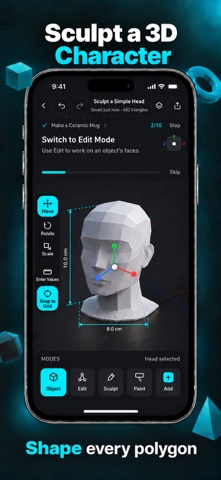
BUILD WITH TOUCH CONTROLS Create objects from simple shapes and interact directly with every element on the screen. Move, rotate and scale objects while viewing your design from different angles. Whether you are learning 3D modeling or developing a new concept, the streamlined workspace makes the creative process easier to understand and control.
MODEL WITH PRECISION Fine-tune your design using precise editing tools. Adjust dimensions and proportions, combine shapes and organize multiple objects within the same project. Key modeling tools include: • Move, rotate and scale objects • Enter precise dimensions • Cut and combine shapes • Duplicate and arrange objects • Edit meshes and polygons • Create low-poly models • Undo and redo changes
SCULPT AND REFINE DETAILS Use sculpting tools to reshape surfaces, smooth rough areas and add organic details. Combine structured modeling with freeform sculpting to create characters, product concepts, decorative objects and original 3D assets.
PAINT AND APPLY MATERIALS Add colors to individual parts of your model and apply materials to complete its appearance. Experiment with different combinations and visual styles before exporting your design or continuing your work in another compatible tool.
AI-ASSISTED 3D CREATION Use AI-assisted tools to explore concepts and begin new models faster. Start from an idea or reference image, then customize the result using the app’s modeling tools. Adjust shapes, dimensions, colors and materials to transform an AI-assisted result into an editable model that fits your project. AI can shorten the journey from an initial idea to a 3D creation while keeping you in control of the final design.
CREATE FOR DIFFERENT PROJECTS Use 3D Model Maker to create: • Product concepts and prototypes • Models for compatible 3D printing workflows • Low-poly game assets • Characters and decorative objects • Presentation models • Creative 3D artwork • Augmented reality projects
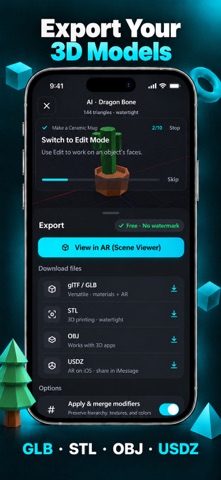
EXPORT POPULAR 3D FORMATS Prepare and export your creations for compatible creative workflows: • STL for 3D printing workflows • OBJ for supported modeling software • glTF and GLB for real-time 3D content • USDZ for compatible augmented reality experiences Continue working with your models in compatible 3D software, game-development tools, printing workflows and augmented reality platforms. Slicing, printer setup and printer control require compatible third-party tools.
MADE FOR BEGINNERS AND CREATORS 3D Model Maker provides an accessible way to learn basic 3D design, explore ideas and edit models on a mobile device. Build your base structure, refine its proportions, sculpt details, apply colors and materials, then export the finished model for your next project.
Download 3D Model Maker and start turning your ideas into editable 3D creations today.
SUBSCRIPTION: We offer auto-renewing subscription: • Length: Weekly and Yearly • Your subscription will be charged to your iTunes Account at confirmation of purchase and will automatically renew for the selected duration unless auto-renew is turned off at least 24 hours before the end of the current period. • You can manage your subscription and turn off auto-renewal by visiting your iTunes Account Settings after purchase
Privacy Policy & Terms of Use • Privacy Policy: https://gosimplex.net/privacy-policy • Terms of Use: https://gosimplex.net/terms-of-service
Así la valora la gente
Inicia sesión para valorar esta app. Lo que cuenta es ser sincero.
Aún no hay valoraciones. ¿La has probado? Sé el primero en valorarla.
Más apps de Productividad
Las mejores apps nuevas de Productividad esta semana ChickMark: Habit TrackerChickMark is a simple habit tracker for routines, goals, and reminders
 Dayflint: One Thing a DayToo many priorities?
- BeginAnywayMorning alarm for hard tasks: set one task, prove you started, build a streak
 DHUDEDHUDE Analityxs es la herramienta de gestión diaria para grupos de restauración y ocio…
 Intent - Scroll by ChoiceTake back control of your screen time
 Whisperly DictationWhisperly turns your voice into clean text