
EveryFlick
Sin reclamarEveryFlick is the toolbox for your videos: one goes in, you choose what to do with it…
De Roberto Bonfa · Foto y vídeoPor qué la esperamos: Clear value, a careful description, and on-device tools like subtitles and instant trimming make this a compelling debut.




En resumen
EveryFlick is a video toolbox that takes one file in and exports a new one, leaving the original untouched. It suits people who want quick cuts, filters, subtitles, or redaction of faces, plates and text without an account or subscription. A standout detail is that trimming, splitting and removing audio skip re-encoding, so the export is near-instant and identical to the source.
Resumen de Debuts, basado en la ficha de la App Store.Acerca de
EveryFlick is the toolbox for your videos: one goes in, you choose what to do with it and a new file comes out. The original is never touched.
Free, no subscription, no ads, no account and no forced watermark.
INSTANT WHEN POSSIBLE Trimming, splitting, removing the audio, removing metadata or changing the container does not re-encode the video: the file comes out in a moment and identical to the original, and the cut lands on the frame you chose.
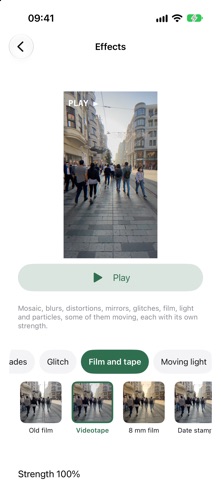
THE LOOK - Filters: more than a hundred, in about twenty groups, each with its intensity. Black and white, duotone, color pop. - Adjustments: exposure, contrast, saturation, temperature, highlights and shadows, sharpness, vignette, grain. - Effects: more than seventy, still, moving and with particles, from film to glitches, from snow to fireworks.
INTELLIGENCE, ON THE DEVICE - Automatic subtitles, to fix before exporting, burned into the video or as an .srt file, translated too. - Pauses and silences removed, one by one. - The voice separated from the noise. - Redact license plates and text too, not just faces. - From landscape to vertical, following whoever is in the shot. - The background behind a person blurred or replaced. - Smooth slow motion, less noise and, for small videos, upscaling with rebuilt detail. - "Describe what you want": with Apple Intelligence a sentence becomes the edits, which you check before exporting. - A title, description, hashtags and chapters that Apple Intelligence writes from what is said, ready to copy.
THE TOOLS - Time: Trim, to keep one part; Cut Out Parts, to remove one or more parts and keep the rest; Split; Merge; Speed up to 100× (the audio keeps its pitch or follows it); Freeze frame; Reverse; Frame rate. - Picture: Crop, even without cutting anything, with black or white bars or the video itself blurred behind; Resize; Rotate; Flip; Watermark with text, an emoji or an image, even for just part of the video; Animated text, up to ten pieces placed with your finger, with a shadow too. - Redact: blur, pixelate, solid color, an image or an emoji over faces found on their own, a fixed area or a moving subject. Before exporting you watch the video with the boxes on top. - Audio: Extract audio to M4A, WAV or FLAC; Remove audio; Volume and fades, with the loudness normalized to the level of video platforms; Background audio, music from Files that lowers itself when someone speaks; Voice effects, nine of them, from chipmunk to cathedral; Equalizer; Audio track, to keep just one. - Format: Compress, including "under 25 MB" or at the bit rate you choose; Convert to MOV, MP4 or M4V with H.264, HEVC or ProRes; Info; Remove metadata. - Images: Extract a frame, with the best ones already suggested; Frames as photos; To GIF.
EDITS ADD UP Every step shows up in the preview right away and goes away with a tap. The video is written only once, at the end, so it loses quality only once.
WHERE VIDEOS COME FROM Photos, Files, drag and drop on iPad or the Share menu of any app. Several videos at once, one at a time.
PRESETS A series of edits becomes a button; "For WhatsApp" is already there. Run it from Shortcuts, Siri or by touching and holding the icon. Presets, watermarks and background audio tracks reach your iPhone and iPad through iCloud.
HDR STAYS HDR An HDR video comes out HDR. If a filter or an effect cannot keep it, the app says so first.
LONG JOBS The space needed is shown first, then progress and "Stop", which leaves no half-written file. Many jobs keep going when you leave the app.
THE RESULT Share, save to Files, save to Photos or copy. The new name is never the original's.
Así la valora la gente
Inicia sesión para valorar esta app. Lo que cuenta es ser sincero.
Aún no hay valoraciones. ¿La has probado? Sé el primero en valorarla.
Más apps de Foto y vídeo
Las mejores apps nuevas de Foto y vídeo esta semana Zoetrope ViewerWatch your zoetrope records and slipmats animate through your camera, or live on your…
 Migumento · QR photo albumOne album for every guest
- ScreenLux: Live Wallpapers 4KLive wallpapers for iPhone and 4K video wallpapers for Android
 SwipeshineSwipeshine turns photo cleanup into one gesture
 Pocket Film: Vintage CameraPocket Film turns your phone into the back of a real film camera
 PlanIt Earth: VR Photo PlannerFor landscape, travel, nature, cityscape, night, time-lapse, star-trail, Milky Way and…