
Handy 3D Models for Bambu Lab.
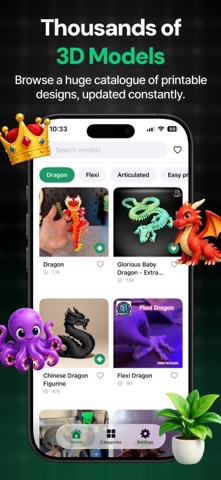
Sin reclamarThousands of 3D printable models, in your pocket
De Ahmed Ijaz · Foto y vídeoPor qué la esperamos: Clear value, a thorough description and honest disclosures make this a promising pick for 3D printing hobbyists.



En resumen
Handy 3D Models for Bambu Lab is an iPhone app for browsing and downloading thousands of 3D printable models, including dragons, flexi toys, keychains and planters. Downloads arrive as standard STL files that open in slicers such as Bambu Studio, Cura and PrusaSlicer. The app is independent and not affiliated with Bambu Lab, and its most popular models require a paid Pro plan.
Resumen de Debuts, basado en la ficha de la App Store.Acerca de
Thousands of 3D printable models, in your pocket.
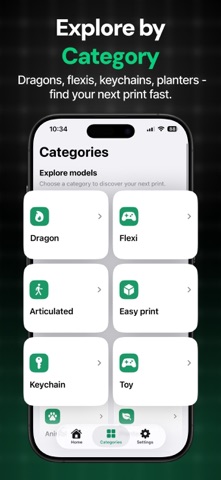
Browse a huge, constantly growing catalogue of designs — dragons, flexi toys, keychains, planters, organisers and more — and download any of them straight to your iPhone, ready for your slicer.
WHY YOU'LL LIKE IT
• Huge catalogue — thousands of printable models across dozens of categories, with new ones appearing all the time. • Real STL files — every download is a standard binary STL that opens in Bambu Studio, Cura, PrusaSlicer, Orca or anything else. • One tap — no browser, no zip files, no desktop. Tap Download and the file lands in your Files app. • Automatic conversion — some sources ship a packed format no slicer can read. The app unpacks and converts it on your device, so what you get always just works. • Print-in-place — a whole section of articulated and flexi models that need no supports and no assembly. • Save for later — heart anything to build your own list. • Paste a link — found a model elsewhere? Paste the link and open it right in the app.
HOW IT WORKS
1. Browse or search for a model. 2. Tap Download — the file converts on your device if it needs to. 3. Open it in your slicer from the Files app, or share it straight across.
Bambu Pro:
The most popular models in the catalogue are part of Pro. Everything else is free to download.
• Weekly, monthly and yearly plans, plus a one-time lifetime option. • Payment is charged to your Apple Account at confirmation of purchase. • Subscriptions renew automatically unless cancelled at least 24 hours before the end of the period. • Manage or cancel any time in Settings on your device, or from the Settings tab in the app.
Not affiliated with, endorsed by, or sponsored by Bambu Lab. "Bambu Lab" is a trademark of its respective owner. This app is an independent tool for browsing publicly available 3D models, which print on any FDM printer.
Useful Links:
Privacy Policy: https://sites.google.com/view/ahmadijazapps/home
Así la valora la gente
Inicia sesión para valorar esta app. Lo que cuenta es ser sincero.
Aún no hay valoraciones. ¿La has probado? Sé el primero en valorarla.
Más apps de Foto y vídeo
Las mejores apps nuevas de Foto y vídeo esta semana Zoetrope ViewerWatch your zoetrope records and slipmats animate through your camera, or live on your…
 Migumento · QR photo albumOne album for every guest
 SwipeshineSwipeshine turns photo cleanup into one gesture
 Pocket Film: Vintage CameraPocket Film turns your phone into the back of a real film camera
 PlanIt Earth: VR Photo PlannerFor landscape, travel, nature, cityscape, night, time-lapse, star-trail, Milky Way and…
 TonalierYour photos now have an editor