
RetroGuide.TV
Sin reclamarRetroGuide.TV turns your Plex library into live TV
De Adam Hunt · Juegos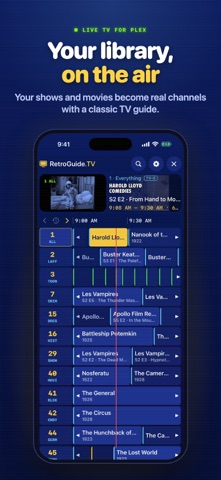



En resumen
RetroGuide.TV turns a user's own Plex library into always-on channels organized by genre, decade, network and show, with a cable-style program guide and channel flipping. It suits people who already run a Plex Media Server and want a lineup playing without picking shows. One standout feature is its custom channels, which combine genres, shows and networks with a live preview.
Resumen de Debuts, basado en la ficha de la App Store.Acerca de
RetroGuide.TV turns your Plex library into live TV.
It builds dozens of always-on channels from the shows and movies you already have: comedy, anime, sci-fi, 90s TV, 24/7 marathons of your favorite series, and more. Turn it on and something is already playing. Flip channels with a swipe or the Siri Remote, drop into whatever's on mid-episode, and browse what's next in a cable-style program guide.
AUTOMATIC CHANNELS Genre, decade and format channels, plus channels for each library, TV network, collection and long-running show. The lineup scales to the size of your library and skips channels with too little to air.
CUSTOM CHANNELS Combine genres, shows, networks, collections, decades and libraries, with a live preview of what your channel will air. One custom channel is free; RetroGuide Pro adds as many as you like.
REAL TV SCHEDULING Every channel runs on a fixed clock, with Shuffle, Block Shuffle, Show Rotation or Marathon ordering and optional start times on the half hour.
PROGRAM GUIDE AND SEARCH A focus-driven guide with a live preview, show logos and artwork, and search with live results that tells you what's on now and when it airs next.
PLAYS NEARLY ANYTHING A built-in player handles MKV, HEVC, AV1, Dolby Vision, DTS, TrueHD and styled subtitles. Compatible files play directly; playback requirements depend on the file, device and server settings. Audio and subtitle tracks follow your Plex language preferences.
MULTIPLE SERVERS (PRO) Mix your own server with ones shared with you. Titles on more than one server are kept once, and each server has its own quality settings for watching away from home.
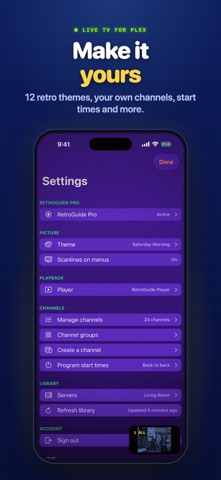
MAKE IT YOURS Twelve themes, from Classic Cable to Local Forecast, VHS and Teletext, and optional CRT scanlines on menus.
FREE AND PRO RetroGuide.TV is free, with a small banner under the menus and an occasional full-screen ad between programs on iPhone and iPad. RetroGuide Pro, a one-time purchase, removes ads and adds multiple servers, unlimited custom channels, every theme, and schedule order and start-time controls, on iPhone, iPad and Apple TV.
Works on iPhone, iPad and Apple TV. Requires access to a Plex Media Server you own or that is shared with you. No media is included. Link your Plex account to get started; no separate RetroGuide.TV account is required. The free iPhone and iPad app uses Google AdMob for ads and related measurement. Apple TV and RetroGuide Pro show no ads. See the Privacy Policy for details.
RetroGuide.TV is an independent app and is not affiliated with or endorsed by Plex, Inc.
Así la valora la gente
Inicia sesión para valorar esta app. Lo que cuenta es ser sincero.
Aún no hay valoraciones. ¿La has probado? Sé el primero en valorarla.
Más apps de Juegos
Las mejores apps nuevas de Juegos esta semana Connect 2: Card Game 2 ConnectConnect 2 is the conversation card game that makes people honest on purpose
 Ballpoint ArmyRemember drawing army men in the back of your school book?
 Chess Master vs AIPlay chess against a strong computer opponent, completely offline, in a sleek neon design
 ClayChonkMash soft clay with your fingers
 Sudoku by IbexoI just want to play sudoku
 SnookScoreVoice-controlled snooker scorekeeper - say the ball and it tracks the frame