
AR Wifi Analyzer
Ei lunastettuFind the Wi-Fi dead spots in your home, and see exactly where they are
Tekijä: Patrick Christensen · ApuohjelmatMiksi odotamme sitä: A clear, well-explained idea that shows exactly where your Wi-Fi struggles, with a generous free tier.


Tietoa
Find the Wi-Fi dead spots in your home, and see exactly where they are.
AR Wifi Analyzer uses the LiDAR scanner on your iPhone or iPad to build a 3D model of your home while it measures your Wi-Fi everywhere you walk. The result is painted straight onto the walls and floor: green where the connection is strong, yellow where it's fair and red where it struggles.
SCAN IN 3D Walk slowly through your home. The LiDAR scanner builds the rooms around you, and every scan is cleaned up into a smooth, tidy model when you save it.
LIVE COVERAGE Coverage is measured as you move and appears on the real walls in real time, so you see a weak spot the moment you walk into it.
FLOOR PLAN Look down on your whole floor, with the walls drawn in, and spot the weak rooms at a glance.
3D VIEW Rotate and zoom around your saved home from any angle.
WALK IT AGAIN Return to a saved scan in AR. It lines back up with your rooms, so the saved coverage appears on the real walls again.
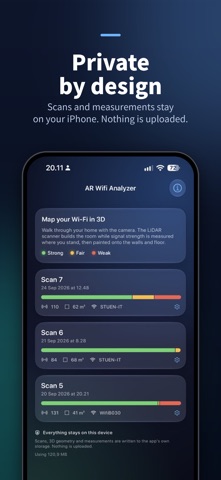
PRIVATE BY DESIGN Everything stays on your device. No account, no ads, no tracking, and nothing is ever uploaded.
PRO: FROM MAP TO PLAN Scanning, live coverage, the floor plan, the 3D view, AR walkthroughs and the PDF report are free. Pro is a one-time purchase, with no subscription, that turns your map into a plan: • Best spot for your router: see whether moving it to the middle of your home would even out coverage. • Where to add a mesh node: the exact spot where the signal is still strong enough to relay into each weak area, floor by floor, including when a floor needs a cable instead. • Before & after: compare two scans of the same home and see what moving the router or adding a node really changed. • Pro PDF report: add your client's name and address, your own name and notes, and the recommended spots on a map. Ready to hand over.
GREAT FOR • Finding the best place for your router • Deciding where a mesh node or extender will actually help • Checking the home office before an important video call • Scanning again after a change to see if it made a difference
HOW IT MEASURES iOS doesn't let apps read raw Wi-Fi signal strength. Instead, AR Wifi Analyzer measures what you actually notice: how quickly and how reliably your router answers from each spot. Slow or missing answers are what make video calls stutter and pages hang.
REQUIREMENTS Requires an iPhone or iPad with a LiDAR scanner (iPhone 12 Pro or later Pro models, iPad Pro 2020 or later) running iOS 26 or later.
Ihmisten arvio
Kirjaudu sisään arvioidaksesi tämän sovelluksen. Rehellisyys on tärkeintä.
Ei vielä arvioita. Oletko kokeillut sitä? Anna ensimmäinen arvio.
Lisää Apuohjelmat-sovelluksia
Viikon parhaat uudet Apuohjelmat-sovellukset Vodoalarm: vodostaji BiHVodoalarm javlja kad tvoja rijeka naglo raste, pa ne moraš stalno gledati vodostaje
 NadhirNadhir is an independent app
 Rokey: Romanian KeyboardType Romanian without worrying about diacritics
 Vibe Island: AI Agent MonitorVibe Island is a command center for the AI coding agents running on your Mac
 Private AuthenticatorPrivate Authenticator keeps your two-factor authentication codes on your own Apple…
 Photo Clean: Photo CleanupA crowded camera roll?