
20 Shot - sequence scanner
Non revendiquéeSome of the best animation ever made is sitting perfectly still on paper
Par Andrew Horsley · Photo et vidéoPourquoi nous l'attendons : Clever idea with thorough, privacy-focused features and a clear workflow that suits comic and flip-book fans.



En bref
20 Shot - sequence scanner turns photos of comic strips, contact sheets, flip-books, and other grids of sequential images into looping videos. Users mark frames in playback order, choose speed and aspect ratio, and save the result to Photos, with all processing done on the iPhone. It stands out for keeping everything on the device, with no account, sign-up, or uploads.
Résumé par Debuts, d'après la fiche de l'App Store.À propos
Some of the best animation ever made is sitting perfectly still on paper.
20 Shot brings it back to life. Photograph a comic strip, a contact sheet, a flip-book, or any grid of sequential images, mark the frames in order, and export a looping video. All of it happens on your iPhone.
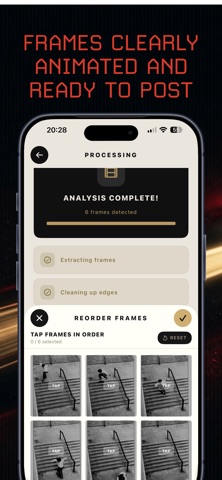
HOW IT WORKS 1. Shoot the page. Use the built-in camera to capture a single page or several. 2. Mark the frames. Set the grid to match the layout, then tap each panel in playback order. 3. Export the loop. Preview the animation, pick a speed and aspect ratio, and save it to Photos.
WHAT IS INSIDE - Grid frame picker: set rows and columns to match any layout, then tap panels in sequence - Single frame mode: capture images one at a time with a manual crop editor - Adjustable crop: drag edges and corners to frame each panel exactly - Automatic edge cleanup: trims borders and print artifacts, and can be switched off - Reorder screen: tap frames to set the exact playback order, or reset and start over - Five playback speeds, from a slow flip to a fast blur - Five output ratios: square, portrait, landscape and photo formats, filled edge to edge - Enhancements: sharpen, black and white, auto light and vivid color - Video export saved straight to Photos - Record mode with a countdown and loop counter for filming the animation as it plays
MADE FOR Comic and manga readers. Zine makers. Collage and flip-book artists. Photographers with contact sheets. Anyone who owns sequential art and wants to watch it move.
PRIVATE BY DESIGN No account. No sign-up. No uploads. Frame extraction, enhancement and video encoding all run on your device, and your photos never leave it.
Please only animate material you own or have permission to use.
Les notes des utilisateurs
Connecte-toi pour noter cette appli. Ce qui compte, c'est d'être honnête.
Pas encore de notes. Tu l'as essayée ? Sois le premier à la noter.
Plus d'apps Photo et vidéo
Les meilleures nouvelles apps Photo et vidéo de la semaine Zoetrope ViewerWatch your zoetrope records and slipmats animate through your camera, or live on your…
 Migumento · QR photo albumOne album for every guest
- ScreenLux: Live Wallpapers 4KLive wallpapers for iPhone and 4K video wallpapers for Android
 SwipeshineSwipeshine turns photo cleanup into one gesture
 Pocket Film: Vintage CameraPocket Film turns your phone into the back of a real film camera
 PlanIt Earth: VR Photo PlannerFor landscape, travel, nature, cityscape, night, time-lapse, star-trail, Milky Way and…