
ClearWave Pro: Water Eject
Non revendiquéeWater in your phone speaker after rain, a spill, or a splash?
Par Mateus Polonini Cardoso · Utilitaires


En bref
ClearWave Pro: Water Eject plays a low-frequency tone through the phone speaker that may help move droplets near the grille. A free 8-second cycle at 165 Hz is included, and a one-time purchase unlocks a 60-second sweep between 150 and 250 Hz. It is aimed at people with water in their speaker after rain, a spill, or a splash, and it does not dry internal parts or guarantee results.
Résumé par Debuts, d'après la fiche de l'App Store.À propos
Water in your phone speaker after rain, a spill, or a splash? ClearWave Pro plays audible low-frequency sound that may help move droplets near the speaker grille.
TRY THE FREE 8-SECOND CYCLE Start the Quick Cycle with one tap. The app plays a continuous 165 Hz sine tone for exactly 8 seconds, with haptics on supported devices. When it ends, listen and check the sound yourself.
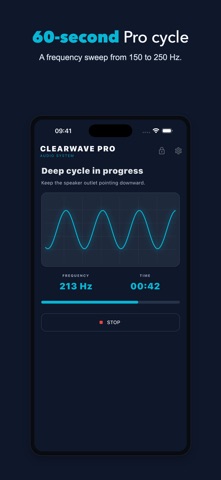
UNLOCK THE 60-SECOND SWEEP One non-consumable purchase unlocks the Deep Cycle, which varies the output between 150 Hz and 250 Hz for 60 seconds. There is no subscription or recurring charge. The App Store displays your local price.
SEE THE GENERATED SIGNAL The waveform on screen represents the signal sent to the speaker. ClearWave Pro does not listen to ambient audio or diagnose moisture or hardware condition.
HOW TO USE • Disconnect headphones, Bluetooth devices, and cables. • Remove any case that blocks the speaker opening. • Keep the speaker grille facing down. • Use a comfortable volume and keep the phone away from your face. • When the cycle ends, listen again and repeat only if you choose.
FEATURES • Free Quick Cycle: 8 seconds at 165 Hz • Pro sweep: 60 seconds from 150 to 250 Hz • Visible generated waveform • Haptics on supported devices • Light, dark, and system themes • In-app language selector • One-time purchase with no subscription
IMPORTANT Results vary by device and exposure. The app does not dry internal components or charging ports, clean microphones or dust, repair hardware, or guarantee water removal. Do not charge a wet phone. If the speaker remains crackly, distorted, or very quiet after drying, seek professional service.
Les notes des utilisateurs
Connecte-toi pour noter cette appli. Ce qui compte, c'est d'être honnête.
Pas encore de notes. Tu l'as essayée ? Sois le premier à la noter.
Plus d'apps Utilitaires
Les meilleures nouvelles apps Utilitaires de la semaine Drainly: Speaker CleanerMuffled speaker after a splash, rain, or a sweaty workout?
 Photo & PDF Resize: KBFile too large to upload?
 Arvectum Proxy LauncherArvectum Proxy Launcher is a network utility that routes your iPhone through a proxy you…
 Vodoalarm: vodostaji BiHVodoalarm javlja kad tvoja rijeka naglo raste, pa ne moraš stalno gledati vodostaje
 FairAuth: AuthenticatorFairAuth creates the codes for two-step verification on iPhone and iPad
 Polarglow: Aurora AlertsKnow tonight's chance of seeing the aurora where you are, and never miss a storm night